How to Build a Blog Content Workflow From Idea to Publish
A blog content workflow gives you a clear path from topic selection to WordPress publishing. By the end of this guide, you can evaluate an idea, produce the article, avoid thin content, and track what happens after publication.

Quick Answer: The Complete Blog Content Workflow
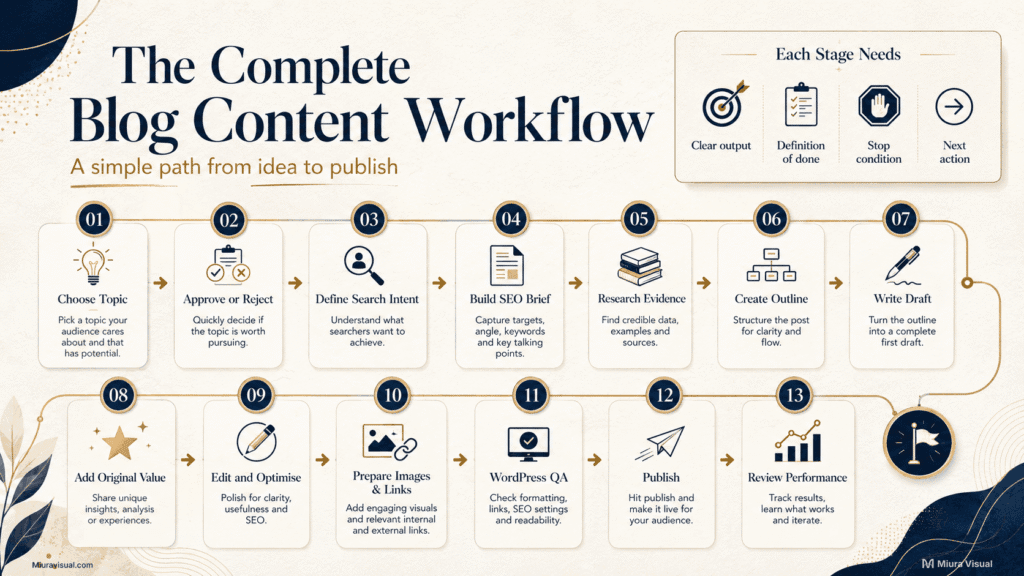
The complete process includes these stages:
- Choose a candidate topic.
- Decide whether to create, update, merge, wait, or skip.
- Define the searcher problem and article job.
- Prepare the SEO brief.
- Research facts, examples, and content gaps.
- Build an action-focused outline.
- Write the direct answer.
- Pass the originality and accuracy checks.
- Edit the structure, clarity, and SEO.
- Prepare internal links and visual assets.
- Complete the WordPress publishing checklist.
- Publish and record the starting data.
- Review the article when enough evidence exists.
Each stage should produce a clear result before the article moves forward.
| Stage | Required result |
|---|---|
| Topic approval | Create, update, merge, wait, or skip |
| Search intent | One searcher problem and one final action |
| Brief | Keyword, scope, angle, evidence, and boundaries |
| Research | Verified facts and identified content gaps |
| Outline | A logical path from answer to action |
| Draft | Useful explanations, steps, judgement, and examples |
| Quality review | Accurate and independently valuable content |
| Publishing | Complete article, assets, links, and WordPress checks |
| Performance review | Evidence-based decision on what to do next |
For a beginner publishing one or two articles a month, a short checklist may be enough.
A website publishing blog posts frequently, uses AI, or handles many content clusters needs stronger quality checks.
What Is a Blog Content Workflow, and How Does It Streamline the Content Creation Process?
A blog content workflow is the process that takes an article from an idea to a published page.
This process is repeatable and ensures each article is reviewed.
A checklist only tells you which tasks exist. A workflow also tells you:
- Which task comes next
- What must be completed
- When the article can move forward
- When the article should stop
- Which status it is currently in
- What information must be recorded
For example, “write the draft” is a task.
A workflow is more specific:
Search intent confirmed → outline approved → draft written → accuracy checked → images prepared → WordPress QA completed → published
The content creation workflow includes blogs, photography, video, affiliate content, and more.
This blog-specific process goes deeper into search intent, article scope, evidence, internal links, WordPress publishing, and search performance.
Keep the system proportional.
A solo blogger does not need an agency-level content approval workflow.
However, publishing without a clear process can cause issues.
You might end up with unfinished drafts, repeated topics, or missing links.
Sometimes, articles may seem finished but fail to address a specific problem.
Step 1: Should This Topic Become a New Blog Post?
Do not begin writing simply because you found a keyword.
A keyword can represent a real topic while still being the wrong new article for your website.
An existing page might already answer the question.
Your site may not have enough evidence to cover it well.
Also, the topic might not fit your current content strategy.
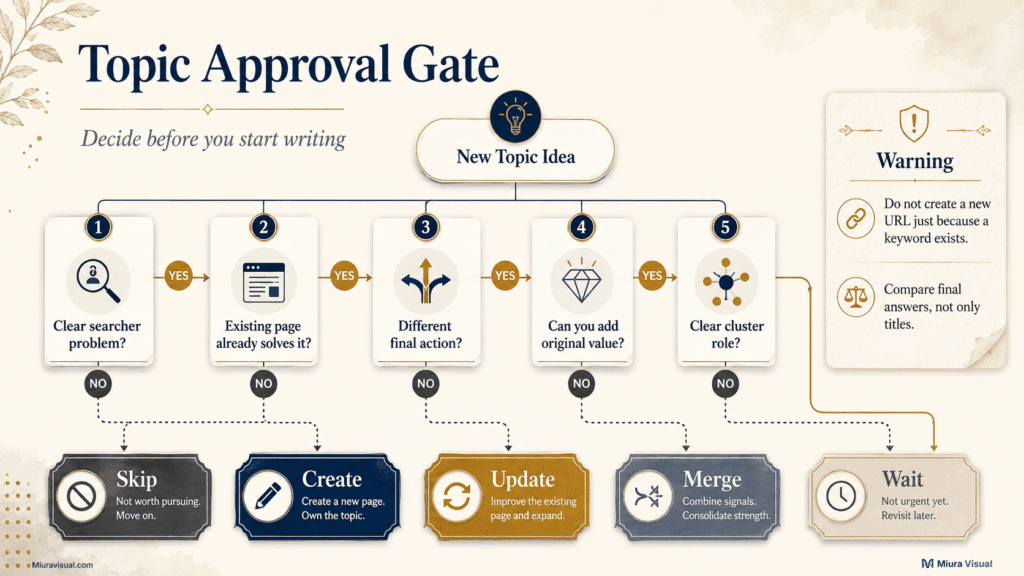
Run a topic approval gate before creating the URL.
Five Questions to Check Before You Create a Blog Post
- Is there a clear problem?
You should be able to describe what the searcher is struggling with. - Does an existing page already solve it?
Compare the final answer, not only the keywords. - Will the new article lead to a different action?
Two pages can mention similar subjects if they help readers make different decisions. - Can you add independent value?
Look for author judgement, practical steps, examples, evidence, templates, limitations, or local context. - Does the page have a clear role?
The article should support a pillar, cluster, service, product, or reader journey.
Use the answers to choose one action:
| Decision | When to use it |
|---|---|
| Create | The topic has a separate problem, answer, and article role |
| Update | An existing page is relevant but incomplete |
| Merge | Two pages serve the same searcher and final action |
| Wait | Demand, evidence, or site priority is still unclear |
| Skip | The article would only repeat existing information |
It’s usually better to enhance an existing URL than to create a similar page.
Use a content gap analysis to find missing topics and check for overlap.
This article only uses that decision as the first workflow checkpoint.
Common Mistake: Comparing Titles Only
Imagine that you already have an article about “Shopee Affiliate No Commission” and are considering another about “Shopee Affiliate Commission Cancelled.”
The keywords are related, but the final problems may differ:
- No commission: The order never produced a payable commission.
- Cancelled commission: A visible or expected commission later became invalid.
A new article might be needed if the reasons, checks, and next steps are truly different.
If both pages would provide the same list of causes and fixes, update the stronger page instead.
Step 2: Who Is Searching, and What Must the Article Do?
A strong article should solve one primary searcher problem.
Before researching, complete these five fields:
- Searcher:
- Problem:
- Fast answer:
- Decision:
- Final action:
For this article, the fields might look like this:
- Searcher: Beginner blogger or solo WordPress publisher
- Problem: Does not know the complete process for producing a blog post
- Fast answer: Follow a defined workflow from topic approval to post-publish review
- Decision: Choose a simple or controlled workflow based on publishing volume
- Final action: Put the next article into a repeatable tracker
This prevents the article from becoming a loose collection of related keywords.
❌ Weak article job
Explain everything about blog writing.
That scope is too broad. It could include domain setup, WordPress, keyword research, copywriting, SEO, images, monetisation, promotion, and analytics.
✅ Stronger article job
Help a beginner understand the complete blog content production process and build a repeatable system that prevents missed steps and weak articles.
The second version establishes a clear reader, problem, outcome, and boundary.
Blog topics can also come from the long-term themes a brand wants to own.
Define your social media content pillars first.
This helps avoid filling your calendar with random ideas.
Avoid choosing the format first.
“Write a blog post” is not a content goal.
Begin with the reader’s main question.
Then, decide if a new article is the right format.
Step 3: What Should Be in an SEO Content Brief?
An SEO brief turns an approved topic into a production-ready assignment.
It does not need to be long.
A good brief should cut out major decisions.
This helps keep the writing process smooth.
Include these fields:
- Primary keyword
- Secondary keywords
- Searcher problem
- Fast answer
- Unique angle
- Article scope
- Cannibalisation boundary
- Required evidence
- Original contribution
- Internal link direction
- Final reader action
Why these fields matter
Primary keyword keeps the page focused.
Searcher problem prevents the article from becoming a keyword glossary.
Unique angle explains why this page deserves to exist.
Article scope defines what the article will and will not cover.
Cannibalisation boundary identifies subjects that existing pages already own.
Required evidence lists official sources, screenshots, data, examples, or product information that must be collected.
Original contribution defines what the article will add beyond the existing search results.
Final reader action ensures the content leads somewhere useful.
A brief is ready when:
- One primary keyword has been chosen
- The reader problem is specific
- The article has a separate job
- Relevant existing pages have been checked
- Necessary facts can be verified
- At least three useful original contributions are possible
- The article has a logical internal-link role
Do not start drafting while the angle is still changing.
A weak brief leads to a lengthy editing process.
This happens because the writer makes too many strategic choices during the blog writing process.
Step 4: How Much Research Is Enough?
Research is done when you have enough proof to answer the reader clearly and provide useful insights.
It is not complete simply because you opened ten competing articles.
Different sources serve different purposes:
| Source | What to use it for |
|---|---|
| Official sources | Rules, specifications, policies, and factual verification |
| Search results | Expected answers, dominant formats, and missing guidance |
| People Also Ask | Related confusion and follow-up questions |
| Communities | Real situations, objections, and user language |
| Your website data | Existing demand, ranking queries, and page overlap |
| Author knowledge | Practical judgement, examples, and trade-offs |
Use competitors to understand the standard readers expect. Do not use their headings as a ready-made outline.
Research is sufficient when:
- Important facts have reliable support
- The searcher’s main decision is clear
- The expected answer is understood
- Competitor gaps have been identified
- Original examples or frameworks are planned
- You know which questions belong in other articles
Stop and reconsider the article when:
- Every useful point already exists on your site
- The only possible content is an official explanation rewritten in simpler words
- You cannot add a practical decision, example, warning, or execution step
- Facts cannot be verified
- The topic requires experience or testing you do not have
More research does not automatically create more value.
Once you gather the needed evidence, browsing more often gives you a longer competitor summary, not a better article.
Step 5: How Do You Turn Research Into a Useful Outline?
Focus the outline on the reader’s choices and actions, not just on every keyword you found.
A practical section sequence is:
Direct answer → decision → steps → example → limitation → mistake → next action
Not every H2 needs all seven elements. However, each major section should help the reader understand, decide, diagnose, or act.
Give every H2 a job
Before approving a section, answer:
- What question does this section solve?
- What can the reader do after reading it?
- What judgement, example, or warning will be added?
- Does another article already own this explanation?
- Would removing the section weaken the reader’s ability to act?
Delete sections that exist only because competitors include them.
Avoid these outline mistakes
- Turning every PAA question into an H2
- Creating a section for every optimisation term
- Repeating the same answer under different keyword variations
- Adding a long definition before giving the solution
- Combining several separate search intents
- Writing a conclusion that simply repeats every heading
A beginner guide still needs explanation, but the explanation should support the workflow. The goal is not to prove how much information you collected.
Step 6: How Do You Draft High-Quality Content Before Optimising SEO Terms?
Write the direct answer and practical value first.
A useful drafting order is:
- Answer the main question.
- Explain the decision or reason.
- Show the steps.
- Add evidence or an example.
- Explain the limitation.
- Tell the reader what to do next.
SEO terms should support the explanation. They should not control the article sentence by sentence.
❌ Weak draft
A blog workflow is key for content creators. It streamlines content creation, planning, production, and publishing.
The paragraph repeats terms without helping the reader.
✅ Stronger draft
A defined workflow helps you focus on one task at a time. This means you won’t mix up research, writing, SEO, and publishing decisions.
Complete each stage in order, and do not move forward until its required output is ready.
The second version explains the practical purpose and gives a clear action.
Draft the difficult sections first
Do not automatically write from the introduction downward.
Start with the sections that contain the article’s real value:
- Decision framework
- Troubleshooting steps
- Comparison
- Original example
- Checklist
- Template
- Limitations
Once those sections are ready, write the introduction and Quick Answer based on the article.
Step 7: What Makes a Blog Post Worth Publishing?
A completed article is not automatically a valuable article.
Before editing for SEO, run an original value and accuracy gate.
Original value checklist
The article should clearly include at least three of these:
- Author judgement
- Executable steps
- Realistic scenario
- Original example
- Useful template
- Decision framework
- Important limitation
- Clear warning
- Local or niche context
- Specific next action
Factual claims must also be accurate, even if the article has strong original ideas.
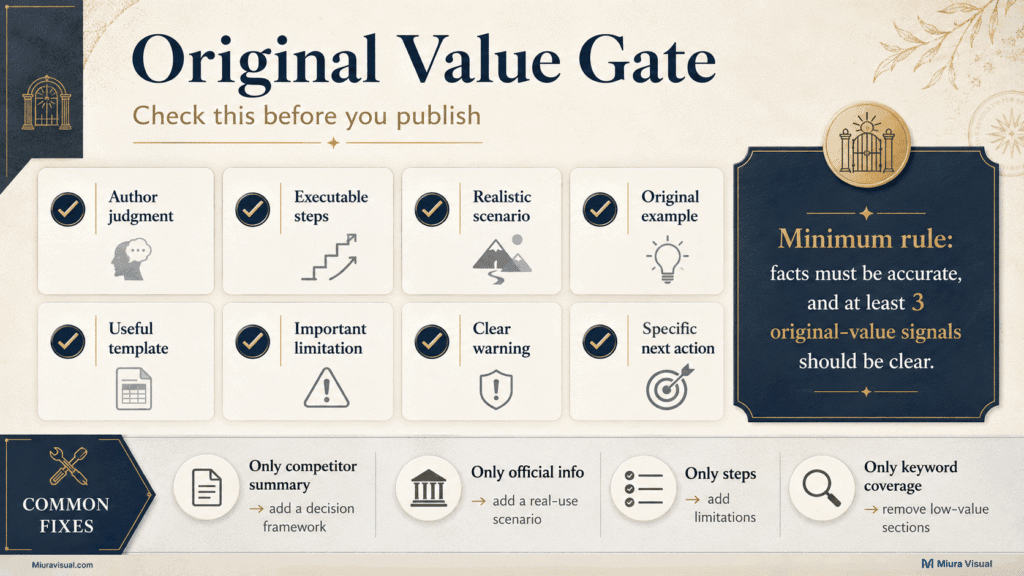
Common problems and corrections
| Problem | Better correction |
|---|---|
| The article only summarises competitors | Add a decision framework |
| The article only rewrites official information | Add real-use scenarios and limitations |
| The article contains steps without judgement | Explain when to use or skip them |
| The article covers many terms but no clear problem | Remove sections that do not change the reader’s action |
| The AI draft sounds generic | Add evidence, examples, and human judgement |
| The article is long but repetitive | Merge sections with the same final answer |
A piece of content does not become valuable because it is longer than competing pages.
For a small content website, it’s often better to publish fewer useful pages.
Producing many similar drafts can overwhelm the review process.
Pages need to be linked, updated, and made unique, so quality matters more than speed.
When not to publish
Do not publish yet when:
- The topic is still overlapping an existing article
- Important rules or facts remain unverified
- The final answer is no different from the current search results
- The article has no practical example or action
- The required screenshot, comparison, or proof is missing
- The article exists only to meet a monthly publishing target
Returning to the brief is better than trying to repair a weak angle with more words.
Step 8: How Should You Edit and Streamline Your Content?
Edit in the correct order:
Search intent → structure → accuracy → clarity → SEO → formatting
Do not begin by replacing individual words while the article structure is still weak.
1. Check the search intent
Confirm that the Quick Answer and main sections solve the problem defined in the brief.
If the searcher wants a decision, do not give only background information.
If the searcher wants steps, do not hide them after several definition sections.
2. Fix the structure
Revised Instructions:
- Eliminate any repeated sections.
- Place the strongest answer at the beginning.
- Ensure each H2 has a distinct purpose.
3. Verify accuracy
Check official rules, dates, platform policies, product details, quoted claims, and links.
4. Improve clarity
Replace vague phrases, long introductions, and unsupported claims.
Use tables only when readers need to compare several conditions or variables.
5. Optimise naturally
Review:
- H1
- SEO title
- Meta description
- Heading wording
- Primary keyword placement
- Supporting terms
- Internal links
- Image alt text
6. Format for scanning
Use:
- Short paragraphs for explanation
- Bullets for repeated actions or warnings
- Numbered lists for sequences
- Tables for comparisons
- Bold phrases for important decisions
Fix meaning before readability scores.
A good readability score won’t fix the wrong search intent or a copied article angle.
Step 9: What Assets and Internal Links Are Needed?
Prepare images, evidence, and internal links before uploading the draft to WordPress.
Useful article assets may include:
- Hero image
- Flowchart
- Screenshot
- Comparison table
- Template
- Original diagram
- Example document
- Downloadable checklist
Every visual should explain, prove, compare, or make a complex idea easier to scan.
Decorative images are optional.
Prepare an asset checklist
- Hero image
- Supporting visual
- Screenshot source
- Image file name
- Alt text
- Caption if needed
- Pillar link
- Supporting cluster links
- Next-step link
- Outbound evidence
Store raw screenshots, edited graphics, and final web exports separately.
A clear content file organisation helps avoid last-minute confusion.
This is especially true when multiple article images have similar names or versions.
Internal links should answer “what next?”
Add an internal link when another page:
- Explains a related process in greater depth
- Helps the reader complete the next action
- Owns a topic excluded by the cannibalisation boundary
- Provides evidence, comparison, or supporting context
Do not add links merely to reach a target number.
In this article, the gap-analysis guide covers the entire topic-selection method.
The audit guide handles the complete post-publish review system.
Brief links work well.
Rewriting those processes here would weaken all three pages.
Step 10: What Should You Check Before Publishing in WordPress?
A draft is publish-ready only when the content and the live page both pass review.
Use this WordPress blog post checklist:
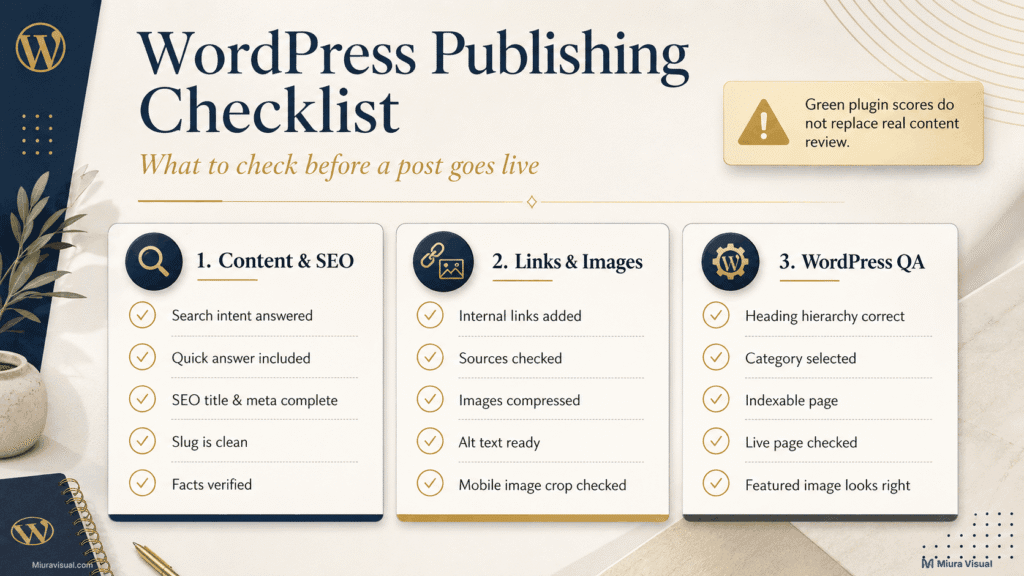
Content and SEO
- The search intent is answered
- The introduction explains the problem and outcome
- The Quick Answer gives the direct response
- Each main section has a clear purpose
- Important facts are verified
- The article contains original practical value
- The conclusion gives a specific next step
- The SEO title and meta description are accurate
- The slug is short and clear
Links and images
- Internal links lead to genuinely useful pages
- Outbound sources open correctly
- Image files are compressed
- File names are descriptive
- Alt text explains relevant images
- Screenshots are readable on mobile
- The featured image is correctly cropped
WordPress setup
- One H1 is used
- H2 and H3 hierarchy is correct
- Category is selected
- Excerpt is complete when needed
- The page is indexable
- Canonical settings are correct
- The page displays properly on desktop and mobile
- The live URL has been checked after publishing
A Rank Math green light is not publishing approval.
An article must not go live if it overlaps with another page, lacks its own value, has unverified facts, or doesn’t meet the searcher’s needs.
Plugin scores show technical gaps, but they won’t make strategic choices for you.
Step 11: What Should a Solo Creator Track After Publishing?
A solo creator does not need a complicated analytics dashboard.
Track the minimum information required to understand the article’s age, index status, search visibility, and next decision.
| Field | Why it matters |
|---|---|
| Article title | Identifies the page |
| Primary keyword | Records the original target |
| Publish date | Shows how long the page has been live |
| Index status | Confirms whether Google can surface it |
| Search queries | Shows how Google understands the page |
| Impressions | Indicates search visibility |
| Clicks | Shows whether users enter the page |
| CTR | Helps identify snippet or intent problems |
| Average position | Shows current ranking range |
| Last update | Prevents unnecessary repeated edits |
| Review date | Creates a planned checkpoint |
| Next action | Wait, improve CTR, update, merge, or remove |
The table is enough for most beginner and small-site workflows.
Use evidence before changing the article
- No meaningful data yet: Wait.
- Relevant impressions but few clicks: Review the title, meta description, and intent match.
- Relevant queries but weak positions: Strengthen the sections those queries need.
- Irrelevant queries: Recheck the angle and page focus.
- Two URLs appearing for the same queries: Investigate cannibalisation.
- Outdated facts or declining performance: Move the page into a structured review.
Do not judge a new SEO page after only a few days.
When the website has enough data, do a blog content audit. This will help you decide which URLs to keep, update, merge, repurpose, or remove.
Blog Content Workflow Template for Beginners and Solo Creators
Choose the tracker based on your publishing volume and website complexity.
Beginner Blog Content Workflow Example
Use this version if you publish now and then.
It’s best for managing few overlapping topics.
| Topic | Keyword | Status | Publish date | Index status | Review date |
|---|---|---|---|---|---|
| Example article | Primary target | Drafting | |||
Recommended statuses:
- Idea
- Researching
- Writing
- Editing
- WordPress
- Published
- Reviewing
This version is enough to prevent forgotten drafts and unclear next steps.
Full blog content workflow tracker
Use the full version when you:
- Publish several articles each month
- Use AI during research or drafting
- Manage multiple content clusters
- Work with writers, editors, or clients
- Frequently update existing pages
- Need stronger cannibalisation control
| Field | What to record |
|---|---|
| Topic | Working article idea |
| Searcher problem | Specific issue to solve |
| Content action | Create, update, merge, wait, or skip |
| Primary keyword | Main search target |
| Existing page checked | Relevant URL or none |
| Unique angle | Why the article deserves to exist |
| Original value | Planned judgement, example, template, or evidence |
| Status | Current workflow stage |
| Evidence needed | Sources, data, screenshot, or test |
| Outline ready | Yes or no |
| Draft complete | Yes or no |
| Original value passed | Yes or no |
| Images ready | Yes or no |
| Internal links added | Yes or no |
| WordPress QA | Passed or incomplete |
| Publish date | Live date |
| Index status | Indexed, not indexed, or pending |
| Review date | Planned evaluation date |
| Next action | Wait, improve, update, merge, or remove |
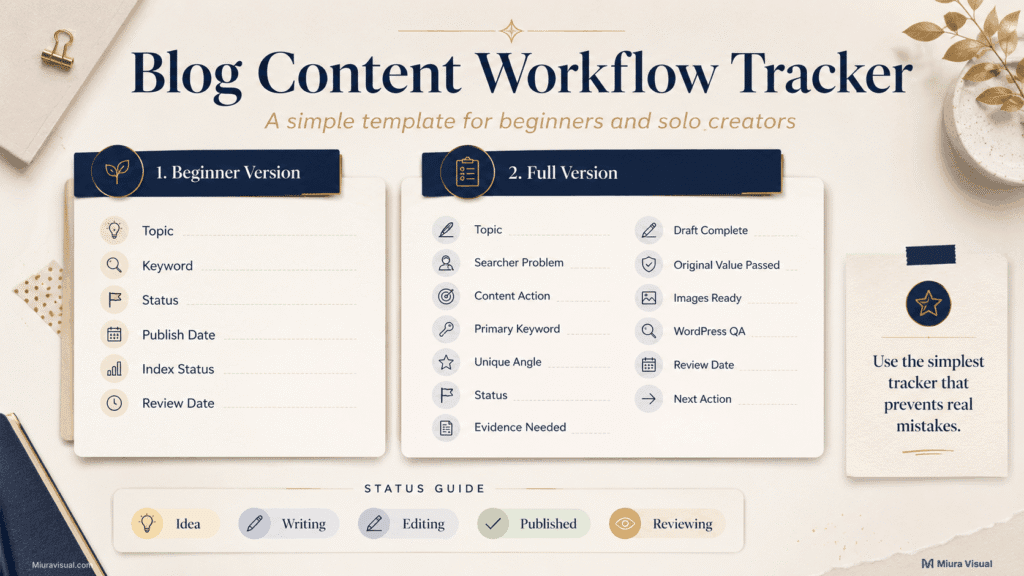
Use the simplest tracker that prevents real mistakes.
A solo creator who writes two articles a month likely does not need complex content workflow tools.
Google Sheets and a reusable checklist are usually sufficient.
A small publisher with ten articles and several affiliate groups needs better status and review fields.
Frequent updates also require more detail.
Conclusion
Before writing, ask yourself: Does this topic deserve a new article?
If the searcher problem is clear and current pages don’t solve it, then add original value.
Move it into the workflow.
Create a new article when the topic passes the approval gate.
Wait when evidence is still limited.
Skip when the content would only repeat existing search results.
Prioritize an older page if it has relevant impressions or answers most of the question.
Your next step is easy: choose either the beginner or full workflow tracker.
Then, run one real article idea through the topic approval stage.
After that, you can open a blank draft.
Frequently Asked Questions
Do beginner bloggers need a blog content workflow?
Yes, but the workflow can remain simple. Beginners need a clear order. They should have a publishing checklist and a small tracker. This helps prevent missing any stages.
Can AI automate a blog content workflow?
AI can assist with research organisation, outlines, formatting, transcription, and draft preparation. Human judgement is still required for search intent, cannibalisation, factual accuracy, original value, and final approval.
What is the difference between a blog workflow and a content calendar?
A content calendar records what will be published and when. A blog workflow guides the journey of each article. It starts with choosing a topic, then moves to writing, review, publishing, and finally, tracking performance.
Should every blog article use the full workflow?
No. Use a lean checklist for simple, low-risk articles. Use stronger approval and accuracy gates for affiliate content, official platform rules, competitive keywords, client work, or topics that overlap existing pages.
How often should a blog workflow be reviewed?
Review the workflow when the same bottleneck appears repeatedly. Fix the stage that causes delays or weak content. Don’t rebuild the whole system after one tough article.

Miura Visual
Transforming visuals into content, stories, and scalable value across platforms and audiences.
Related Article