How to Create Social Media Content Pillars for Your Brand
Social media content pillars help your brand decide what to talk about consistently. This guide helps you pick, test, and remove content themes. This way, you won’t waste time creating them.

Quick Answer: Choose 3–5 Content Pillars That Pass Three Tests
Start with 3–5 content pillars.
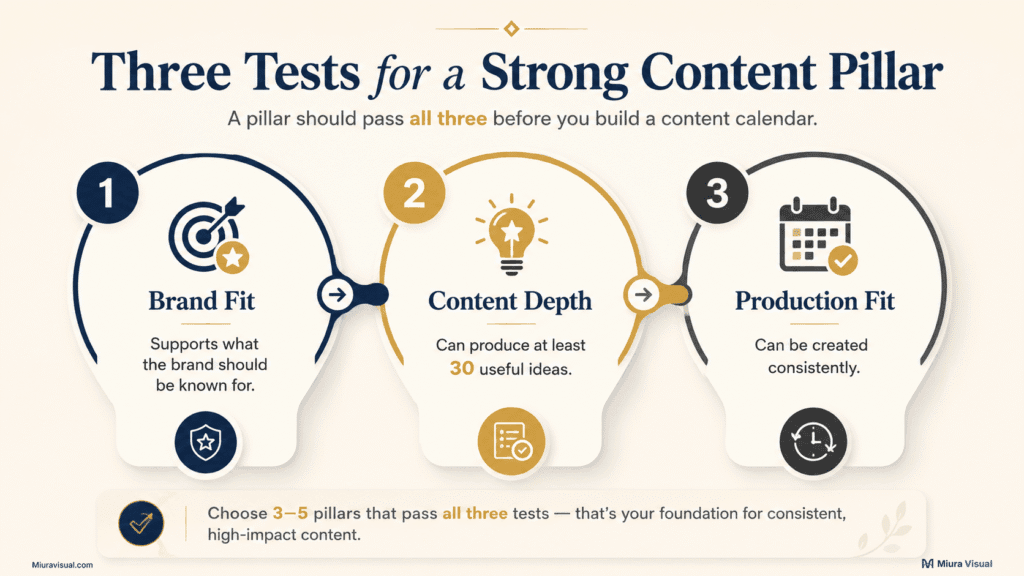
Each pillar should pass three tests:
- Brand fit: Does this topic support what your brand wants to be known for?
- Content depth: Can you create at least 30 useful post ideas from it?
- Production fit: Can you realistically produce this content every month?
Do not choose a pillar just because it sounds professional.
A useful pillar should:
- Solve a recurring audience problem
- Match the brand’s real expertise
- Support trust, traffic, enquiries, or sales
- Produce different content angles
- Remain realistic to create every month
The better move is to test them first.
Remove weak pillars before you build your content calendar.
What Are Social Media Content Pillars?
A social media content pillar is a long-term theme your brand can return to repeatedly.
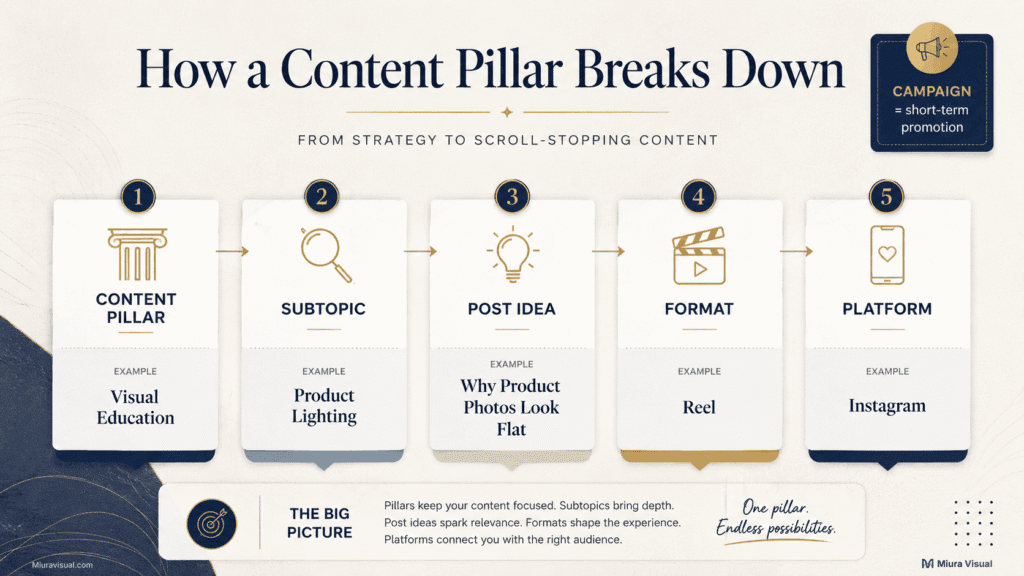
Content pillars aren’t single posts, campaigns, or content formats.
| Element | Meaning | Example |
|---|---|---|
| Content pillar | Long-term topic | Visual Education |
| Subtopic | Smaller subject | Product Lighting |
| Post idea | Specific angle | Why Product Photos Look Flat |
| Format | How it is presented | Reel |
| Platform | Where it is published | |
| Campaign | Short-term promotion | August Product Shoot Offer |
For example, “Reels” is not a pillar.
Reels are a format.
“Visual Education” can be a pillar because it can include:
- Lighting tips
- Composition mistakes
- Editing examples
- Background choices
- Before-and-after comparisons
- Website image preparation
- Product photography advice
A good pillar gives your audience a clear reason to follow the brand.
It also helps the creator stay on track.
With this way, they don’t have to start from scratch each week.
Why Most Social Media Content Pillar Strategies Fail
Most brands do not fail because they have no ideas.
They fail because their pillars are poorly defined.
Common problems include:
- The topic is too broad.
- The topic is too narrow.
- A format is mistaken for a pillar.
- Every pillar becomes promotional content.
- The brand has no real experience in the subject.
- The content requires more production than the team can handle.
- The brand copies popular categories without checking audience demand.
Weak Example: Lifestyle
This could include food, travel, health, work, fashion, or personal updates.
It gives the creator almost no direction.
Stronger Version: Creator Workspace and Production Habits
This gives the audience a clearer expectation.
It also makes content planning easier.
Weak Example: Photography Tips
This may attract beginner camera users, wedding photographers, product photographers, phone photographers, retouchers, and hobbyists.
These people do not always share the same problem or buying intent.
Stronger Version: Better Product Visuals for Small Brands
This focuses on a clearer audience, problem, and commercial outcome.
How to Create Content Pillars From Real Audience Signals
Do not begin with a blank document and invent five attractive categories.
Start with real audience signals.
- Google searches: Look for repeated questions and recurring problems.
- Customer enquiries: Collect questions people ask before buying.
- Comments and DMs: Note confusion, objections, and content requests.
- Sales conversations: Identify the reasons people hesitate.
- Existing content: Review topics that already receive saves, clicks, or enquiries.
- Brand expertise: List problems you can explain with real examples.
- Products or services: Find topics that connect naturally to what you sell.
Focus first on customer questions.
Use this order:
- Collect customer and audience questions
- Review existing content performance
- List the brand’s proven expertise
- Check products, services, business goals, and social media goals.
- Review competitor topics last
A product photographer may repeatedly hear:
- Why do my product photos look flat?
- Can I use a phone instead of a camera?
- Should I use a white background?
- Why do product colours look inconsistent?
- What photos does an online store need?
- Do professional photos increase sales?
A repeated question is a useful signal, but it should not become a pillar automatically.
First, see if the brand can respond based on real experience.
Also, check if the topic leads to a meaningful next step.
In this case, the questions point to a problem the photographer can solve with real examples. They can be grouped into one candidate pillar: Better Product Visuals.
This is better than picking “Photography” as a pillar.
It targets a clear audience problem.
Competitor research is useful for discovery.
It should not decide your final content strategy.
A competitor may have:
- A larger team
- More customers
- More case studies
- A different audience
- A higher production budget
- A different business model
Copying their categories can create a strategy your brand cannot sustain.
For a small Malaysian creator or business, don’t focus on trends that lack local relevance or a business link.
A popular overseas topic may still be a poor choice if you have no proof, examples, or audience demand.
Use the Miura Visual Content Pillar Fit Test
Before adopting a pillar, score first.
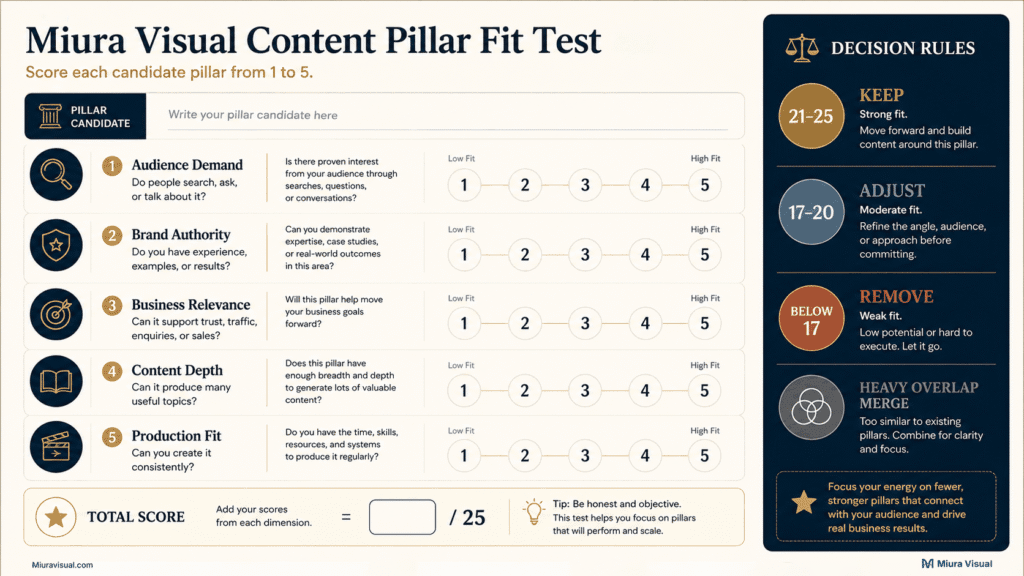
Give each candidate topic a score from 1 to 5.
| Factor | Question |
|---|---|
| Audience Demand | Does the audience regularly search, ask, or talk about this? |
| Brand Authority | Do you have experience, examples, or results to share? |
| Business Relevance | Can this support trust, traffic, enquiries, or sales? |
| Content Depth | Can it produce many different useful topics? |
| Production Fit | Can your current team, budget, and schedule support it? |
Use this decision range:
- 21–25 points: Keep it as a core pillar.
- 17–20 points: Adjust the angle, name, or scope.
- Below 17 points: Remove or redefine it.
- Heavy overlap: Merge it with another pillar.
These scores are not an industry rule.
They are a practical filter.
Example Scorecard
| Candidate Pillar | Demand | Authority | Business | Depth | Production | Total |
|---|---|---|---|---|---|---|
| Visual Education | 5 | 5 | 4 | 5 | 4 | 23 |
| Behind the Scenes | 3 | 5 | 3 | 3 | 2 | 16 |
| Creator Motivation | 3 | 2 | 1 | 3 | 5 | 14 |
| Client Problems and Solutions | 5 | 4 | 5 | 4 | 4 | 22 |
In this example, the decisions would be:
- Keep Visual Education.
- Keep Client Problems and Solutions.
- Adjust Behind the Scenes into supporting content.
- Remove Creator Motivation.
Creator Motivation may be easy to produce.
That does not make it commercially useful.
Easy content is not automatically valuable content.
A small creator site should not keep a topic only because AI can generate it quickly.
If the brand has no proof, experience, or useful decision to add, the content will still feel generic.
Run the 30-Post Stress Test for Your Content Pillars
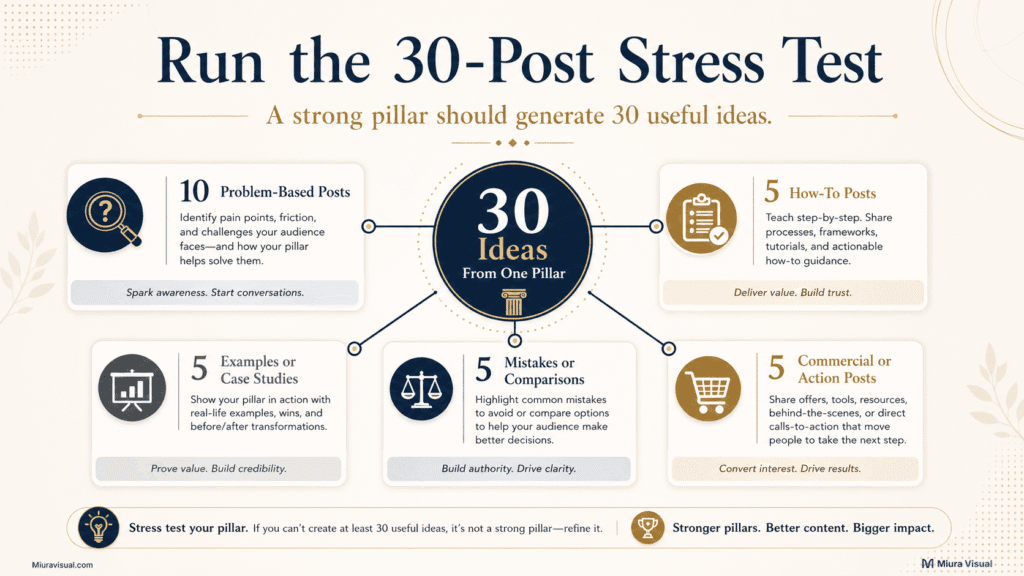
Strong content pillars should survive a 30-post test.
Try to produce:
- 10 problem-based posts
- 5 how-to posts
- 5 examples or case studies
- 5 mistakes or comparisons
- 5 commercial or action posts
This test reveals whether the pillar has real depth.
Worked Example: Visual Education
Problem-Based Ideas
- Why product photos look flat
- Why skin tones change between images
- Why website images load slowly
- Why indoor videos look noisy
- Why brand visuals feel inconsistent
- Why white backgrounds look grey
- Why product colours look inaccurate
- Why social media covers look cropped
- Why images lose quality after upload
- Why portfolio images fail to attract enquiries
How-To Ideas
- How to use window light for product photos
- How to prepare images for a website
- How to plan horizontal and vertical shots
- How to choose a background colour
- How to create a simple visual reference board
Examples and Case Studies
- Phone camera vs mirrorless camera
- White background vs lifestyle setup
- Before-and-after colour correction
- One-light product setup
- Strong vs weak website hero images
Mistakes and Comparisons
- Lighting mistakes that make products look cheap
- Natural light vs continuous light
- High-resolution vs web-size images
- Creative visuals vs conversion-focused visuals
- Editing every image vs selecting first
Commercial and Action Ideas
- What photos an online store needs
- When professional photography is worth paying for
- How to prepare for a brand photoshoot
- What to include in a photography brief
- How poor visuals affect buyer trust
If the ideas begin repeating after eight or ten topics, stop forcing it.
The pillar may be:
- Too narrow
- A subtopic
- A short-term campaign
- Outside the brand’s expertise
- Unsupported by real audience demand
Adding more words or changing the title will not solve a weak pillar.
The problem is strategic, not editorial.
Match Your Social Media Content Pillars to Production Capacity
A good topic can still be a bad pillar if the production fit is weak.
Ask:
- How often can we publish?
- What assets does the topic require?
- Do we need new photos or footage every week?
- Can existing projects provide material?
- Do clients allow the content to be shared?
- Does the topic require a presenter or location?
- How long does one post take?
- Can the quality remain consistent for six months?
| Pillar | Required Assets | Realistic Frequency | Decision |
|---|---|---|---|
| Visual Education | Existing work, graphics, examples | Weekly | Core pillar |
| Behind the Scenes | Live project footage | 1–2 times monthly | Supporting pillar |
| Client Case Studies | Approved client results | Monthly | Supporting pillar |
| Quick Creator Tips | Existing knowledge and simple visuals | Weekly | Core pillar |

Behind the Scenes looks like an attractive content pillar.
But it becomes unreliable when:
- Projects are inconsistent.
- Clients do not allow filming.
- The creator works alone.
- The shoot is already stressful.
- There is no one available to record the process.
In that situation, treat it as a supporting pillar, not a core pillar.
For a solo Malaysian creator with a limited budget, these formats may be more sustainable:
- Before-and-after images
- Screen recordings
- Simple talking videos
- Annotated screenshots
- Carousels
- Blog posts
- Existing project breakdowns
Cinematic content can look more impressive.
It also takes more time to shoot, edit, subtitle, and repurpose.
A strong, realistic pillar built steadily is better than an ambitious one left behind after three weeks.
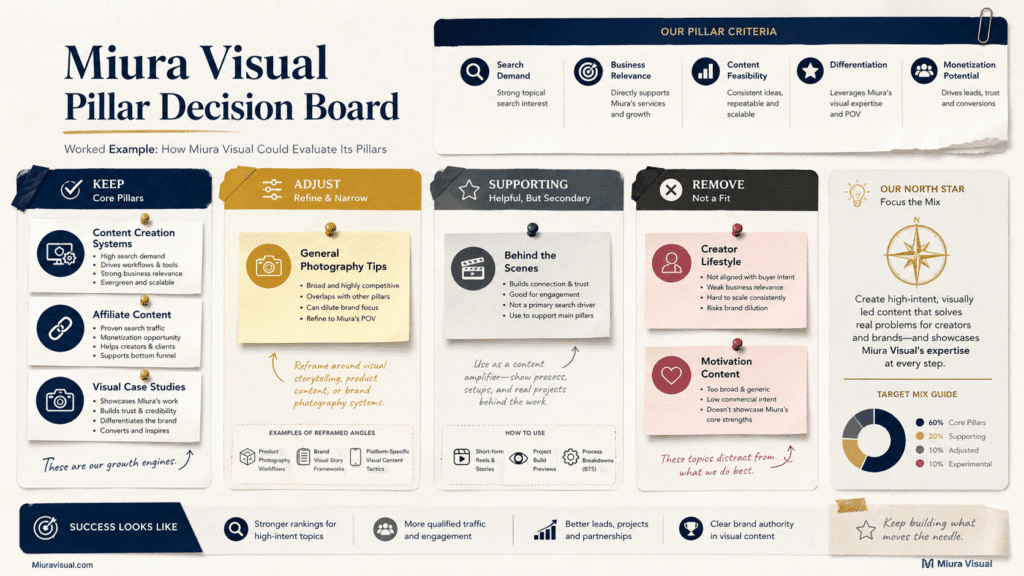
Worked Example: How to Evaluate Content Pillars for Your Brand
A useful content pillar decision is not only about what looks good.
It is also about what supports the brand’s direction.
Candidate Pillar Review
| Candidate Pillar | Decision | Reason |
|---|---|---|
| General Photography Tips | Adjust | Too broad and difficult to connect to one audience |
| Content Creation Systems | Keep | Matches real production and workflow experience |
| Creator Lifestyle | Remove | Easy to publish but weak business relevance |
| Affiliate Content | Keep | Supports search traffic and monetisation |
| Behind the Scenes | Supporting | Useful, but project footage is not always available |
| Visual Case Studies | Keep | Shows proof and supports service enquiries |
| Motivation | Remove | Highly replaceable and difficult to differentiate |
The easiest pillar to produce was not always the best pillar to keep.
Creator Lifestyle and Motivation can generate many quick posts.
They might attract people who aren’t really interested in the brand’s services, skills, or future offers.
Content Creation Systems requires more work.
It also supports:
- Search traffic
- Creative authority
- Service positioning
- Internal links
- Future templates
- Real project examples
Affiliate Content serves a different purpose.
It connects content production with:
- Product discovery
- Buyer questions
- Comparison content
- Search intent
- Commercial action
The final decision should not be based only on which topic gets the most likes.
A pillar should earn its place by supporting the brand’s wider system.
Turn Each Content Pillar Into Useful Post Ideas
Use this sequence:
Pillar → Audience Question → Content Angle → Format → Action
Start with the problem first.
Choose the format later.
Worked Example
- Pillar: Visual Education
- Audience question: Why do my product photos look flat?
- Content angle: Three lighting problems that remove depth
- Format: Reel and carousel
- Action: Check the light direction before shooting
One idea can support several formats:
- Three lighting mistakes: Reel
- Flat vs dimensional lighting: Carousel
- One-light product setup: Blog guide
- Behind-the-scenes lighting test: Story
- Phone light vs softbox: Comparison video
Do not force every pillar into every format.
A detailed comparison may work better as a blog or carousel.
A visual mistake may work better as a Reel.
A step-by-step process may work better as a carousel.
The format should support the idea.
It should not control your social media strategy.
Every social media post should lead to one clear action:
- Save a checklist
- Compare two options
- Change a production habit
- Visit a detailed guide
- Request a quotation
- Evaluate a product
- Explore a relevant service
For affiliate content, views alone are not enough.
The content should help the reader:
- Understand a problem
- Compare options
- Judge product fit
- Take the next buying step
For a small content site, action-based topics work better than broad inspiration posts.
Test Your Social Media Content Pillars for 30 Days
Do not commit to a pillar for one year before you test it.
Use the first 30 days to test idea depth, audience response, and production effort.
Continue to 60 days when the social media account publishes slowly or does not yet have enough data.
Track social metrics, audience response, and production effort.
| Signal | What It May Mean | Possible Decision |
|---|---|---|
| High saves | The content is useful | Keep |
| High shares | The topic is relatable or valuable | Keep |
| High clicks | The content creates action | Prioritise |
| High enquiries | Strong commercial relevance | Prioritise |
| Low engagement but high enquiries | Small audience, high business value | Keep |
| Ideas run out quickly | The pillar is too narrow | Adjust |
| Content takes too long | Production is unsustainable | Reduce |
| Heavy overlap with another pillar | Categories are unclear | Merge |
| No audience response | Weak demand or execution | Retest or remove |
Do not judge a pillar from one post.
One weak post may have:
- A poor hook
- A weak cover
- Bad timing
- The wrong format
- An unclear angle
Look for patterns across several posts.
Also, do not chase likes without context.
A post with 30 likes and three inquiries could be more valuable.
This is better than a post with 500 likes and no follow-ups.
For a small business, commercial value matters.
For a blog, search impressions and clicks matter.
For an affiliate creator, product interest and conversions matter.
For a visual creator, portfolio views and enquiries may matter more than comments.
For a small website, 30 days is usually too early to judge SEO performance.
First, use the test to check production fit.
Then, wait for enough search impressions before changing the pillar.
The right metric depends on the job of the pillar.
Keep, Adjust, Merge, or Remove Your Content Pillars
After testing, make a decision.
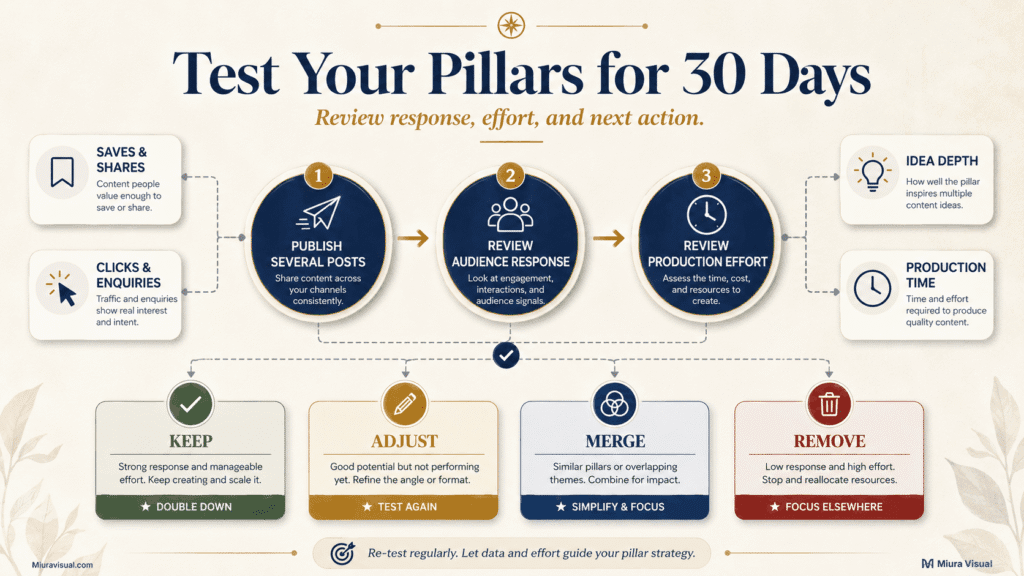
Keep
Keep a pillar when it:
- Produces useful ideas consistently
- Supports the brand’s positioning
- Creates audience or business results
- Is realistic to produce
Adjust
Adjust a pillar when the idea is correct but the name is weak.
Example:
- Lifestyle
- Creator Workspace and Production Habits
The second version is clearer and easier to plan.
Merge
Merge pillars when more than half of the ideas overlap.
Example:
- Photography Tips + Photo Editing Tips
- Visual Education
This helps ensure your content stays focused and avoids repetitive posts.
Remove
Remove a pillar when it:
- Has no recurring audience need
- Produces generic content
- Does not support the brand
- Requires too much effort
- Runs out of ideas
- Exists only because competitors use it
It is better to remove one weak pillar than spend six months filling it with low-value posts.
More content categories do not automatically create a stronger strategy.
Clearer categories usually work better.
Conclusion
Before approving your final pillars, check:
- Does each pillar solve a recurring audience problem?
- Is it connected to the brand’s expertise?
- Can it support a business or communication goal?
- Can it produce at least 30 different post ideas?
- Can the current team produce it consistently?
- Is it clearly different from the other pillars?
- Can you test it with real content?
- Do you know when to keep, adjust, merge, or remove it?
Your pillars decide what the brand should talk about.
Your content creation workflow decides how those ideas get finished.
Choose the themes first.
Then build the production system around the themes that survive the test.
Frequently Asked Questions
What are social media content pillars?
Content pillars for social media are the main topics a brand covers repeatedly.
They help organise content ideas and create a clearer brand direction.
How many content pillars should a brand have?
Most small brands can start with three to five.
A solo creator may only need three.
A larger team can manage more if each pillar has enough depth and production support.
What are the five content pillars of social media?
There is no universal list.
Common types of content include educational content, promotional content, community content, social proof, and behind-the-scenes content.
Your final pillars should still depend on your audience, expertise, business goals, and production capacity.
What is the difference between content pillars and content buckets?
A pillar is a broad, long-term theme.
A content bucket is often a smaller category inside that theme.
Some teams use both terms interchangeably, so define them clearly in your own system.
Should every platform use the same content pillars?
The main pillars can stay consistent across your social media channels.
The execution should change across social media platforms.
A detailed educational topic may become a blog on your website, a carousel on Instagram, and a short video on TikTok.
How often should content pillars be reviewed?
Review them after 30–60 days of consistent testing.
Check audience response, clicks, enquiries, idea depth, and production effort.
Do not replace a pillar after one weak post.
Look for repeated patterns.

Miura Visual
Transforming visuals into content, stories, and scalable value across platforms and audiences.
Related Article