Content Creation Workflow: 8 Steps, Template and Examples
A content creation workflow takes scattered ideas and turns them into organized content. You can plan, produce, publish, and improve it consistently. This guide gives you eight practical stages, a reusable template, and examples for solo creators and small content teams.

Quick Answer: A Simple Content Workflow
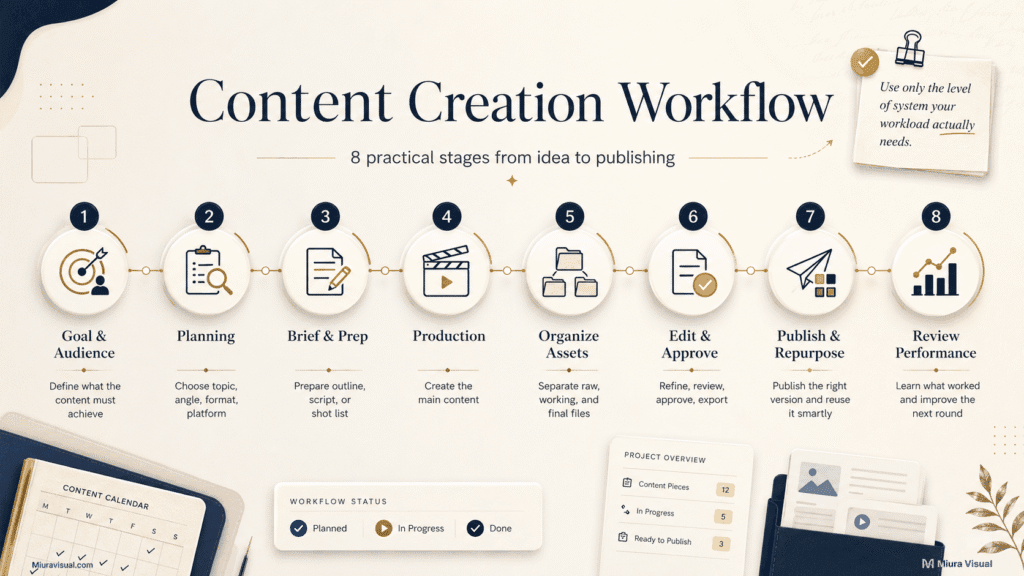
A practical content creation workflow follows eight stages:
| Stage | What You Need to Complete |
|---|---|
| 1. Goal and audience | Decide what the content must achieve and who it is for |
| 2. Planning | Choose the topic, angle, format, platform, and deadline |
| 3. Brief and preparation | Create an outline, script, brief, or shot list |
| 4. Production | Write, shoot, record, or design the content |
| 5. Asset organization | Separate raw files, working files, and final versions |
| 6. Editing and approval | Refine, review, approve, and export the content |
| 7. Publishing and repurposing | Publish the correct version and adapt it for other uses |
| 8. Performance review | Review results and improve the next workflow |
Use eight stages, but keep each stage as simple as your project allows.
A solo creator publishing three posts a month does not need an agency-level system. You only need enough structure to stop restarting from zero every time.
What Is a Content Creation Workflow?
A content creation workflow is a system that helps turn ideas into published content.
It defines:
- What needs to happen
- Who is responsible
- When it is due
- Which tools are used
- What the current status is
- Who approves the final version
- What happens next
A checklist tells you what tasks exist.
A workflow also tells you how those tasks move from one person or stage to another.
For example:
Idea → Planned → In Production → Editing → Approval → Scheduled → Published
A useful workflow should define the flow, not add unnecessary admin.
If you create content alone, you may be the planner, creator, editor, and publisher. The roles are still useful because they remind you which type of work you should be doing at each stage.
The system becomes more important when you manage:
- Multiple platforms
- Client deadlines
- Photo and video files
- Blog production
- Affiliate campaigns
- Freelancers or editors
- Regular publishing schedules
If you only create content occasionally, a simple checklist may be enough.
But if you are creating a complex content management system for just two monthly posts it is not worth it.
Content Creation Process vs Content Production Workflow
These terms are related, but they do not mean exactly the same thing.
| Term | Main Focus | Example |
|---|---|---|
| Content strategy | Why the content should exist | Build trust, generate traffic, support sales |
| Content creation process | What you do to create the content | Research, write, shoot, edit |
| Content production workflow | How content moves between stages | Draft ? editing ? approval ? publishing |
| Content workflow management | Who owns each stage and deadline | Writer, editor, approver, publisher |
| Content calendar | What will be published and when | Weekly blog and social schedule |
The process explains what happens.
The workflow explains movement, ownership, status, and handoff.
This distinction matters when content keeps getting stuck. The problem may not be your writing, shooting, or editing skills. The problem may be that nobody knows what must happen next.
For a solo creator, the difference can be simple:
- Process: Write the article
- Workflow: Keyword confirmed → outline ready → draft written → edited → uploaded → published
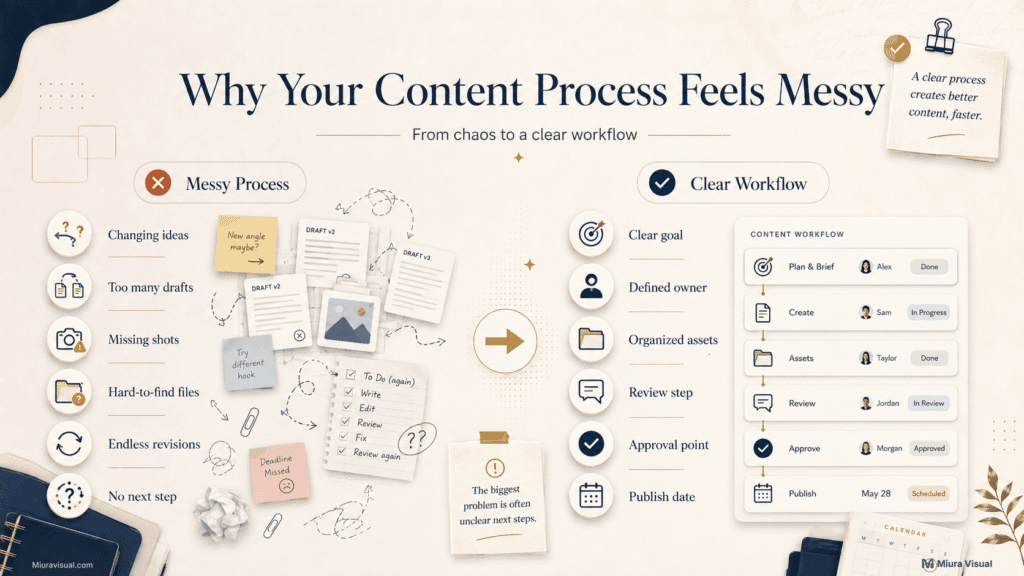
Why Your Content Process Feels Messy
Most creators do not struggle because they lack ideas.
They struggle because they make too many decisions during production.
| Problem | Likely Workflow Gap |
|---|---|
| You keep changing the idea halfway | The goal or angle was unclear |
| You have many unfinished drafts | There is no priority or deadline |
| You miss important photos or footage | There was no brief or shot list |
| Your files are hard to find | There is no asset organization system |
| Editing takes too long | You created too much unnecessary material |
| Revisions never end | There is no final approver |
| Publishing is inconsistent | There is no calendar or status tracking |
| Team members keep waiting | Ownership or handoff is unclear |
| You do not know what worked | There is no review stage |
The biggest warning sign is no next step.
You finish a task, but you’re unsure what to do next.
Should you edit it, ask for approval, prepare platform versions, or publish?
That uncertainty creates delays.
Small creators often make a mistake.
They try to plan, shoot, edit, write captions, and publish all at once.
Switching between creative and administrative work usually makes every task slower.
How to Build a Content Creation Workflow Step by Step
Start with the minimum system that helps you finish content consistently.
Do not copy a large marketing team’s workflow if you work alone. Add more steps only when a real bottleneck appears.
Step 1: Define the Content Goal and Target Audience
Before creating anything, you should answer this question:
What should this content achieve?
Different goals require different content decisions.
| Goal | Suitable Content Direction |
|---|---|
| Build trust | Educational content, behind-the-scenes, case studies |
| Generate search traffic | SEO blog posts and related guides |
| Increase reach | Short videos, visual hooks, relatable content |
| Support affiliate sales | Product use cases, comparisons, demonstrations |
| Show creative quality | Portfolio work, before-and-after, project breakdowns |
| Generate inquiries | Service pages, results, testimonials, clear calls to action |
Then define the target audience.
Ask:
- Who is this for?
- What problem are they facing?
- What do they already know?
- What should they understand or do next?
Start with the outcome, not the platform.
“Make an Instagram Reel” is not a goal.
“Teach Malaysian small business owners how better product photos can boost their listings.”
A piece of content can look good but still fail if it has no clear job.
Step 2: Plan the Topic, Format and Deadline
Turn the idea into a production-ready plan.
A production-ready content plan should answer:
- Topic: What is the content about?
- Audience: Who needs this information?
- Angle: What specific problem are you solving?
- Format: Will it be a blog, photo, Reel, carousel, or video?
- Platform: Where will it be published?
- Key message: What should the audience remember?
- Action: What should they do next?
- Deadline: When must production be completed?
- Publish date: When will the content go live?
Weak plan: Create content about camera gear.
Strong plan: Create a short video showing three affordable desk tools that help beginner creators film more efficiently.
The second plan gives you a topic, audience, angle, format, and commercial direction.
Choose the format early.
A blog, photo post, carousel, and short video require different preparation.
Choosing the format after production can cause problems.
You might end up with missing shots. The image orientation could be wrong.
Also, the content might not fit the platform.
For a small content site, do not build a full calendar around topics with no clear demand. A neat calendar cannot rescue weak topic selection.
Step 3: Prepare the Brief, Outline, Script or Shot List
Use the planning document that matches the content:
- Photography: Prepare a shot list.
- Short video: Prepare an outline, script, and shot list.
- Blog post: Create an article outline.
- Carousel: Plan the slide structure.
- Client project: Prepare a creative brief.
- Campaign: Use a brief and approval checklist.
The document should answer:
- What must be created?
- What information or visuals are required?
- What is the final format?
- Who needs to review it?
- When is it due?
Prepare before production, but keep the document usable.
A simple Reel may only need:
- One goal
- One hook
- Three key points
- Five required shots
- One call to action
It does not need a ten-page production file.
A client campaign needs more details. More people, money, and expectations are involved.
A common mistake is not preparing at all.
Another mistake is over-preparing, which can delay production.
 For details on when a video needs a storyboard, how to turn an approved script into visual panels, and how to convert it into a practical shot list, check out this guide on How to Storyboard a Video.
Step 4: Produce Content Based on the Format
Production means creating the main material.
That may involve:
- Shooting photos
- Recording video
- Writing an article
- Designing a carousel
- Recording audio
- Creating graphics
The workflow stays similar, but execution changes by format.
Each format has a different production priority:
- Photography: Capture the required images, angles, crops, and orientations.
- Video: Record the main footage, audio, supporting footage, and backup takes.
- Blog: Write around the reader’s question and search intent.
- Carousel: Build one clear idea across a logical slide sequence.
- Affiliate content: Show the product, use case, problem, and result clearly.
Capture useful material first.
Do not chase creative extras before securing what the project actually needs.
For photography, capture the required hero image before experimenting with unusual angles.
For video, first record the main explanation.
Then, get the needed supporting footage.
After that, film the cinematic clips.
For an affiliate review, showing the product in action is often more helpful than making a fancy opening montage.
More footage does not automatically create better content. It can simply create a heavier editing workload.
Step 5: Organize Assets and Prepare the Handoff
Separate files into four basic stages:
- Raw: Original photos, footage, audio, and source files.
- Working: Drafts, project files, selections, and edits.
- Final: Approved files ready to publish or deliver.
- Archive: Completed projects stored for future use.
Separate file stages before editing begins.
At minimum, one project should have:
Project Name
- Raw: Original photos, footage, audio, and source files
- Working: Drafts, selections, edits, and project files
- Final: Approved files ready to publish or deliver
- Archive: Completed projects stored for future use
You can add more folders when needed, but avoid creating a structure you will not maintain.
For team projects, include:
- Clear version numbers
- Current file owner
- Approval status
- Final export location
Do not depend on file names such as: final-final-new-v3-real-final.mp4
That looks harmless when working alone. It becomes a serious problem when a client or editor needs the correct version quickly.
For a detailed folder, naming, and backup system, refer to a specific guide.
This way, you can organize photos and videos without turning your main content workflow into a full asset management tutorial.
Step 6: Edit, Review and Approve the Content
Use the same general editing sequence across formats:
Select → Rough Edit → Refine → Review → Approve → Export
Use the same general editing sequence:
- Select: Remove weak, duplicate, or unnecessary material.
- Rough edit: Build the main structure.
- Refine: Improve clarity, pacing, visuals, sound, or writing.
- Review: Check accuracy, consistency, and missing elements.
- Approve: Confirm the final version.
- Export: Prepare the correct file for publication or delivery.
Select before refining.
Editing everything is one of the fastest ways to waste time.
For photo projects, select the strongest images before detailed retouching.
For video, build the rough cut before spending time on subtitles, effects, or colour.
For blog content, fix the structure and search intent before polishing individual sentences.
The final approver should also be clear.
For solo content, that may be a final self-review checklist.
For client work, decide who can approve the project. Too many approvers often create conflicting revisions and endless editing.
Step 7: Publish, Distribute and Repurpose
Publishing is not just uploading a file.
Before publishing, prepare the correct version and context.
Check:
- File size and format
- Title or caption
- Thumbnail or cover
- Keywords or hashtags
- Internal links
- Alt text
- Call to action
- Platform dimensions
- Scheduled date
Package for the platform.
The same core idea can be reused, but the execution should change.
One original content piece can support several formats:
- Photoshoot: Turn it into a carousel, website image, case study, or portfolio post.
- Short video: Adapt it for Instagram Reels, TikTok, YouTube Shorts, or Stories.
- Blog post: Repurpose it into a carousel, newsletter, social post, or video script.
- Client project: Use it for a portfolio page, behind-the-scenes post, or testimonial content.
- Affiliate review: Create a blog guide, short demonstration, comparison post, or product photos.
Repurposing works best when planned before production.
For example, a Malaysian creator reviewing a desk light could prepare:
- Horizontal photos for the blog
- Vertical clips for TikTok and Reels
- A close-up showing the controls
- A before-and-after lighting comparison
- One thumbnail image
- One short opinion for social captions
It’s better to capture the vertical footage first than to finish the blog and find out later that you missed it.
Do not force every content piece onto every platform.
If adapting it takes nearly as long as making something new, then repurposing might not be worth it.
Step 8: Measure Results and Improve the Workflow
Review both content performance and production efficiency.
Content Performance
Review these metrics to judge how the content performed:
- Reach: Shows how many people saw the content.
- Saves: Indicates whether the content was useful.
- Shares: Shows whether people felt it was worth spreading.
- Clicks: Measures whether the content moved people to act.
- Watch time: Shows whether the video held attention.
- Inquiries: Indicates whether the content created commercial interest.
- Search impressions: Shows whether the page is gaining search visibility.
- Conversions: Measures whether it supported sales or affiliate results.
Workflow Performance
Review these metrics to judge how efficient the production process was:
- Production time: Shows whether the preparation stage was efficient.
- Editing time: Helps identify whether too much material was created.
- Revision count: Shows whether the brief or approval process was unclear.
- Missed deadlines: Indicates whether the workload was realistic.
- Approval delay: Shows whether ownership or decision-making was unclear.
- Unfinished content: Indicates whether too many ideas entered production.
- Repurpose rate: Shows whether assets were planned for reuse.
Review the bottleneck, not only the final views.
A video with low watch time may need a better hook.
A blog with impressions but no clicks may need a better title.
A shoot that took eight hours to edit may have created too many unnecessary files.
For a small site, do not judge a new SEO article after a few days.
Search content needs time and impressions.
Only then can you make a good decision.
Task-Based vs Status-Based Content Workflows
There are two practical ways to manage content.
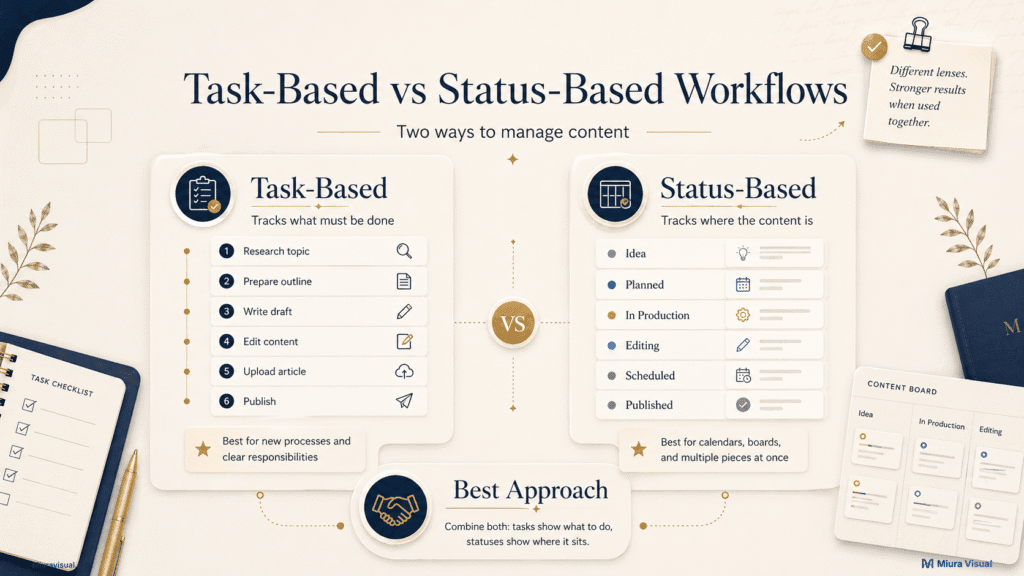
Task-Based Workflow
A task-based workflow tracks what must be completed.
Example:
- Research topic
- Prepare outline
- Write draft
- Edit content
- Create images
- Upload to WordPress
- Add internal links
- Publish
Use tasks when the team needs clear instructions.
This works well for:
- New processes
- Client projects
- Complex articles
- Video shoots with many requirements
- Team members who need specific responsibilities
The weakness is that a long task list may not show the current position of the content clearly.
Status-Based Workflow
A status-based workflow tracks where the content currently sits.
Example:
- Idea
- Planned
- In Production
- Editing
- Waiting for Approval
- Scheduled
- Published
- Updating
Use statuses when managing several content pieces at once.
This works well for:
- Solo creators
- Editorial calendars
- Content marketing teams
- Kanban boards
- Websites publishing regularly
The weakness is that “In Production” may not explain which tasks are still missing.
The Better Approach
Combine both.
Use statuses to show where the content is.
Use tasks to show what needs to happen before it can move forward.
For example:
Status: Editing
Tasks:
- Check structure
- Replace weak image
- Add internal links
- Complete final proofread
This gives you both visibility and control.
How to Assign Roles and Responsibilities
Every important stage needs:
- An owner
- An approver
- A next action
| Stage | Solo Creator | Small Content Team |
|---|---|---|
| Strategy | Creator | Marketing lead |
| Planning | Creator | Content manager |
| Production | Creator | Writer, photographer, or videographer |
| Editing | Creator | Editor or designer |
| Approval | Self-review or client | Brand lead or client |
| Publishing | Creator | Content manager |
| Reporting | Creator | Marketing lead |
Use one owner for each stage.
More people can contribute, but one person must be responsible for moving the work forward.
Use one approver whenever possible.
A photographer, editor, marketing manager, business owner, and client all giving equal final direction usually creates slow and inconsistent revisions.
The next action should also be visible.
Example: Once the video is approved, the content manager schedules it for Friday.
Simple Content Creation Workflow Template Example
Use one row for each piece of content.
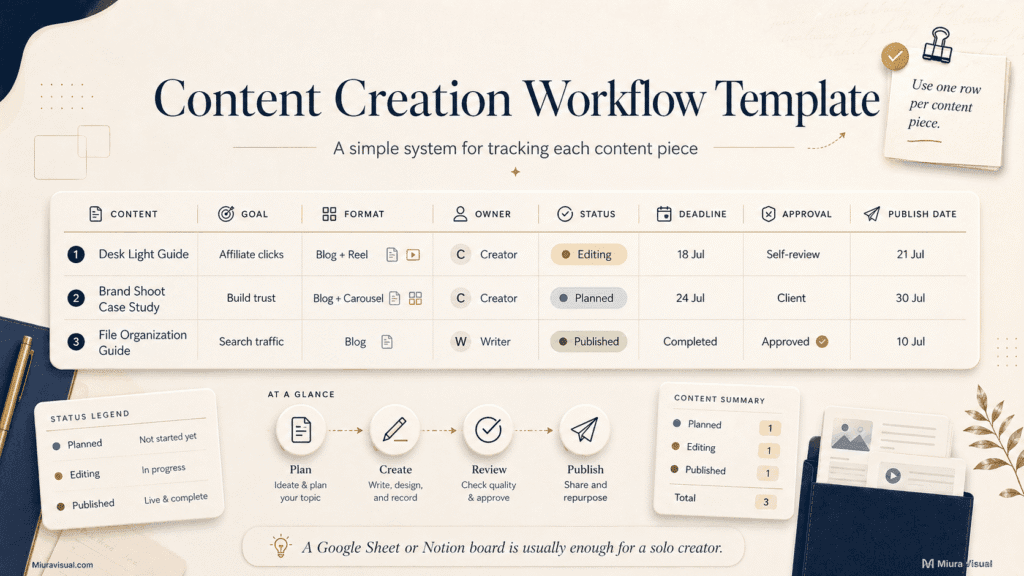
Desk Light Guide
- Goal: Generate affiliate clicks
- Format: Blog and Reel
- Owner: Creator
- Status: Editing
- Deadline: 18 July
- Assets: Photos ready
- Approval: Self-review
- Publish date: 21 July
- Result: Add after publishing
Brand Shoot Case Study
- Goal: Build trust
- Format: Blog and carousel
- Owner: Creator
- Status: Planned
- Deadline: 24 July
- Assets: Waiting for selects
- Approval: Client
- Publish date: 30 July
- Result: Add after publishing
File Organization Guide
- Goal: Generate search traffic
- Format: Blog
- Owner: Writer
- Status: Published
- Deadline: Completed
- Assets: Complete
- Approval: Approved
- Publish date: 10 July
- Result: Review in Google Search Console
Use one row per content.
Avoid making separate planning systems for each platform unless the projects are truly unrelated.
How to Use the Template
- Add the content idea.
- Define one primary goal.
- Select the main format.
- Assign the owner.
- Set the current status.
- Add a production deadline.
- Record the required assets.
- Identify the approver.
- Set the publishing date.
- Review the result later.
Keep the production deadline and publish date separate.
A blog may need to be completed three days before publishing.
A client video may need approval one week before the campaign starts.
For a solo creator, a Google Sheet or simple Notion board is enough.
Creating a complex dashboard without a consistent publishing habit can distract you.
How the Workflow Changes by Content Format
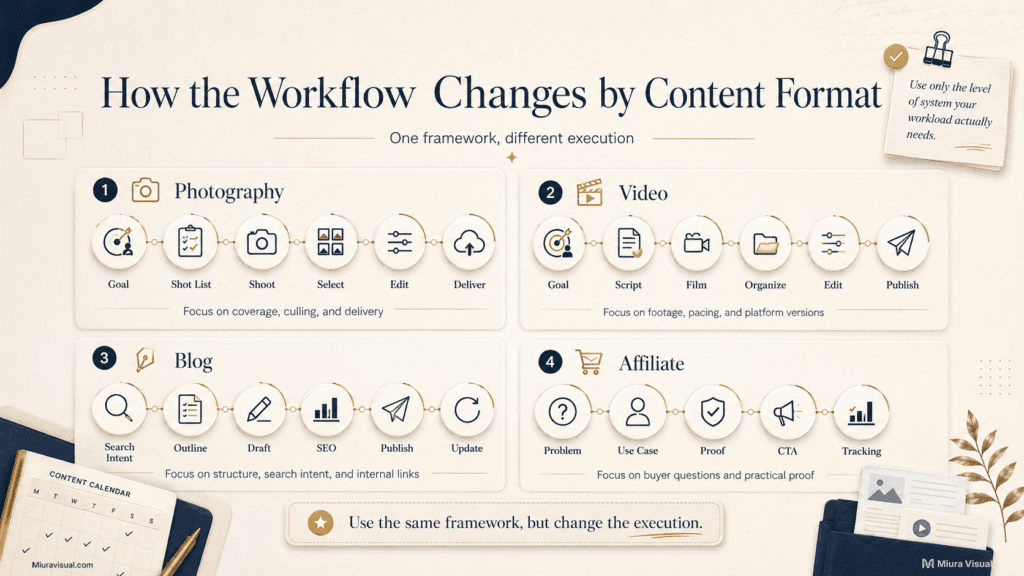
Use the same framework, but change the execution.
Photography Content Workflow
Goal → Planning → Shot List → Shoot → Backup → Select → Edit → Export → Deliver
Photography needs more attention to:
- Final image use
- Orientation
- Shot coverage
- File backup
- Culling
- Consistent editing
- Delivery versions
Do not turn the main content creation workflow into a complete photography tutorial.
Use a dedicated photography workflow. It helps with shoot planning, culling images, editing, exporting, and delivery.
Video Content Workflow
Goal → Outline → Script → Shot List → Film → Organize → Edit → Review → Publish
Video needs more attention to:
- Hook
- Main footage
- Audio
- B-roll
- Pacing
- Subtitles
- Cover frame
- Platform versions
The most expensive video mistake usually happens before editing: missing footage.
Extra effects cannot replace a missing explanation, product demonstration, or key scene.
Blog Content Workflow
Search Intent → Outline → Draft → Edit → SEO → Publish → Update
Blog content needs more attention to:
- Search demand
- Reader intent
- Heading structure
- Examples
- Internal links
- Images
- SEO title
- Updating performance
For a small content site, writing more words is not automatically better.
If the article targets the wrong search intent, adding another 1,000 words will not solve the problem.
Affiliate Content Workflow
Product Problem → Use Case → Proof → Comparison → Call to Action → Tracking
Affiliate content needs more attention to:
- Real product use
- Buyer questions
- Clear benefits and limits
- Useful comparisons
- Platform rules
- Tracking links
- Commercial intent
Don’t make a stunning product video that fails to say who it’s for or why people should buy it.
Where AI and Automation Fit Into the Workflow
Use AI to reduce repetitive support work.
Do not use it to replace the decisions that make the content useful.
| AI Can Assist With | Human Judgment Still Matters |
|---|---|
| Sorting ideas | Choosing the right topic |
| Drafting outlines | Understanding search intent |
| Transcription | Deciding what should remain |
| Caption variations | Protecting brand voice |
| Task creation | Setting realistic priorities |
| Repurposing suggestions | Choosing suitable platforms |
| Summarising research | Verifying facts |
| Scheduling reminders | Final approval |
| File naming suggestions | Creative direction |
Automate support work.
Keep final judgment human.
For example, ChatGPT can create a first article outline.
It can’t know if that article will hurt an existing page.
You need to share the full content structure and make a clear decision.
AI-generated volume can cause another issue: too many drafts to review, publish, or update.
For a small creator site, it’s better to produce fewer strong articles than to publish lots of weak, similar content.
Content Workflow Tools
Choose tools based on the job they need to perform:
- Ideas and planning: Google Docs, Notion, or Google Sheets.
- Tasks and statuses: Trello, Notion, or Google Sheets.
- File storage: Google Drive, Dropbox, or an external SSD.
- Photo editing: Lightroom or Photoshop.
- Video editing: CapCut, Premiere Pro, or DaVinci Resolve.
- Design: Canva or Illustrator.
- Blog publishing: WordPress.
- Scheduling: Meta Business Suite, Buffer, or Later.
- Search reporting: Google Search Console.
- Content optimization: Rank Math, NeuronWriter, or Ahrefs.
Fix the process first.
A messy creator with more software will still have a messy workflow.
For a solo Malaysian creator or small business, this basic stack is often enough:
- Google Sheets for status tracking
- Google Docs for briefs and drafts
- Google Drive for shared files
- CapCut or DaVinci Resolve for video
- Lightroom and Photoshop for photos
- Canva for simple graphics
- WordPress for publishing
- Google Search Console for SEO review
Paid workflow software becomes worthwhile when manual tracking creates a real problem.
If you manage only ten pieces of content a month, paying for another platform adds costs.
It won’t lighten your workload.
How to Streamline Your Content Creation Workflow
The goal is to remove repeated decisions.
Use these actions:
1. Reuse the Same Stages
Do not invent a new process for every project.
Use the same basic statuses:
Idea → Planned → Production → Editing → Approval → Published
2. Create Reusable Templates
Prepare templates for:
- Article outlines
- Creative briefs
- Shot lists
- Project folders
- Video scripts
- Publishing checklists
- Client approvals
3. Batch Similar Tasks
Group similar work together.
Examples:
- Plan five topics in one session
- Shoot several short videos together
- Edit photos from the same project together
- Upload and format multiple articles together
Do not batch work that requires different mental modes without a clear reason.
Combining writing, color grading, and analytics in one block can cause more fatigue than efficiency.
4. Limit Work in Progress
Do not move every idea into production.
A simple rule:
- Keep many ideas
- Plan a smaller number
- Produce only what you can finish
Ten unfinished drafts are not a strong content pipeline.
5. Set a Final Approver
Decide who can approve the content.
This prevents endless changes and conflicting feedback.
6. Review One Bottleneck at a Time
After publishing, ask: Which stage created the most delay or unnecessary work?
Then fix that stage.
Do not rebuild the entire system because one video took longer than expected.
Fix the bottleneck, then test the next project.
Conclusion
A content creation workflow should make content easier to finish.
It will cut down on repeated decisions, missed steps, file mix-ups, editing delays, and unclear handoffs.
Start with eight basic stages:
Goal → Planning → Preparation → Production → Organization → Editing → Publishing → Review
Then adjust the system based on your real workload.
A good workflow does not remove creativity.
It protects creative energy from avoidable chaos.
Frequently Asked Questions
What is a content creation workflow?
A content creation workflow is a system that takes content from an idea to publication. It’s repeatable and efficient. It defines the stages, tasks, owners, deadlines, tools, approval points, and statuses involved.
What are the main stages of content creation?
The eight practical stages are:
- Define the goal and audience
- Plan the topic and format
- Prepare the brief or outline
- Produce the content
- Organize the assets
- Edit and approve
- Publish and repurpose
- Review performance
The exact number can change. The important part is having a clear path from idea to published content.
What are the benefits of a content creation workflow?
A clear workflow helps you:
- Finish more content
- Reduce repeated decisions
- Avoid missing files or tasks
- Improve team handoffs
- Control revisions
- Publish more consistently
- Identify production bottlenecks
- Reuse content more efficiently
Is a content creation workflow only for teams?
No. Solo creators also benefit from a workflow because they handle several roles themselves.
The system can remain simple. A spreadsheet, folder template, and publishing checklist may be enough.
What tools can help with content creation workflow?
You can start with Google Sheets, Google Docs, Google Drive, Trello, or Notion.
Use editing and publishing tools based on your content format.
The workflow should work before you add more software.
Can ChatGPT create a content creation workflow?
ChatGPT can help create:
- Workflow stages
- Task lists
- Article outlines
- Brief templates
- Shot lists
- Status options
- Repurposing ideas
You need to tweak the workflow to fit your actual audience, team, tools, deadlines, approval process, and current content.

Miura Visual
Transforming visuals into content, stories, and scalable value across platforms and audiences.
Related Article