How to Run a Content Gap Analysis Without Paid SEO Tools
A content gap analysis helps you find missing opportunities without blindly copying competitors. By the end, you can decide what to write, update, merge, wait on, or skip.

Quick Answer: A Content Gap Should Lead to One Clear Action
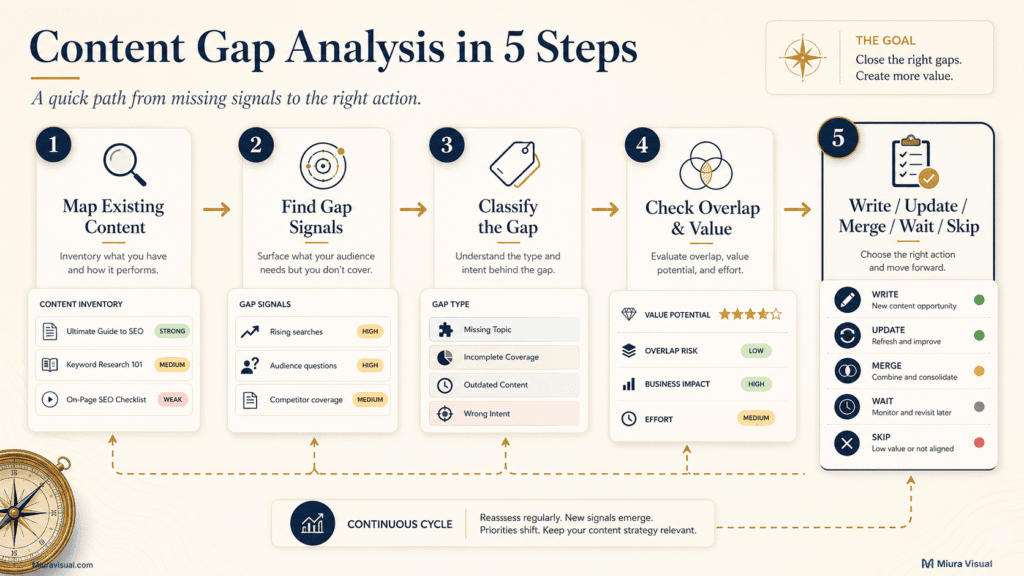
A useful content gap analysis follows five stages:
- Map the content you already have.
- Collect possible gap signals.
- Classify what is actually missing.
- Check overlap and strategic value.
- Choose a clear next action.
Your final decision should be one of these:
- Write a new page.
- Update an existing page.
- Merge overlapping pages.
- Wait for better evidence.
- Skip an unsuitable opportunity.
Do not create new content just because a competitor covers a topic that you do not.
A competitor could focus on a different audience.
They might have more authority or answer questions your site misses.
Aim to find gaps that fit your audience, skills, content cluster, and resources.
Content Gap Analysis vs Keyword Gap Analysis and Content Audits
This analysis identifies missing topics, answers, formats, proof, or content connections.
It is broader than finding keywords that competitors rank for.
| Method | Main Question | Typical Output |
|---|---|---|
| Keyword gap analysis | Which keywords do competitors rank for that I do not? | Missing keyword list |
| Content gap analysis | What useful answer, intent, format, or proof is missing? | Content decision |
| Content audit | What should I do with existing pages? | Keep, update, merge, or remove |
A keyword gap can reveal an opportunity, but it cannot prove that you need another URL.
The same keyword may already belong inside an existing page.
A content audit begins with pages you have already published.
A gap analysis starts by identifying missed opportunities.
Then, it checks if an existing page can address them.
Use a blog content audit when you need to decide what to do with weak or similar URLs.
Use this process to find gaps in your content.
Then, decide if each gap needs a new page, an update, a merge, or no action.
The common mistake is treating every missing keyword as a missing article.
The better decision is to identify the missing value first.
Step 1: Start by Mapping Your Content
You cannot identify a real gap until you understand what your existing pages already do.
Use a spreadsheet as a simple research tool.
A small website does not need an expensive analysis tool, crawler, or complex enterprise dashboard.
Use one row for every important piece of content.
| Column | What to Record |
|---|---|
| URL | The live page |
| Primary topic | The main subject |
| Search intent | Why someone visits the page |
| Final answer | What decision or action the page provides |
| Content role | Pillar, guide, comparison, template, or troubleshooting |
| Main queries | Relevant queries already appearing |
| Format | Article, checklist, table, tool, or visual |
| Possible overlap | Pages that may solve a similar problem |
| Last updated | Whether the page may be outdated |
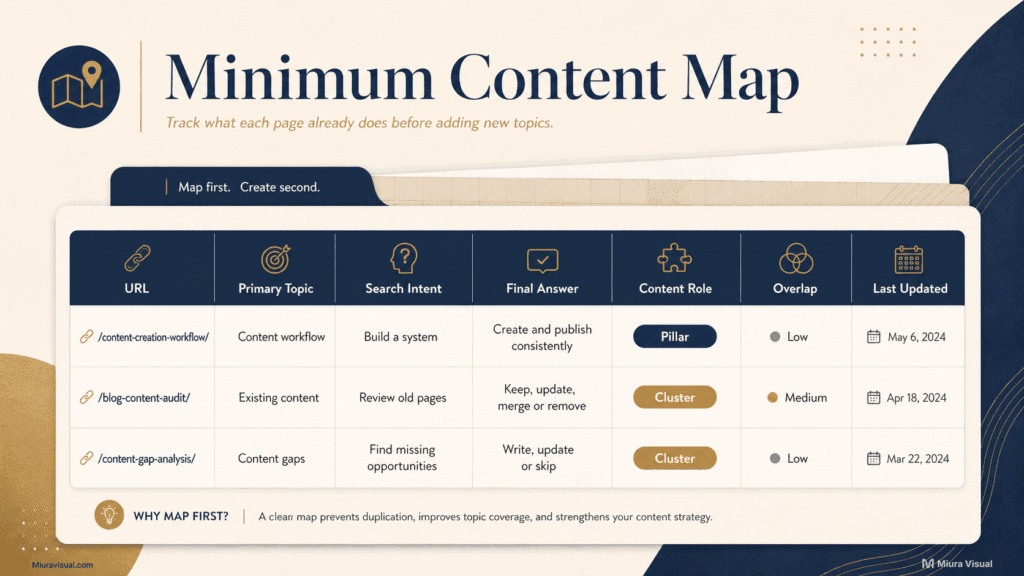
The most important column is final answer.
Two pages can mention similar topics without competing.
For example:
- A content pillar guide helps a brand decide what themes to discuss.
- A workflow guide helps move an approved idea from planning to publication.
- A content audit helps decide what to do with existing URLs.
The subjects overlap, but the reader completes a different task on each page.
Check if your website’s long-term themes are clear before adding new SEO ideas.
A guide to choosing social media content pillars handles that broader brand decision.
Keep this content map small enough to maintain.
For a website with 40 articles, it’s usually better to map out the 20 most important pages.
This method works better than making a rough spreadsheet for each archive, tag, and attachment URL.
Avoid overbuilding the system.
Your content map should have just enough info to avoid duplication and help with the next decision.
Do not turn this stage into a complete performance audit.
If you find indexing issues, old info, or low CTR, note them and address each one separately.
Step 2: Find Content Gaps on Your Site Using Five Free Signals
Free tools can show useful opportunities, but each signal proves something different.
Do not collect hundreds of ideas before deciding what evidence you actually need.
1. Check Google Search Console Queries and Rankings
A tool like Google Search Console shows how people are already discovering your website.
Review page and query data for:
- Queries receiving impressions but lacking a complete answer.
- Queries that trigger an unsuitable page.
- Similar queries appearing across several URLs.
- Questions related to a cluster but lacking a clear destination page.
- Pages ranking for a different intent than their title promises.
Only use this method if your pages get enough impressions to reveal a clear pattern.
A new website should not shape its entire content strategy around a handful of isolated impressions.
Suppose a photo editing article starts appearing for “photo editing workflow flowchart.”
That does not automatically justify a new article.
A better option might be to add a useful flowchart.
You could also include a process sequence and decision points.
This would enhance the current page.
A separate URL could split the same search intent.
2. Review Your Existing Content Clusters
Check each pillar and supporting guide.
Look for:
- Important questions mentioned but never answered properly.
- A reader journey that stops before the next action.
- Missing comparison or troubleshooting content.
- Pillars with no supporting execution guides.
- Useful pages that are isolated from the cluster.
This is where a connection gap often appears.
The content might be there, but readers and search engines can’t find it easily from the right pillar.
3. Inspect Google and AI Search Results
Use the Google search engine results page (SERP), autocomplete, People Also Ask, related searches, and visible result formats.
Do not copy every question you see.
Use the search results to confirm five things:
- The query represents a distinct task.
- The dominant format matches what the reader needs.
- Your current page does not already solve the same problem.
- You can provide genuine expertise or practical judgement.
- The basic answer is not already fully satisfied by the search results.
If the main answer appears in the search results, add a decision model, a helpful template, or a relevant trade-off. If not, skip this topic.
An AI overview can often answer a simple definition or list of tools.
Your article needs a clear purpose.
Try adding a decision model, a practical template, or a specific trade-off.
4. Examine Competitor Content
Competitor articles are a secondary source, not your content calendar.
Review what their pages help the reader do.
Check whether they lack:
- Clear recommendations.
- Actionable steps.
- Local context.
- Real limitations.
- Useful templates.
- Decision rules.
- Evidence or practical examples.
A competitor having an article only proves that they published it.
It does not prove that the topic fits your audience or business.
5. Collect Real Audience Questions
Useful sources include:
- Search queries.
- Customer enquiries.
- Comments.
- Support questions.
- Reddit discussions.
- Sales conversations.
- Affiliate buyer questions.
Repeated questions are stronger than isolated ideas.
For an affiliate publisher, “Which product is best?” may be too broad.
A repeated question such as “Why was my commission cancelled after an order appeared?” represents a clearer problem and next action.
The key is signal quality, not the number of tools used.
One repeated customer problem can be more useful than hundreds of exported keywords with unclear intent.
Those keywords often lack clear intent.
Step 3: Classify the Six Types of Content Gaps
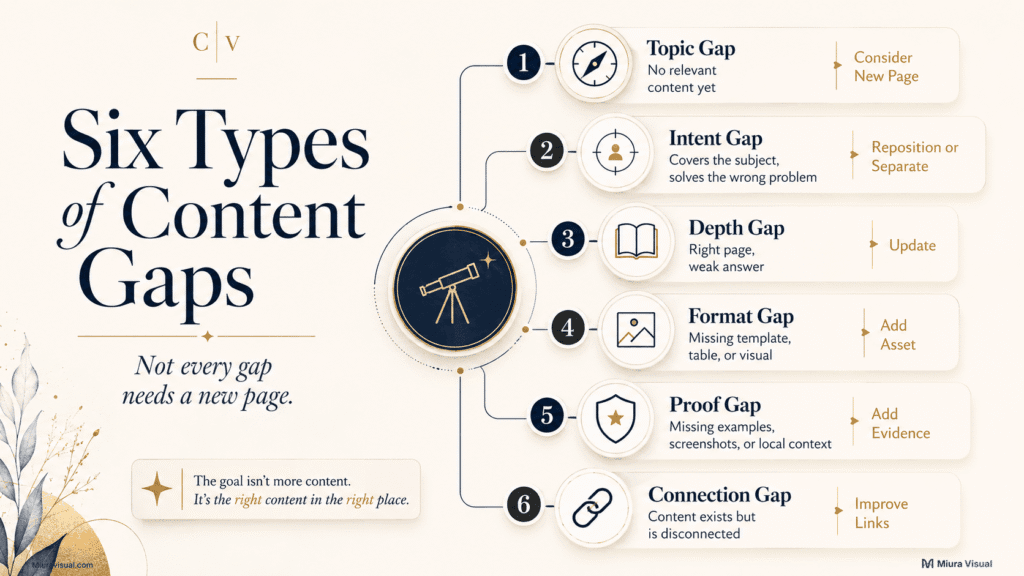
Not every content gap needs another article.
Classify the gap before choosing the solution.
| Gap Type | What Is Missing | Usual Action |
|---|---|---|
| Topic gap | No relevant content exists | Consider a new page |
| Intent gap | The topic exists, but the page solves another problem | Reposition or create a separate page |
| Depth gap | The page exists but misses an important answer | Update the page |
| Format gap | Readers need a template, table, visual, or calculator | Add the missing format |
| Proof gap | The page lacks examples, screenshots, tests, or local context | Add stronger evidence |
| Connection gap | Useful content exists but lacks internal links or cluster support | Improve the structure |
Topic Gap
A topic gap exists when your website has no page that can naturally answer the question.
A new page may be justified when the intent is clear and strategically relevant.
Warning: A missing topic is not automatically a useful topic.
Intent Gap
An intent gap appears when you cover the subject but answer a different question.
For example:
- “What is affiliate marketing?” explains a model.
- “Which affiliate program should a Malaysian beginner join?” supports a choice.
The topic is related, but the expected outcome differs.
Depth Gap
A depth gap means the existing page owns the right intent but gives an incomplete answer.
Update the current page when users need:
- A missing decision.
- A clearer process.
- More current information.
- A necessary limitation.
- A practical example.
Adding another URL usually creates unnecessary overlap.
Format Gap
A format gap exists when the information is present but difficult to use.
Examples include:
- A workflow article without a flowchart.
- A comparison without a table.
- A planning guide without a template.
- A technical guide without screenshots.
The fix is often a better asset, not more paragraphs.
Proof Gap
A proof gap happens when a page makes claims that sound good but lacks solid support.
You can strengthen it with:
- Screenshots.
- Conditional examples.
- A filled template.
- A local scenario.
- A process breakdown.
- Clear limitations.
Do not invent client results or personal tests to fill this gap.
Use transparent illustrative examples when first-hand evidence is unavailable.
Connection Gap
A connection gap exists when useful content is published but disconnected from the relevant pillar, supporting guides, or next reader action.
Improve:
- Pillar-to-cluster links.
- Cluster-to-pillar links.
- Contextual links between related problems.
- Navigation from general guides to focused solutions.
If your issue is about file or asset structure, use a different system to organize content files.
The decision rule is simple: fix the type of gap you actually found.
Do not prescribe a new article for every diagnosis.
Step 4: Check Cannibalization Before Creating a New URL
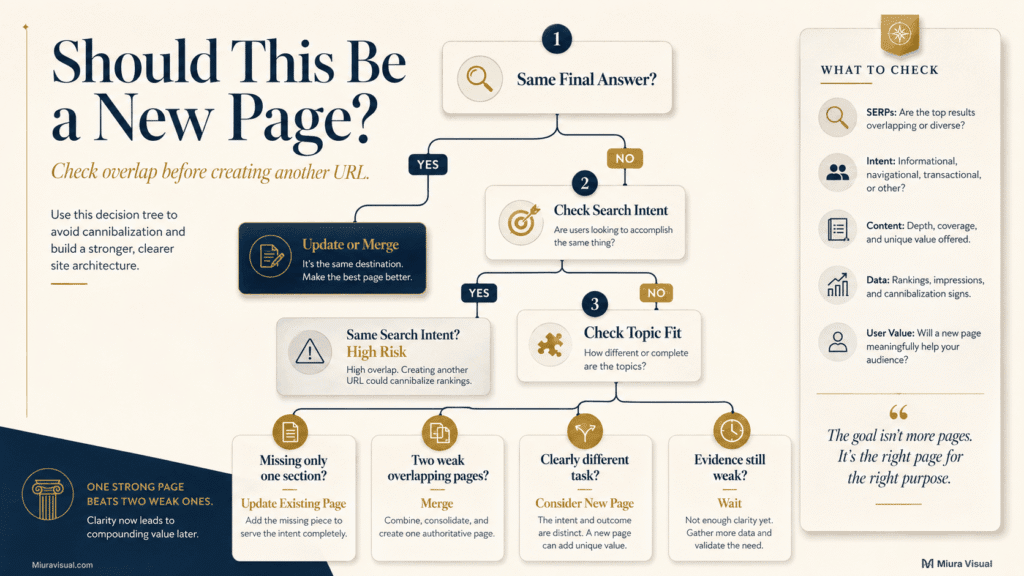
Cannibalization is not confirmed by shared words alone.
Two articles become risky when they compete to solve the same problem for the same reader.
Run these five checks.
1. Compare the Primary Keywords
Check whether both pages target identical or closely related phrases.
Keyword overlap is a warning signal, not final proof.
2. Compare Search Intent
Compare why the searcher would choose each page.
When both searches occur in the same situation and need the same solution, the risk goes up.
3. Compare the Final Answer
This is the strongest test.
Compare the action or decision each page enables.
If both pages lead readers to the same outcome, the cannibalization risk is high.
Different keywords can still cannibalize when the final answer is identical.
4. Compare the Planned Sections
A new topic may only deserve one section inside an existing guide.
Create a new page only when the reader needs much more detail, a different task, or a new stage in their journey.
5. Compare the Search Results
Search both phrases manually.
Check whether Google returns similar pages, formats, and dominant intents.
If both result sets are nearly identical, separating the content requires stronger justification.
| Situation | Better Action |
|---|---|
| Similar keywords, different final outcomes | Separate pages may work |
| Different keywords, same final answer | Update or merge |
| New idea is one missing section | Update the current page |
| Both pages contain partial versions of one answer | Consider merging |
| Distinct intent and reader action | Consider a new URL |
Suppose you already have a detailed photo editing guide.
A proposed article about a “photo editing workflow flowchart” may target a different phrase.
However, the user still wants the same editing process.
The stronger action is to improve the current photo editing workflow with a clear visual.
Avoid keyword-only decisions.
When two pages look alike, check the audience, the problem, the expected answer, and the next step.
Technical merge and redirect instructions belong in a full content audit.
They don’t fit in this gap analysis.
Step 5: Score the Opportunity With the Content Gap Decision Scorecard
A gap can be real and still not deserve immediate production.
Score each candidate from 1 to 5 across seven factors.
| Factor | 1 Point | 3 Points | 5 Points |
|---|---|---|---|
| Demand evidence | One weak signal | Some relevant evidence | Several clear signals |
| Intent distance | Same as an existing page | Partly distinct | Clearly independent |
| Topical fit | Outside your focus | Supporting topic | Core cluster |
| Information gain | Mostly summary | Some useful additions | Strong original framework or asset |
| Author ability | Limited practical knowledge | Can explain reliably | Can provide useful judgement |
| Business value | Little strategic role | Supports authority | Supports search traffic, leads, or revenue |
| Site readiness | Unrealistic competition | Possible with focus | Suitable for current authority |
Use 2 or 4 when the opportunity falls between the descriptions shown in the table.
Add the seven scores.
- 29–35 points: Write the article.
- 23–28 points: Prioritise it, but check competition and overlap first.
- 17–22 points: Update an existing page, merge related content, or wait for stronger evidence.
- Below 17 points: Skip the topic for now.
The score supports your choice, but don’t overlook clear cannibalization or low-value risks.
This scorecard is a prioritisation tool, not an SEO guarantee.
A high score does not promise rankings.
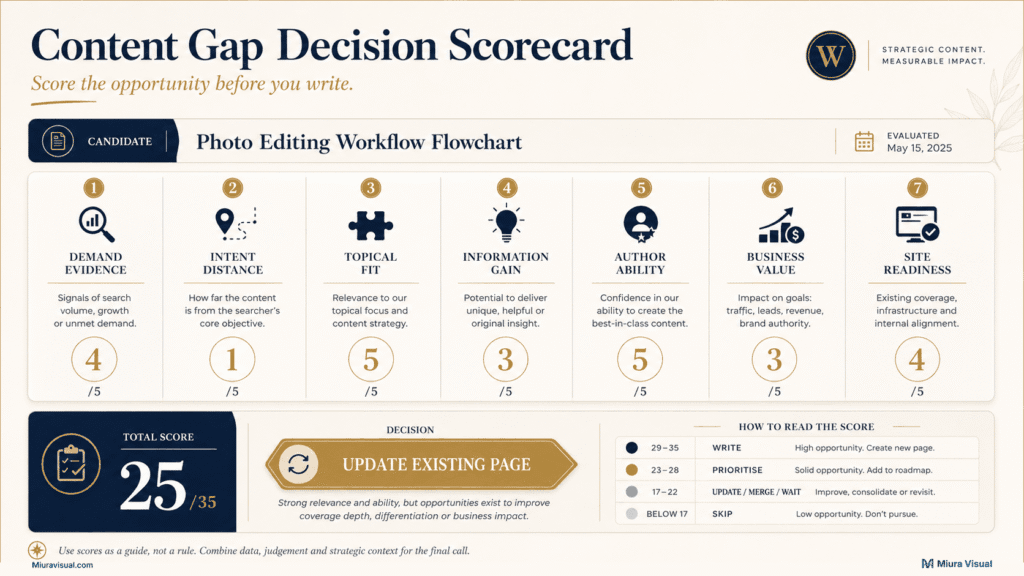
Review a low-scoring topic again only when it supports a business-critical service, conversion page, or customer journey.
Use one hard gate before approval.
Approve the topic only when the article can provide at least three clear forms of original value.
Possible forms include:
- A decision framework.
- A practical workflow.
- A useful template.
- A troubleshooting process.
- A local recommendation.
- A clear trade-off.
- A realistic example.
- A limitation competitors ignore.
If the answer is no, do not approve the article yet.
A topic with high search volume can still lead to thin content if you just repeat what’s already out there.
For a small creator site, the author’s skills are more important than having a huge keyword list.
Choose topics where you can help the reader act.
How to Handle Low-Volume and Zero-Volume Content Gaps
Keyword tools often group small markets into broad or incomplete volume ranges.
This matters for Malaysian businesses, niche creators, and local affiliate topics.
A reported zero does not always mean nobody searches.
It also does not give you permission to publish every obscure idea.
Use the two-signal rule.
A zero-volume topic should have at least two additional signals before entering production.
Useful signals include:
- Relevant Search Console queries.
- Repeated customer questions.
- Consistent autocomplete or PAA results.
- Strong fit with a core cluster.
- Clear business or affiliate value.
- Weak existing search results.
- A clear original asset or decision framework.
- A necessary step in the reader journey.
| Situation | Decision |
|---|---|
| Zero volume and no supporting evidence | Skip |
| Zero volume and two strong signals | Consider |
| Low volume and strong commercial value | Prioritise selectively |
| High volume but no original value | Wait or skip |
| Basic answer already covered by AI results | Add deeper execution value or skip |
For a small business in Malaysia, even a low-volume service question can be important.
One qualified inquiry can hold significant value.
For a site that relies on ads, a low-volume topic might not need a full article.
The trade-off depends on the page’s job.
Do not call every low-volume query a hidden gem.
Low competition cannot rescue weak relevance, unclear intent, or thin information.
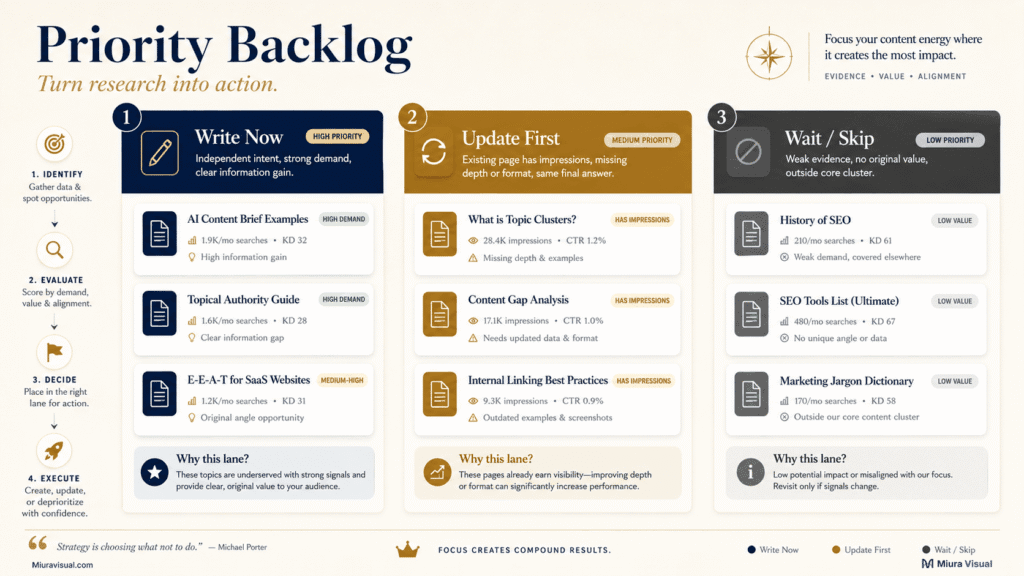
Turn Approved Content Gaps Into a Priority Backlog
Research is only useful when it produces a manageable execution list.
Create three lanes:
- Write Now
- Update First
- Wait or Skip
Use these columns:
| Column | What to Record |
|---|---|
| Candidate topic | The proposed subject |
| Gap type | Topic, intent, depth, format, proof, or connection |
| Demand signals | Evidence supporting the opportunity |
| Existing URL | Any page already related |
| Intent overlap | Low, medium, or high |
| Information gain | What new value you can add |
| Score | Decision scorecard result |
| Final decision | Write, update, merge, wait, or skip |
| Internal link direction | Where the content belongs |
| Next action | The first task required |
Prioritise existing-page opportunities before producing more URLs.
A page with relevant impressions and one clear missing answer may improve faster than a completely new article.
Next, prioritise gaps with:
- Clear intent.
- Strong cluster fit.
- Useful information gain.
- Realistic competition.
- A natural internal linking role.
Move only approved topics into your content creation workflow.
That workflow should handle the brief, production, editing, approval, publishing, and performance review.
Keep production deadlines out of the gap analysis sheet unless they directly affect topic priority.
For a solo creator, limit the first backlog to ten candidates.
Approve two or three strong actions before collecting another hundred ideas.
Common Content Gap Analysis Mistakes
| Common Mistake | Why It Causes Problems | Better Decision |
|---|---|---|
| Copying competitor topics blindly | Competitors may target a different audience, business model, or level of authority. | Treat competitor content as a signal. Then, check for audience fit, expertise, and business value. |
| Creating separate pages for keyword variations | Different phrases can have the same search intent. They can also lead to the same answer. | Compare the intent and expected action before creating another URL. |
| Ignoring existing weak pages | The correct page may already exist but lack depth, proof, or a useful format. | Update the existing page before splitting its relevance across multiple URLs. |
| Using search volume as the only filter | Volume does not show topical fit, commercial value, information gain, or ranking feasibility. | Combine demand with intent, expertise, business value, and site readiness. |
| Mistaking a format gap for a topic gap | Readers may only need a table, checklist, template, screenshot, or visual explanation. | Add the missing asset instead of writing another article. |
| Chasing every Search Console query | Some queries are accidental, irrelevant, or based on too little data. | Look for repeated patterns and queries that match a useful reader problem. |
| Writing outside your real expertise | The article may become a summary of existing sources with no independent value. | Prioritise topics where your judgement, process, or examples improve the answer. |
The pattern is simple: find the reason the gap exists before deciding to create another page.
Conclusion: Choose the Right Action Before You Add Another URL
Act when the gap has multiple demand signals, a distinct intent, strong cluster fit, and at least three forms of practical value.
Update existing pages when they get impressions but need more depth, proof, or a better format.
Wait when the evidence is weak or the website is too new to show a reliable pattern.
Skip topics that just repeat competitors or duplicate answers.
First, map ten URLs.
Then, find five candidate gaps.
Lastly, approve no more than three actions.
Frequently Asked Questions
What is a content gap analysis?
It identifies useful topics, answers, formats, proof, or connections that your website is missing. Its purpose is to decide whether you should create, update, merge, wait, or skip.
How do I find content gaps without paid SEO tools?
Check your content list, Google Search Console, and search results. Look at competitor pages and real audience questions, too. Log any gaps in a spreadsheet. Then, check for intent, overlap, strategic fit, and original value.
What is the difference between a keyword gap and a content gap?
A keyword gap shows queries that competitors rank for and you do not. A content gap may also involve missing intent, depth, format, proof, or internal linking.
Should every content gap become a new article?
No. Many gaps should be handled by updating an existing page, adding a useful asset, merging overlap, or improving internal links.
How often should a small website run a content gap analysis?
Run one before planning a big content cycle, expanding a topic cluster, or if growth starts to slow. For many small websites, reviewing gaps every three to six months is enough.
Can Google Search Console reveal content gaps?
Yes, but only when the queries show a meaningful pattern. Use impressions, ranking URLs, and intent mismatches as signals rather than treating every query as a new article idea.

Miura Visual
Transforming visuals into content, stories, and scalable value across platforms and audiences.
Related Article