How to Do a Content Audit for Your Blog: Keep, Update, Merge or Remove?
A content audit helps you evaluate each piece of content and choose what to keep or change. Instead of rewriting everything, you can focus on what matters most. This guide shows you how to do a content audit for your blog and decide which articles to keep, update, merge, repurpose or remove.

Quick Answer: How to Do a Content Audit
Audit each blog post using four questions:
- Is there enough data?
Check the page age, index status, impressions, queries, and traffic history. - What job does the page perform?
It can drive traffic, support a content cluster, attract inquiries, or help readers decide to buy. - What is the actual problem?
Low clicks, poor rankings, weak demand, outdated info, and keyword overlap need different fixes. - What action should you take?
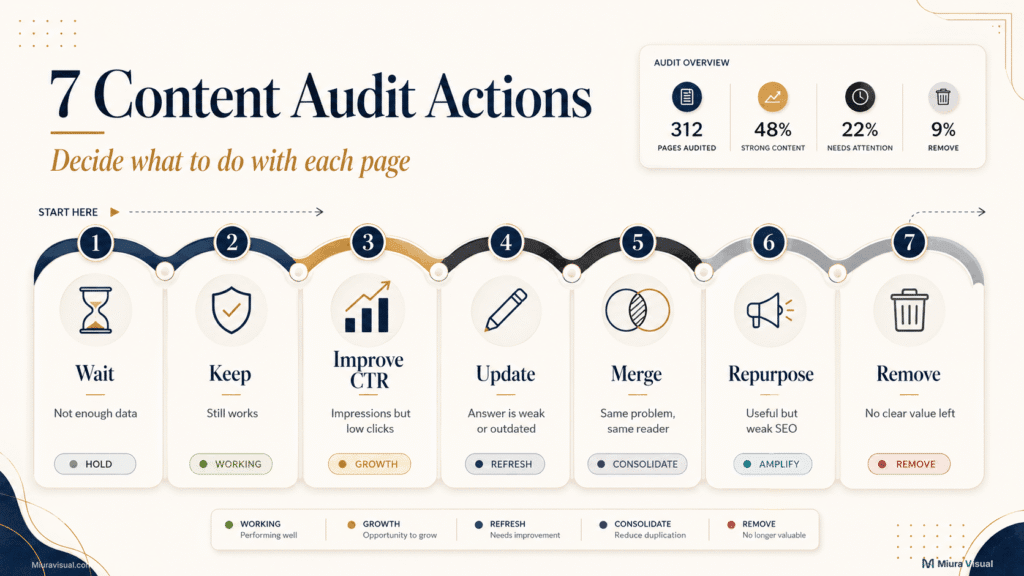
Assign one clear decision:
| Action | Use It When |
|---|---|
| Wait | The page does not have enough evidence yet |
| Keep | The content still serves its intended purpose |
| Improve CTR | The page receives impressions but few clicks |
| Update or rewrite | The search demand is relevant, but the answer is weak or outdated |
| Merge and redirect | Two pages solve the same problem for the same reader |
| Repurpose | The material is useful, but the page has weak SEO potential |
| Remove | The page has no useful demand, role, links, or recoverable value |
Do not remove a page because traffic is low. Diagnose why it is low first.
Do You Actually Need a Blog Content Audit Yet?
A content audit is important if your content library is hard to manage or if your website’s direction has changed.
It is usually time to audit when:
- You have articles that no longer match your current expertise or business direction.
- Several pages cover similar topics.
- Older articles no longer reflect your current writing quality.
- Search impressions are growing, but clicks are not.
- Important pages are not indexed.
- You cannot decide which articles to optimise first.
- You are publishing regularly, but traffic growth has slowed.
A full audit may be low priority when:
- Your website only has a small number of articles.
- Most pages were published recently.
- Google has not collected enough impressions.
- You are still changing your main content direction.
- You are using the audit to avoid publishing new content.
For a small creator website, it’s better to audit ten key pages.
This method is better than making a huge spreadsheet for a hundred pages that you can’t change.
Check Whether You Have Enough Evidence
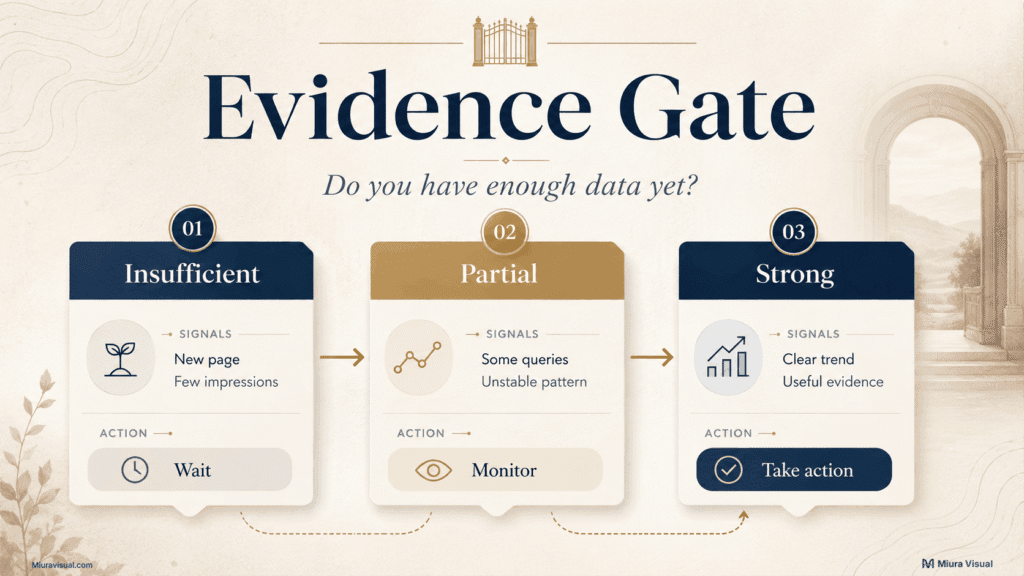
Use this practical evidence gate before making a major decision.
| Evidence Level | Typical Signals | Recommended Approach |
|---|---|---|
| Insufficient | New page, very few impressions, uncertain index status | Check technical issues, then wait |
| Partial | Some relevant queries and impressions, but no stable pattern | Make a limited improvement and monitor |
| Strong | Consistent query data, obvious overlap, outdated information, or a clear decline | Update, merge, reposition, or remove |
These levels are not fixed Google rules.
They prevent small websites from making permanent decisions with incomplete information.
For example, a two-week-old article with no clicks is not automatically underperforming.
It may not have been properly discovered or tested yet.
A page with relevant impressions over several months gives you better proof.
You can compare its queries, CTR, and trend before choosing an action.
Your broader content creation workflow should already include a performance review stage.
The content audit process reviews your whole blog library.
It also decides what to do with each URL.
Build a Blog Content Inventory With Only the Data You Need
An inventory of your content lists what you have.
The audit adds evidence, diagnosis, and a final action.
You do not need an expensive platform to start.
For a small WordPress website, use:
- WordPress
- Google Search Console
- Google Analytics 4
- Google Sheets
- An SEO plugin for basic index and metadata checks
A paid crawler becomes more useful when manual URL collection creates a real problem.
It is usually unnecessary when you only manage several dozen articles.
Step 1: Export Your Existing Blog Posts
Create one row for every indexable article.
Include:
- URL
- Page title
- Category or cluster
- Publish date
- Last updated date
Don’t mix tag archives, author pages, attachment pages, and regular blog posts.
Do this only if you want to audit them.
Step 2: Add Search Console Data
Use the same reporting period for every page.
A three- to six-month period is usually more useful than a few recent days.
Compare it with the previous period when possible.
Add:
- Clicks
- Impressions
- CTR
- Average position
- Main queries
Search Console defines CTR as clicks divided by impressions.
Average position is a trend signal, not an exact ranking.
Use it to spot patterns over time.
Step 3: Add Analytics Data
Search Console explains visibility in Google Search.
GA4 helps you see what happens after a visitor arrives.
Useful fields include:
- Organic page views
- Engaged sessions
- Conversions or enquiries
- Affiliate clicks, when tracked
A page with modest traffic may still be commercially valuable.
For example, an affiliate comparison might get fewer visitors than an educational article.
But it can still produce more outbound product clicks.
Removing it based only on page views would be a poor decision.
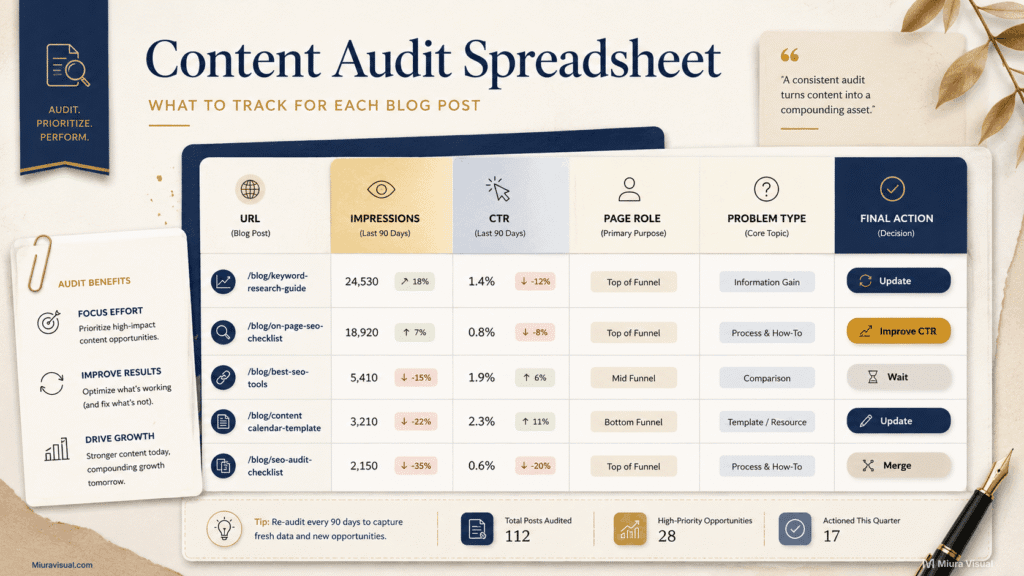
Step 4: Add Strategic Information
This is where a small-site content audit spreadsheet becomes more useful than a simple SEO export.
Add these columns:
| Column | Why It Matters |
|---|---|
| Page role | Identifies whether the page supports traffic, authority, sales, or another article |
| Index status | Separates visibility problems from performance problems |
| Main search intent | Shows what the reader expects |
| Overlapping URL | Identifies possible cannibalisation |
| Evidence level | Prevents premature decisions |
| Problem type | Records what is actually wrong |
| Final action | Defines the next step |
| Priority | Controls execution order |
| Review date | Prevents endless rechecking |
Your spreadsheet should make decisions easier.
If a column does not affect your final action, remove it.
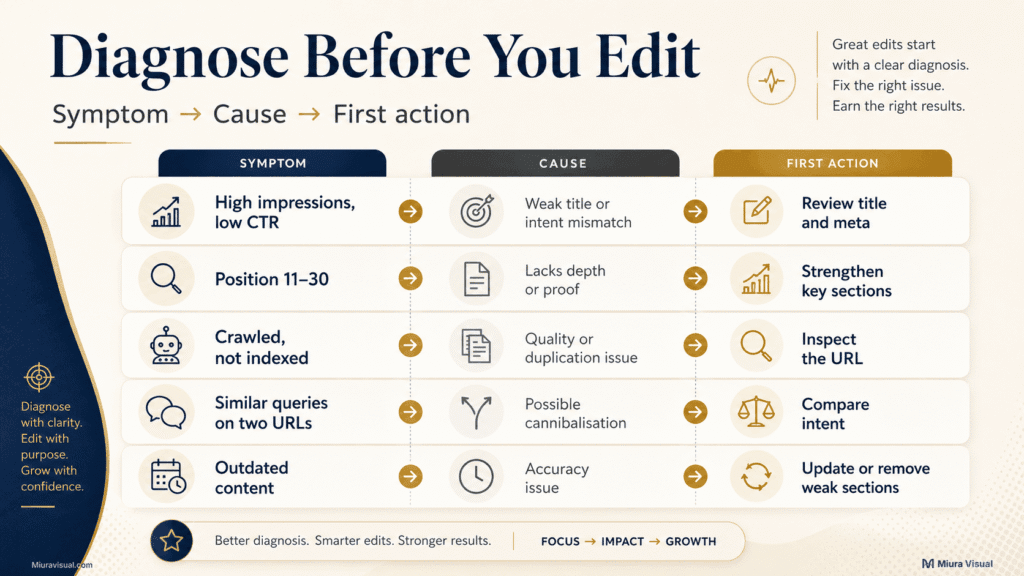
Diagnose the Problem Before Choosing an Action
A weak content performance signal is a symptom, not a diagnosis.
The same low traffic number can mean:
- Google has not tested the page.
- Search demand is small.
- The page ranks too low.
- The title does not attract clicks.
- Another URL is competing for the same query.
- The topic is useful but commercially narrow.
- The article answers the wrong question.
Use this table to identify content problems before changing the page.
| Symptom | Likely Cause | First Action | Avoid |
|---|---|---|---|
| High impressions, low CTR | Weak title, unclear promise, or intent mismatch | Review queries, title, and meta description | Rewriting the entire article immediately |
| Position 11–30 with relevant queries | The page has potential but lacks depth, proof, or a key answer | Strengthen the sections connected to those queries | Adding unrelated word count |
| Low impressions, reasonable position | Limited search demand | Check business and cluster value | Assuming every low-volume topic is worthless |
| Impressions but irrelevant queries | Topic or page positioning is unclear | Refocus the angle and headings | Chasing every query shown in Search Console |
| Crawled but not indexed | Possible quality, duplication, discovery, or technical issue | Inspect the URL and compare similar content | Automatically deleting the page |
| Two URLs appear for similar queries | Possible cannibalisation | Compare intent, audience, and final answer | Merging based only on shared keywords |
| Traffic is low but enquiries are strong | Small but commercially valuable audience | Keep and improve conversion support | Replacing it with a broader traffic topic |
| Outdated content | Accuracy and trust problem | Update or remove unsupported sections | Changing the date without improving the content |
Focus on trends in impressions and clicks, not just average position.
A low CTR can also indicate that users see the result but do not believe it answers their query.
Separate Weak Search Demand From Underperforming Content
Making an article longer will not fix weak search demand.
Before expanding a page, check:
- Are people searching for this problem?
- Are the page’s current queries relevant?
- Does the article already answer the main intent?
- Can you add a useful decision, example, or process?
- Does the page support another strategic article or service?
If the answer is no across all five questions, adding another 1,000 words is unlikely to help.
Confirm Cannibalisation Before Merging
Similar keywords do not automatically mean two articles compete.
Merge only when the pages share most of these traits:
- The searcher has the same problem.
- The expected answer is the same.
- The articles serve the same stage of the reader journey.
- Google shows similar result types for both queries.
- The unique information from both pages can fit naturally into one stronger page.
Do not merge when one page is a broad hub and the other is a focused troubleshooting guide.
For example:
- Shopee Affiliate Malaysia can serve as a broad starting hub.
- Why a Shopee Affiliate commission shows zero solves one specific tracking, validation, or order problem.
They contain related languages, but their jobs are different.
Use the Seven-Action Content Audit Decision Matrix
Audit your content by assigning one primary action to each URL.
Avoid labels such as “maybe update later.”
They do not tell you what to do next.
1. Wait
Choose Wait when the evidence is insufficient.
Use it when:
- The article is still new.
- The page has not received enough impressions.
- Google has only started testing a few queries.
- A recent update has not had time to settle.
- The website itself is still gaining authority.
Recommended action:
- Check indexability.
- Strengthen relevant internal links.
- Record a future review date.
- Continue publishing related content.
Common mistake: Changing the title each week because the page hasn’t gotten clicks yet.
2. Keep
Choose Keep when the page is accurate and completes its intended job.
A page can be worth keeping even when traffic is modest.
Keep it when it:
- Supports an important content cluster.
- Answers a useful niche question.
- Generates affiliate clicks or enquiries.
- Provides necessary context for another guide.
- Has backlinks or referral value.
- Represents expertise that still fits the brand.
Recommended action:
- Fix small accuracy issues.
- Check broken links.
- Improve internal linking when relevant.
- Leave the core angle alone.
3. Improve CTR
Choose Improve CTR if the page gets many impressions but few clicks.
Check:
- Does the title match the actual queries?
- Is the answer or outcome clear?
- Does the title sound generic beside stronger results?
- Is the article positioned as a guide when searchers want troubleshooting?
- Does the meta description explain who the page is for?
Recommended action:
- Group similar queries.
- Identify the dominant problem.
- Rewrite the title around the expected outcome.
- Make the Quick Answer match the new promise.
- Monitor the next complete reporting period.
Do not redesign the entire article until you confirm that the content itself is the problem.
4. Update or Rewrite
Choose Update when search demand is high, but the page isn’t the best answer you can give.
Update when:
- Important information is outdated.
- Relevant queries reveal missing sections.
- The page ranks within reach but lacks useful detail.
- The article was written before your current quality standards.
- The answer is correct but too generic.
- The page lacks examples, screenshots, or decision guidance.
A light update may be enough when the structure still works.
A full rewrite is better when:
- The original search intent was misunderstood.
- Most sections no longer support the topic.
- The page contains generic material with little practical value.
- Your current expertise can produce a substantially better answer.
Decision rule:
Preserve the URL when the target intent remains the same.
Rewrite the content, not the address.
5. Merge and Redirect
Choose Merge when two pages solve substantially the same problem.
Before merging, confirm:
- The same reader would benefit from both pages.
- Their main queries overlap.
- Their final recommendations are similar.
- One combined article would be clearer than two separate ones.
- Neither page requires a distinct format or journey stage.
Recommended process:
- Choose the URL with the strongest relevance, history, or link profile.
- Keep the unique information from both pages.
- Remove duplicated explanations.
- Publish the combined version.
- Redirect the weaker URL.
- Update all internal links.
Do not merge a pillar with a cluster article simply because they share a topic.
If the whole theme is unclear, not just one URL, use a wider framework.
This helps check if a content pillar still supports your brand.
6. Repurpose
Choose Repurpose when the material is useful but shouldn’t stay as a standalone SEO article.
Possible uses include:
- A case-study section
- A social media carousel
- A newsletter
- A checklist
- A supporting example inside a stronger guide
- A service-page FAQ
- A short affiliate video
Repurposing is not a rescue plan for every weak article.
If changing the material takes almost as much work as starting fresh, just skip it.
7. Remove
Choose Remove only when the page has no meaningful reason to remain.
Removal may be appropriate when the page:
- Has no relevant demand.
- Is inaccurate or misleading.
- Does not support the current brand direction.
- Has no useful links, conversions, or cluster role.
- Duplicates a better page.
- Cannot provide an independent answer.
- Would require more work than its potential value justifies.
Removal is final. Check internal links, redirects, and replacement content before acting.
Four Real Small Website Content Audit Examples
Here are some examples of why a low-performance label shouldn’t lead to the same action.
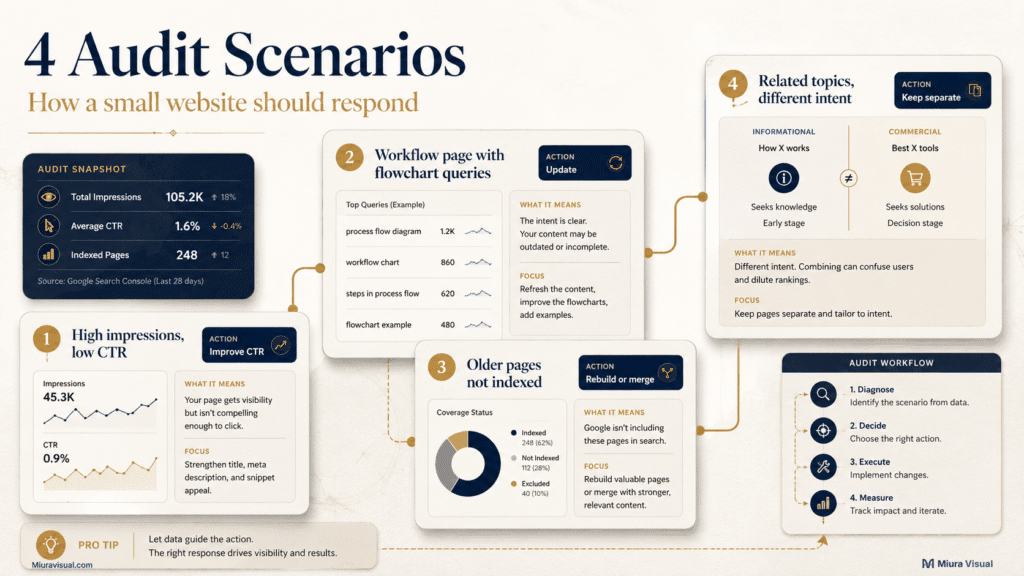
Example 1: A Hub With High Impressions but Very Few Clicks
Miura Visual’s Shopee affiliate hub had over 8,500 impressions in a month.
However, it only received four clicks.
Situation: The page was quite visible, so search demand and discovery weren’t big issues.
Recommended action: Improve CTR and clarify the hub structure.
The first checks should include:
- Which queries produced the impressions?
- Did the title promise a clear outcome?
- Did searchers want a start guide, requirements, or troubleshooting?
- Could readers quickly navigate to focused cluster articles?
Why not rewrite everything?
The page was already being shown.
Rebuilding each section before testing can waste time.
This includes the title, Quick Answer, and navigation.
❌ Avoid: Treating high impressions as proof that the article itself is successful. Visibility without clicks still signals a problem.
Example 2: A Workflow Article Receiving Flowchart Queries
A Photo Editing Workflow article had about 579 impressions.
It received no clicks during that reporting period.
Search queries included variations related to a photo editing workflow flowchart.
Situation: The topic was important, but users wanted a clear visual sequence to follow.
Recommended action: Update the existing article with:
- A clear editing flowchart
- Lightroom-to-Photoshop decision points
- A step order
- Export checks
- A visual checklist
Why not publish another article?
A new “photo editing workflow flowchart” page could compete with the current article.
The better move is to strengthen the page that already owns the broader intent.
❌ Avoid: Adding a generic paragraph about flowcharts without supplying an actual visual process.
Example 3: Older Monetisation Articles That Are Not Indexed
Several older monetisation articles were crawled but not indexed.
Situation: They were created before the website’s current content system. Some topics overlap.
A no-index status alone does not decide the action.
Each page still needs a role check:
- Is it a strategic pillar?
- Does it connect to the current affiliate cluster?
- Is the information still accurate?
- Does another article answer the same question better?
- Can the page provide a distinct Malaysia-focused decision?
Recommended action:
- Rebuild the main monetisation overview if it still supports the website strategy.
- Keep a separate affiliate-program comparison when it serves a clear bridge role.
- Merge or remove smaller pages that cannot provide independent value.
❌ Avoid: Spending equal effort on every old article. Strategic pages should be rescued before weak supporting pages.
Example 4: Related Topics With Different Search Intent
Content Creation Workflow and Social Media Content Pillars talk about planning.
They also cover performance and content choices.
They should not be merged.
Situation:
- Content pillars determine what a brand should talk about.
- A content workflow determines how each idea moves from planning to publication.
- A blog content audit determines what to do with content that already exists.
Recommended action: Keep all three when each article maintains a separate outcome.
Why?
The same reader may need all three guides at different stages.
❌ Avoid: Seeing topic similarity as cannibalization. Always compare the final action each page helps the reader complete.
What to Do After a Content Audit: Update, Merge, Repurpose or Remove
A content decision is incomplete until the website is cleaned up
After Updating a Page
- Keep the same URL when the search intent remains unchanged.
- Update inaccurate or weak sections.
- Improve the title and meta description when needed.
- Add relevant internal links.
- Check the live page on mobile.
- Record the update date.
- Set a realistic review period.
Do not change the publish date without making a meaningful improvement.
After Merging Pages
- Select the strongest destination URL.
- Combine useful information.
- Remove repeated sections.
- Redirect the old URL permanently.
- Replace internal links pointing to the old URL.
- Check the canonical tag.
- Update the sitemap when necessary.
- Monitor the destination page.
Send removed articles to a relevant destination, not just the homepage.
After Repurposing Content
Keep only the material that still provides value.
For example, an article with weak standalone demand may contain:
- A useful comparison table
- An original visual
- A practical checklist
- A strong example
- A section that supports a larger guide
Move that value into the best destination.
Do not keep a thin article online only because one paragraph is useful.
After Removing a Page
Before removal, check:
- Does the URL have backlinks?
- Does it generate affiliate clicks or enquiries?
- Are internal links pointing to it?
- Is there a closely related replacement?
- Would a redirect genuinely help the reader?
Use a redirect when a relevant replacement exists.
Do not redirect unrelated content simply to avoid a 404.
A misleading redirect creates a worse user journey than an honest removal.
Turn Your Content Audit Into a 30-Day Priority Plan
Running a content audit can uncover more work than one person can complete.
Do not classify fifty pages as urgent.
Score each action using three factors:
| Factor | Question |
|---|---|
| Impact | Could this page improve traffic, authority, enquiries, or conversions? |
| Evidence confidence | Do you have enough data to support the decision? |
| Effort | Can the improvement be completed without rebuilding the entire site? |
Use a simple score from 1 to 3 for each factor.
Prioritise pages with:
- High potential impact
- Strong evidence
- Low or moderate effort
Week 1: Fix Clear Blockers
Focus on:
- Important pages blocked from indexing
- Broken internal links
- Incorrect canonicals
- Pages targeting the wrong intent
- Strategic pages with obvious quality issues
Skip cosmetic updates that will not change performance.
Week 2: Improve High-Impression Opportunities
Prioritise pages with:
- High impressions
- Low CTR
- Relevant queries
- Clear title or snippet problems
These are often faster opportunities than rewriting pages Google barely shows.
Week 3: Strengthen Ranking Opportunities
Review pages that:
- Rank outside the top results
- Receive relevant impressions
- Lack an important answer, example, or format
- Support an existing cluster
Update only the sections connected to actual reader needs.
Do not add every related keyword from an optimisation tool.
Week 4: Merge and Rebuild
Handle:
- Confirmed cannibalisation
- Older low-value content
- Strategic pillars that need full rewrites
- Articles that should become supporting sections elsewhere
Merging and removing pages require more care, so leave them until the diagnosis is clear.
Final Blog Content Audit Checklist
Before completing the audit, confirm:
- Every page has a defined role.
- Every major decision has enough evidence.
- Low traffic was not treated as an automatic failure.
- Cannibalisation was confirmed through intent, not just keywords.
- Strategic pages were evaluated separately from traffic-only pages.
- Every URL has one clear action.
- Redirects point to relevant destinations.
- Internal links have been updated.
- High-priority tasks have an owner and deadline.
- Low-confidence pages have a future review date.
The goal is not to make every page rank.
The goal is to stop wasting time on the wrong fixes.
Conclusion: Choose the Right Action, Not the Biggest Rewrite
A useful blog content audit should end with one clear action for each page.
Focus on pages that get impressions, draw relevant queries, or play a key commercial or topical role.
Revised Title: Optimize Titles and Search Intent Before Article Rewriting
Guideline: Merge URLs only if they address the same issue for the same audience.
For a new or low-traffic website, wait when the evidence is still weak.
Publishing more useful pages is usually more valuable than repeatedly changing fresh content.
Begin with five to ten reliable URLs.
Note the next steps, then review the results in your overall content creation workflow.
Frequently Asked Questions
What Is a Content Audit?
A content audit is a structured review of existing content.
It checks how well each page performs.
It looks at accuracy, search intent, strategic role, and how it overlaps with other pages.
The final result should be a clear action such as keep, wait, update, merge, repurpose, or remove.
What Is the Difference Between a Content Inventory and a Content Audit?
A content inventory records what content exists.
A content audit evaluates that content and decides what should happen next.
Your inventory may contain URLs, titles, and dates. Your audit adds performance data, diagnosis, priority, and final action.
Do You Need Regular Content Audits?
Do a quick monthly review for key pages.
Then, conduct a more thorough audit every three to six months when you have enough data.
A full audit may also be useful after:
- A major website repositioning
- A category or cluster restructure
- A sustained traffic decline
- A large publishing period
- A significant Google indexing problem
Do not audit new articles repeatedly before they have enough impressions.
Should You Remove Blog Posts With No Traffic?
Not automatically.
First check:
- Page age
- Index status
- Search impressions
- Query relevance
- Search demand
- Backlinks
- Business value
- Content-cluster role
- Overlap with stronger pages
Remove the page only when it has no recoverable search, strategic, or commercial value.
Can AI Perform a Content Audit?
AI can help organise URLs, classify topics, summarise pages, and identify possible overlap.
It should not make the final decision alone.
Human judgement is still needed to determine:
- Whether two pages truly share the same search intent
- Whether a low-traffic page has business value
- Whether a strategic pillar should be rebuilt
- Whether a redirect destination is relevant
- Whether the available data is strong enough for removal

Miura Visual
Transforming visuals into content, stories, and scalable value across platforms and audiences.
Related Article