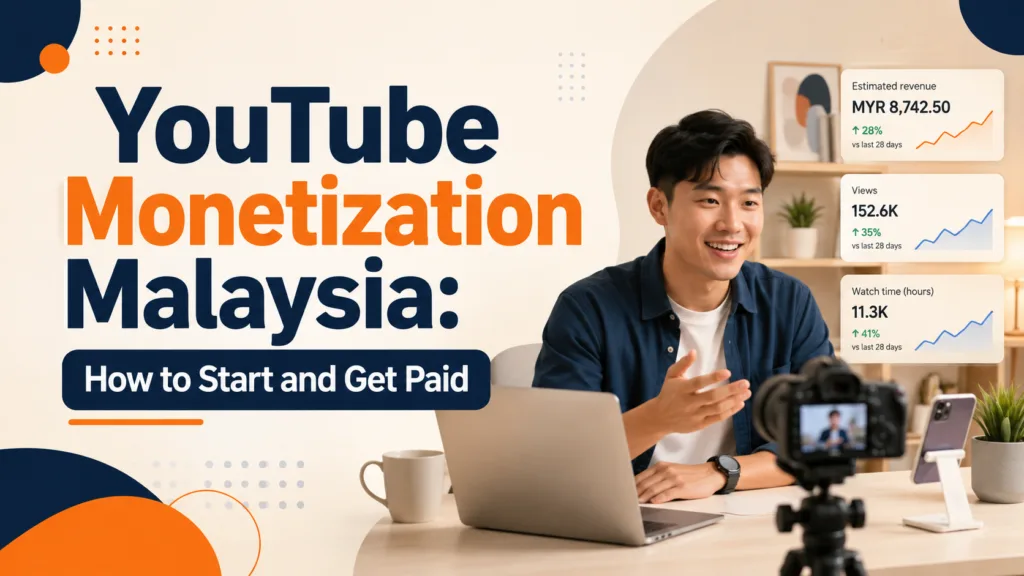
YouTube Monetization Malaysia: How to Start and Get Paid
You can monetize on YouTube in Malaysia, but it’s not just about getting subscribers. You need to know which monetization tier you’re aiming for. Understand how to apply, where AdSense fits in, and what happens before you get paid.
Quick Answer
Yes. Content creators in Malaysia can join the YouTube Partner Program (YPP).
This lets them access monetization features.
As of August 2026, YouTube has two main entry levels.
The first level begins at 500 subscribers.
It unlocks certain fan-funding and shopping features.
To earn revenue from advertising and YouTube Premium, you need at least 1,000 subscribers.
You also need the required watch hours or Shorts views.
If you are starting now, open YouTube Studio → Earn first. Check your progress.
Then, decide if long-form videos or Shorts are better for your content.
How YouTube Creators Actually Make Money in Malaysia
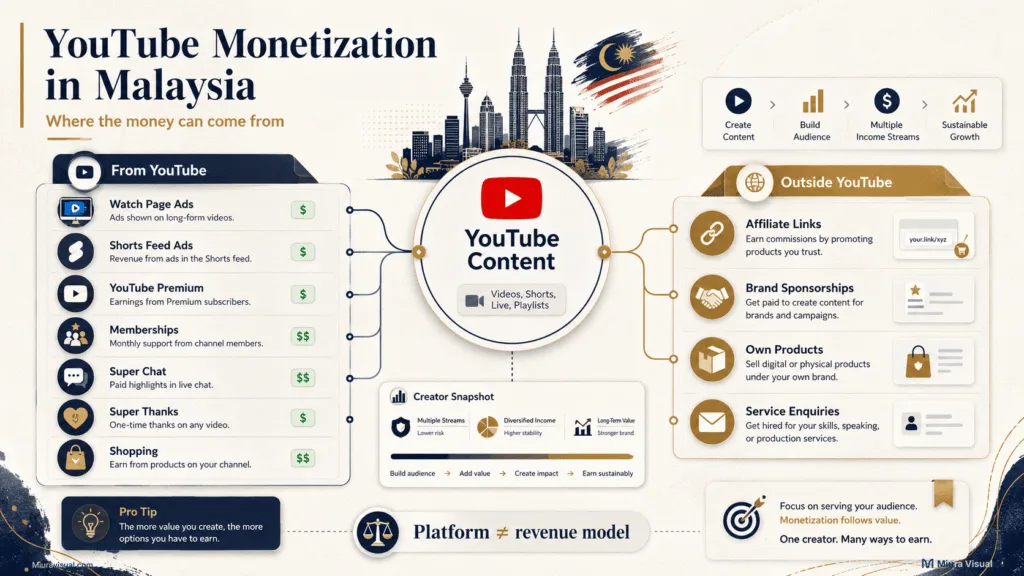
YouTube can help you earn money in several ways.
However, not every payment comes directly from YouTube.
Once your channel qualifies, YouTube offers monetization features that may include:
- Watch Page Ads
- Shorts Feed Ads
- YouTube Premium revenue
- Channel memberships
- Super Chat and Super Stickers
- Super Thanks
- YouTube Shopping
Each feature has its own eligibility conditions.
Reaching one YPP level does not automatically unlock every feature.
Your YouTube content can also support income outside YouTube.
Examples include affiliate commissions, sponsorships, product sales, and enquiries for your own services.
This distinction is key. YouTube is the content platform.
Money comes from ads, affiliate marketing, sponsorships, and services.
Still deciding on a revenue model? Start with the guide to creator income paths in Malaysia. It compares income routes. These are based on your skills, audience, traffic, and current stage.
For this guide, we will stay focused on the YouTube journey itself.
👉 Related Guide: Comparing YouTube Memberships with an external membership platform? See how Patreon works for Malaysian creators.
What Are the YouTube Monetization Requirements in Malaysia?
Malaysia is now a part of YouTube’s enlarged Partner Program.
That creates two useful milestones for beginners.
| Monetization level | Current requirements in 2026 | Main features |
|---|---|---|
| Earlier YPP access | 500 subscribers + 3 public uploads in 90 days + either 3,000 public long-form watch hours in 365 days or 3 million public Shorts views in 90 days | Memberships, Super Chat and Stickers, Super Thanks, selected Shopping features |
| Ads and Premium revenue | 1,000 subscribers + either 4,000 public long-form watch hours in 365 days or 10 million public Shorts views in 90 days | Watch Page Ads, Shorts Feed Ads, YouTube Premium, plus eligible earlier features |
The most important beginner mistake to avoid is simple:
500 subscribers does not mean normal ad revenue is unlocked.
Eligible creators with 500 subscribers can unlock selected monetization features earlier.
You still need the higher threshold for Watch Page Ads, Shorts Feed Ads, and YouTube Premium revenue sharing.
There is another important detail.
Watch hours from the Shorts Feed don’t count toward the 4,000 long-form watch-hour requirement.
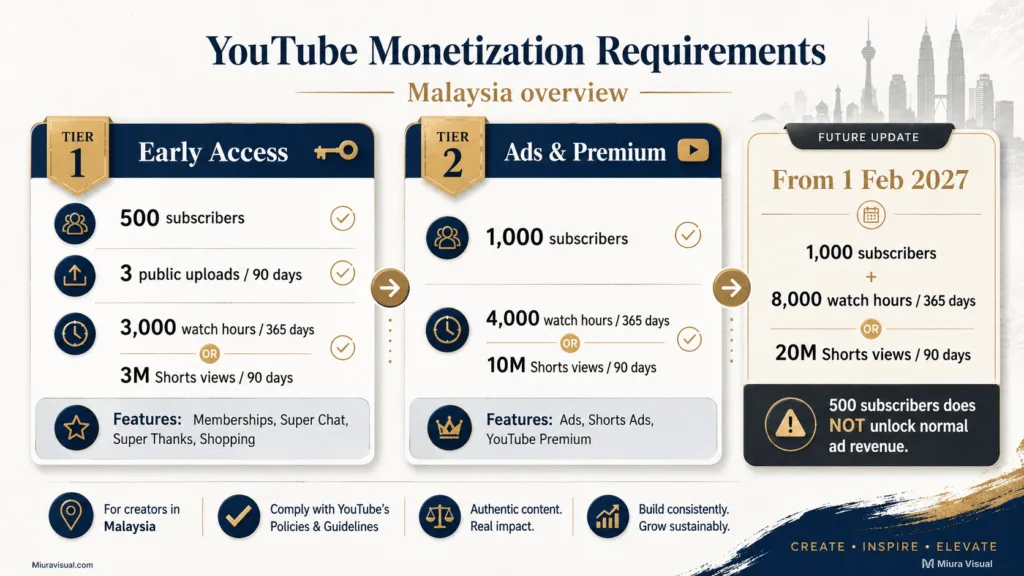
YouTube Monetization Requirements From February 2027
YouTube will increase Ads and Premium entry rules.
This change starts on February 1, 2027 for new creators.
New applicants will still need 1,000 subscribers, but must reach either:
- 8,000 qualified watch hours within 365 days, or
- 20 million qualified Shorts views within 90 days.
The 500-subscriber rule for fan funding and Shopping isn’t changing.
It stays the same with this update.
Creators already in YPP are also not removed simply because of the new entry threshold.
If you’re close to the advertising limit, this change asks you to check your progress now.
Don’t just assume the same rules will apply next year.
How to Start YouTube Monetization Step by Step
You do not need to set up every payment tool before you have an audience.
Follow the process in the right order instead.
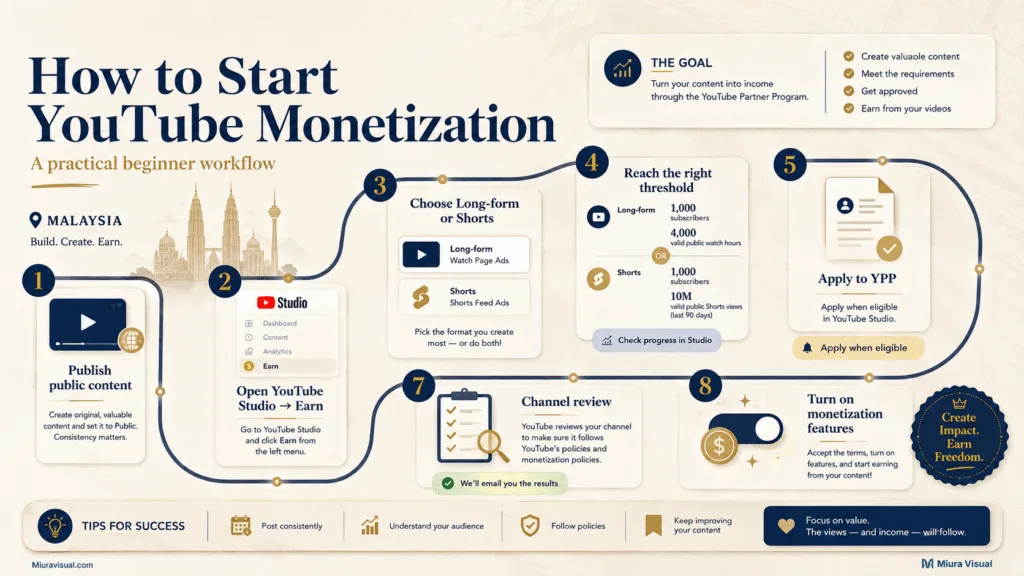
1. Publish eligible public content
Start with a repeatable content format.
Your first priority is not monetization settings.
You need videos that can build subscribers and qualified viewing activity.
Private, unlisted, deleted, and certain other views do not count toward YPP eligibility.
Shorts Feed watch hours also do not count toward the long-form watch-hour requirement.
2. Open YouTube Studio and check Earn
Go to:
YouTube Studio → Earn
This page shows your channel’s progress toward available YPP requirements.
If your channel is not yet eligible for monetization, YouTube will notify you.
They will let you know when your channel reaches the needed threshold.
Don’t depend on an old article, a screenshot, or someone else’s dashboard.
Your own Earn page shows your current status.
3. Choose the progress route that fits your content
You can work toward YPP through long-form watch hours or YouTube Shorts views.
That does not mean you should chase whichever number looks easier.
A tutorial creator may have a stronger long-form path.
A creator who naturally produces frequent vertical videos may prefer Shorts.
Choose based on the content you can realistically keep publishing.
4. Meet the YPP Eligibility Requirements
You do not have to wait for the advertising tier before checking YPP.
Once you hit 500 subscribers, look at what fan-funding or shopping features you can access.
If your goal is YouTube ad revenue, continue toward the higher threshold.
5. Apply for the YouTube Partner Program
Once eligible:
- Open YouTube Studio
- Select Earn
- Choose Apply Now
- Review and accept the YPP terms
YouTube will then guide you through the remaining setup.
6. Create or link AdSense for YouTube
AdSense for YouTube handles the payment side of your YouTube earnings.
To get a new AdSense for YouTube account, create it in YouTube Studio while applying.
YouTube asks applicants to use Studio for setting up a new YPP account.
Do not create several AdSense accounts because you are unsure which one works.
7. Wait for channel review
Meeting the numbers does not guarantee acceptance.
YouTube checks the channel against its channel monetization policies.
Then, it approves access to YPP.
Channels can also be reviewed again after joining.
Your job is therefore not only to hit a number.
Your channel also needs content that complies with YouTube’s policies.
8. Turn On Monetization Features
After approval, check your Earn area again.
Review the available channel monetization options and turn on the features that fit your channel.
Do not assume every monetization feature becomes active automatically.
How Does AdSense for YouTube Pay You in Malaysia?
Becoming eligible for YouTube monetization and receiving money are two different milestones.
The basic payment flow looks like this:
YouTube content → eligible revenue → finalized earnings → AdSense for YouTube → payment threshold → payment method
Your estimated YouTube earnings are not the same as money already received.
YouTube says your finalized earnings show up in AdSense.
This usually happens between the 7th and 12th of the next month.
If your balance hits the payment threshold and has no holds, payments are usually sent out between the 21st and 26th.
You may also need to complete steps such as:
- Tax information
- Identity verification
- Address verification
- Payment method setup
- Removal of any payment holds
The exact thresholds depend on the reporting currency of your payments account. For example, a USD account currently has a US$100 payment threshold. Other reporting currencies use their own thresholds.
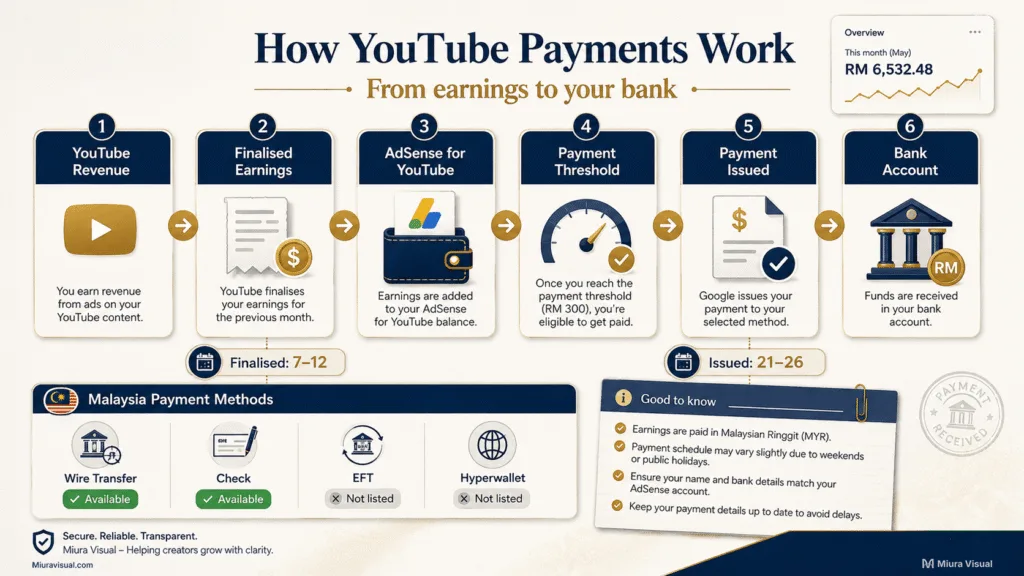
How Malaysian YouTube accounts can receive payment
This is one detail worth checking carefully.
Google’s APAC payment table shows these methods for YouTube payment accounts in Malaysia:
| Payment method | Currently listed for Malaysia |
|---|---|
| Check | Yes |
| EFT | No |
| Wire transfer | Yes |
| Hyperwallet | No |
A wire transfer sends your payment to the bank account you provide.
Google advises entering the bank information exactly as your bank holds it.
Payment options can change.
Your AdSense for YouTube → Payments page is the best place to check when setting up payments.
Should You Use Long-Form Videos or YouTube Shorts?
Do not choose between long-form videos and Shorts only by comparing monetization thresholds.
Choose the format that fits both your topic and your production capacity.
| Situation | More practical direction |
|---|---|
| Tutorials and detailed explanations | Long-form |
| Reviews and product demonstrations | Long-form or mixed |
| Fast visual ideas and frequent updates | Shorts |
| Topics that need context before a decision | Long-form |
| Content that can be cut into multiple formats | Hybrid |
| Limited ability to publish frequently | Avoid choosing Shorts only for the threshold |
The workload matters more than many beginner monetization guides suggest.
At Miura Visual, video editing work involves reviewing footage, structuring the edit, adding captions or supporting graphics, handling revisions, and preparing platform-ready files.
That production reality affects what a creator can sustain.
A 15-minute tutorial may require more planning and editing per upload.
However, the same video can answer a deeper problem and stay useful for longer.
Shorts might take less time on their own.
But a high-frequency strategy can add its own workload.
Do not pick Shorts simply because the threshold looks easier.
Choose a format you can reliably use to develop the desired audience behavior.
👉 If you’re good at fast short-form content, LIVE events, or social commerce, check out TikTok monetization in Malaysia. Do this before you fully commit to YouTube.
Can You Make Money on YouTube Before You Qualify for Ads?
Yes, but the money may not come from YouTube ads.
You can earn money on YouTube before reaching the full advertising threshold.
For example, a camera creator could publish a comparison between two microphones. The video can help viewers decide which model fits them.
A relevant affiliate path might look like this:
Viewer problem → useful video → relevant recommendation → tracked link → purchase → validated commission
That’s not like posting random product videos.
You shouldn’t fill every description with links.
Miura Visual uses the same principle in affiliate content.
We begin with the buyer’s issue.
Next, we link helpful content to a related product and a trackable action.
We also separate views, clicks, orders, and validated commission when reading affiliate performance. A click alone is not treated as income.
If your product recommendations fit your content, check our guide to affiliate marketing in Malaysia. It covers the entire process.
Other pre-ad possibilities can include sponsorships, your own products, or service enquiries. However, do not add every monetization method at once.
Pick one commercial action that fits what people already watch you for.
How Much Does YouTube Pay in Malaysia?
There is no reliable fixed answer such as: “1,000 Malaysian views always pay RM X.”
Two YouTube channels with the same view count can earn different amounts.
YouTube revenue can vary with factors such as:
- Whether the views were monetized
- Viewer location
- Advertiser demand
- Video format
- Available ad inventory
- YouTube Premium viewing
- Other enabled monetization features
This is why generic CPM ranges can create poor expectations.
Once your channel is monetized, RPM helps you see what your channel really earns.
RPM means revenue per thousand views.
YouTube calculates RPM after its revenue share and includes all relevant views.
CPM focuses on advertisers.
It shows how much advertisers pay for ad impressions before YouTube takes its share.
Public earnings reports from other Malaysian creators can still be useful examples.
Just do not treat one creator’s result as your expected rate.
A better question after monetization is: “What is my own RPM, and which content is producing the revenue?”
Use your YouTube Analytics for that answer.
Common YouTube Monetization Mistakes Beginners Should Avoid
Thinking 500 subscribers unlocks normal ad revenue
It does not.
The 500-subscriber level can provide earlier access to selected monetization features. Watch Page Ads and Shorts Feed Ads require the higher YPP level.
Counting Shorts Feed watch time toward 4,000 hours
Shorts Feed watch hours do not count toward the long-form watch-hour threshold.
Track the correct metric inside YouTube Studio.
Creating the wrong AdSense account too early
Do not open random AdSense accounts while trying to prepare for YPP.
To get a new AdSense for YouTube account, create it in YouTube Studio while you apply.
Assuming the threshold guarantees approval
Subscribers and watch time make your channel eligible to apply.
YouTube still reviews the channel before it is accepted into the YouTube Partner Program.
Choosing Shorts only because the number looks easier
A monetization target means little if you cannot sustain the production style.
Choose based on your topic, filming capacity, editing workload, and publishing rhythm.
Treating estimated earnings as cash received
Revenue must be finalized and added to your AdSense for YouTube payments account.
Your account must also meet its payment requirements before Google issues payment.
Planning around generic Malaysia CPM figures
A published CPM estimate is not a guaranteed creator payout.
Use external figures for context only.
Once you monetize, your YouTube Analytics helps you make better decisions.
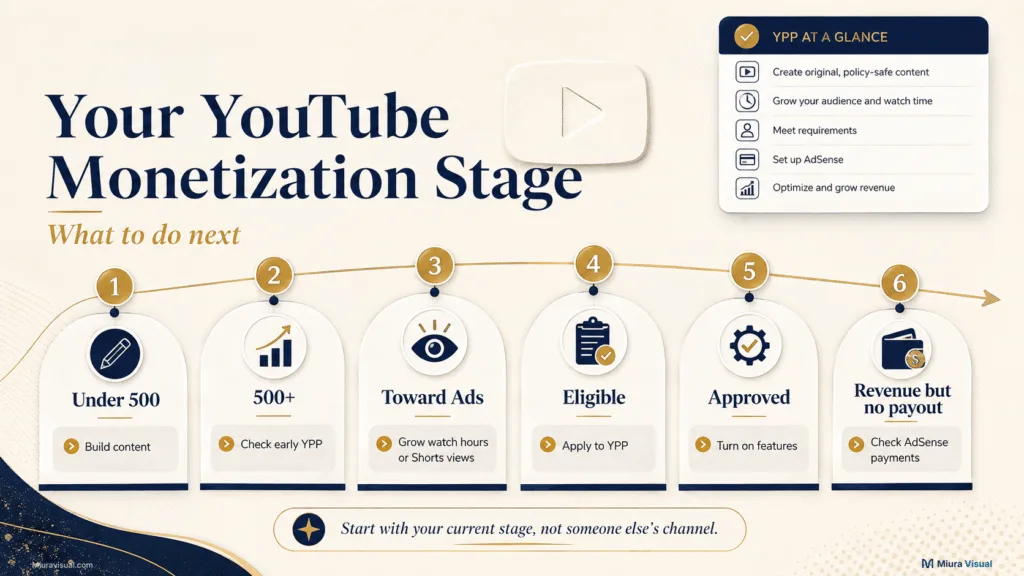
What to Do Next at Each YouTube Monetization Stage
You do not need the same priority as someone who already has 50,000 subscribers.
Use your current stage to choose the next action.
| Your current stage | What to prioritise now |
|---|---|
| Under 500 subscribers | Build a repeatable topic and publishing format |
| Near the 500 level | Check Studio ? Earn and understand the early YPP requirements |
| 500+ and building toward ads | Choose a realistic long-form or Shorts path |
| Reached the ads threshold | Apply through YouTube Studio and complete YPP setup |
| Approved for YPP | Enable relevant features and start reading your own Analytics |
| Revenue showing but no payout | Check AdSense payment threshold, verification, method, and holds |
If you have fewer than 500 subscribers, don’t waste hours on payout settings.
Focus on growing your audience first. Build content first.
If you are close to an eligibility threshold, check YouTube Studio → Earn now.
Do not rely on an old requirement from a blog or video.
If you are very far from YPP but need income soon, waiting for ad revenue may not be practical.
A marketable service or a related affiliate offer can create a quicker way to profit.
The monetization route should match the asset you already have.
Conclusion: Start With Your Current Stage
YouTube monetization in Malaysia is worth it if you build a steady channel.
Just know that it takes time to earn money from the platform.
If you’re starting from scratch, focus on a repeatable content format first.
Then, set up your payment options.
If you’re close to a YPP threshold, go to YouTube Studio → Earn.
Then, check the requirements for your channel.
Creators who need income much sooner should not assume AdSense is the only route.
Build YouTube as an audience asset.
Use a quicker income path when it suits your content.
Frequently Asked Questions
Does reaching the YouTube monetization threshold guarantee approval?
No. Reaching the subscriber and viewing requirements makes your channel eligible to apply. YouTube still reviews your channel against its monetization policies before acceptance.
Do YouTube Shorts watch hours count toward the long-form watch-hour requirement?
No. Watch hours from views in the Shorts Feed don’t count for the long-form watch-hour requirement.
Do I need an AdSense account before applying to YPP?
You need an active AdSense for YouTube account linked to your channel, but you do not need to create one in advance. To create a new account, YouTube tells you to do it via YouTube Studio when applying for YPP.
Can YouTube remove monetization after approval?
Yes. YouTube continues checking YPP channels for compliance with its policies. A channel can lose monetization if it fails to meet the rules or breaks the policies.

Miura Visual
Transforming visuals into content, stories, and scalable value across platforms and audiences.
Related Article