TikTok Affiliate No Sales: Why It Happens and What to Fix First
TikTok Affiliate no sales can come from your video, product, account, or buying path. This guide helps you find where the problem starts and decide what to fix first.
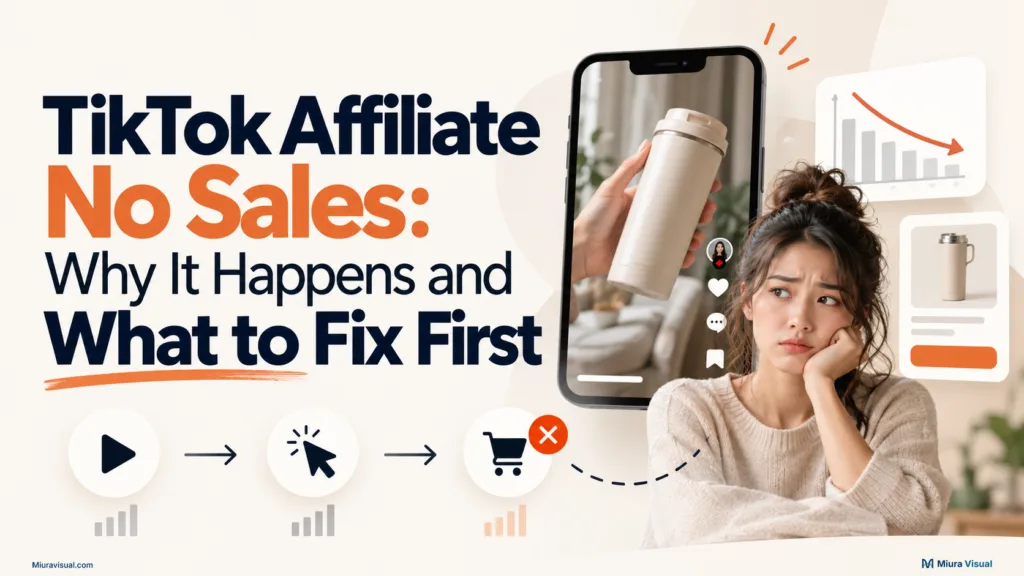
Quick Answer
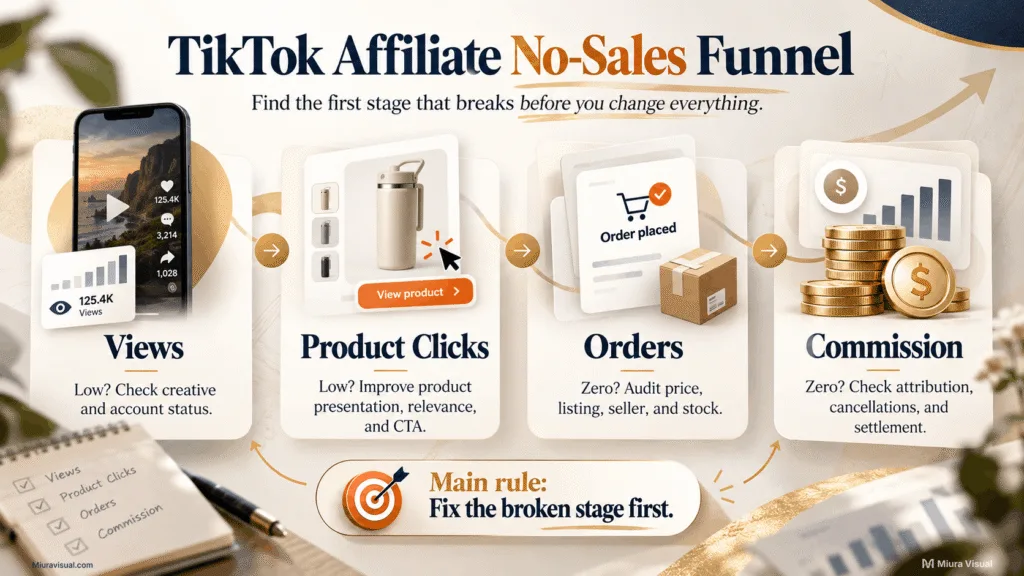
If your TikTok Affiliate videos have no sales, start with four checkpoints:
Views → Product Clicks → Orders → Commission
| What you see | Check first |
|---|---|
| Very low views | Video quality, audience fit, account status |
| Views but few product clicks | Product presentation, buying reason, CTA |
| Product clicks but no orders | Product, price, listing, seller, stock |
| Orders but no commission | Attribution, cancellations, settlement |
| Everything suddenly drops | Account restriction or reporting issue |
The main mistake is treating every zero-sale result as a content problem.
If people are clicking the product, making ten more versions of the same hook won’t help.
The problem has moved further down the purchase path.
👉 If you haven’t set up the creator side, check our guide to TikTok Affiliate in Malaysia. Do this before you fix sales issues.
Why TikTok Affiliate No Sales Can Happen Even With Views
A video can get views without creating purchase intent.
Views only confirm that people saw the content.
They don’t confirm if viewers understood the product, wanted it, clicked it, or finished an order.
Start by separating five common video and audience problems.
1. Your videos are not reaching enough relevant viewers
Low reach limits how many people can reach the product in the first place.
Before changing products, check the video performance available inside your account.
Check your content views.
Look at completion rates and retention signals.
Also, see if TikTok flags the video for low views.
If several videos stop at the same early stage, review the creative first.
Common Question:
- Does the product appear early enough?
- Can viewers understand the problem quickly?
- Is the opening too slow?
- Does the video give people a clear reason to keep watching?
- Are you repeating the same weak format?
Action: Improve the opening and product presentation before changing several other variables.
Do not assume a product failed when the video barely gave it a chance.
2. The hook gets attention but attracts the wrong audience
A strong hook can still attract people who were never likely to buy.
For example, a catchy or fun opening can boost views, but it might distract from the product.
A strong hook can still attract people who were never likely to buy.
An exciting opening can boost views but may distract from the product.
What matters is whether the right viewers understand why the product is relevant to them.
If the content is fun but then becomes a sales pitch, the audience may stay but won’t want to buy.
Action: Make the hook relevant to the product problem, use case, or result.
3. The content is too generic or repetitive
Posting more videos does not help if every video gives viewers the same weak reason to buy.
Generic product videos often look like:
- product spinning on a table
- slideshow clips with little explanation
- repeated seller footage
- the same script with minor wording changes
- product features without a real use case.
TikTok can also treat repetitive or low-interaction shoppable content as a quality issue.
Action: Give each video a clear job.
A practical three-angle structure is:
- Problem → Solution
Show the problem first, then show the product solving it. - Demonstration → Proof
Let viewers see what the product actually does. - Real Use Case → CTA
Put the product into a believable situation, then give one clear next action.

Miura Visual uses a three-angle framework.
We apply it to evaluate a small TikTok Affiliate product test.
The goal is not to prove that three videos will generate sales.
It is to learn whether the product and content direction deserve more work.
4. The video explains features instead of a buying reason
A viewer can understand a product perfectly and still have no reason to buy it.
“Portable.”
“Three speed settings.”
“Available in four colours.”
Those are features.
A buying reason answers:
- What problem does this solve?
- Why would I need it?
- What changes after I use it?
- Why should I consider this product instead of scrolling away?
From a video-production perspective, we would prioritise five things:
Hook → Product Clarity → Demonstration → Proof → CTA
You do not need all five to be dramatic.
They simply need to work together.
5. The product does not fit the audience
Audience fit matters more once your account already has a clear content identity.
A photography creator may have strong engagement around cameras and editing.
The same audience might not want other products.
This includes household items, beauty goods, pet supplies, or baby gear.
Check the relationship between:
- what people normally follow you for
- what the video promises
- what the product solves
- who would realistically buy it.
Decision rule: If the audience is watching but not interested, change your approach. Don’t blame reach just yet.
TikTok Affiliate Views but Few Product Clicks: What to Change
Views with few product clicks often suggest an issue before the product page.
Your video created attention, but not enough product interest.
Do not jump straight to changing sellers or commission rates.
First check how the product is being presented.
Check whether the product is actually central to the video
Ask:
- Does the viewer know what is being promoted?
- Is the product visible at the right moment?
- Does the demonstration make the benefit obvious?
- Is there a clear reason to tap the product?
- Does the CTA match the video?
- Is the linked product the exact item shown?
A beautiful video can still be weak affiliate content if the product feels secondary.
Change the content angle before changing the product
For example:
Angle A: Problem → Solution
Show the frustration first. Then show how the product helps.
Angle B: Demonstration → Proof
Show the product in action. Don’t just tell viewers what it does.
Angle C: Real Use Case
Show when someone would actually use it and why the product matters in that situation.
This gives you cleaner information.
If you change the product, hook, video style, CTA, and audience angle all at once, you may see different results.
But then, you won’t know the cause.
Change one important variable first.
Product Clicks but No Sales: Audit the Product Before Refilming
Product clicks are an important dividing line.
If people are clicking through, the video has already created some interest.
Rewriting the first three seconds may no longer be the highest priority.
Now audit what happens after the click.
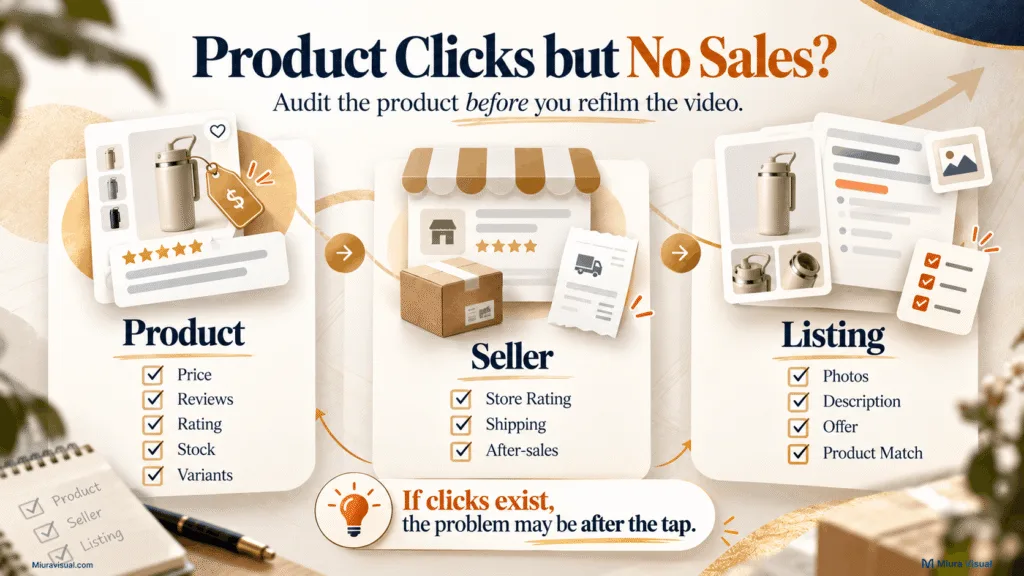
Check the TikTok Shop Product First
Open the product page and checkout path as if you were the buyer.
Review:
- current price
- available vouchers
- shipping cost
- stock availability
- available variants
- product rating
- number of reviews
- number sold
- product photos
- product description
A product may look great in your video.
But it can be much harder to buy once the viewer sees the listing.
Check whether the seller creates confidence
Do not evaluate only the product.
Look at seller signals such as:
- Store Rating
- customer feedback
- shipping performance
- after-sales experience
- listing quality.
A strong video cannot fully repair a weak buying experience after the click.
Compare the Product Description and Listing With Your Video
Make sure the buyer sees what the video led them to expect.
Watch for:
- a different price
- missing variants
- unclear specifications
- changed product images
- confusing bundles
- unavailable colours or sizes
- a different model from the one shown
Action: If you get clicks but no orders, focus on the product page and seller. Then, consider making more videos.
What We Could Verify Inside the TikTok Shop Creator Marketplace
We looked at a Malaysian TikTok Shop Affiliate creator account.
The Product Marketplace showed helpful details.
These included price, rating, sold count, estimated earnings, and sample availability.
Those signals help with shortlisting.
They do not prove that a product will convert.
A useful product filter is:
- Can someone understand the product quickly?
- Can you demonstrate the benefit?
- Is there an obvious buying reason?
- Is the value easy to explain?
- Do the Marketplace signals look reasonable?
- Does the product fit your content?
Treat Marketplace data as decision support, not a sales guarantee.
Check the Product Link, Stock and Listing Before Blaming Your Content
Some TikTok Affiliate no sales problems are simpler than creative strategy.
The buying path itself may be broken.
Confirm the product link is present
Open the published video from the viewer side.
Check:
- Is the product anchor visible?
- Does it open the correct product?
- Is the item still available?
- Does the correct variation exist?
- Is the price still close to what the video communicates?
Do not assume the link is fine because you attached it during posting.
Check whether the product became inactive or unavailable
Products can change after content is published.
The seller may:
- run out of stock
- remove a variation
- change the listing
- deactivate the product
- change the price
That can make an older video less useful for sales, even if it still gets views.
Check for a misleading mismatch
Your video and linked product should describe the same thing.
Avoid situations where:
- the video shows one model but links another
- the video uses an old promotional price
- the product materials or specifications changed
- the video makes a claim the listing does not support.
Mistake to avoid: Do not create fake urgency to compensate for weak conversion.
Only use claims like “cheapest price,” “selling out,” or “I bought this twice” when they are true and can be backed up.
A stronger buying reason is useful.
A fabricated buying reason is a risk.
Account Problems Can Cause No Sales Even When the Video Still Gets Views
Not every no-sales problem comes from the video or product.
Your account can also affect shoppable content.
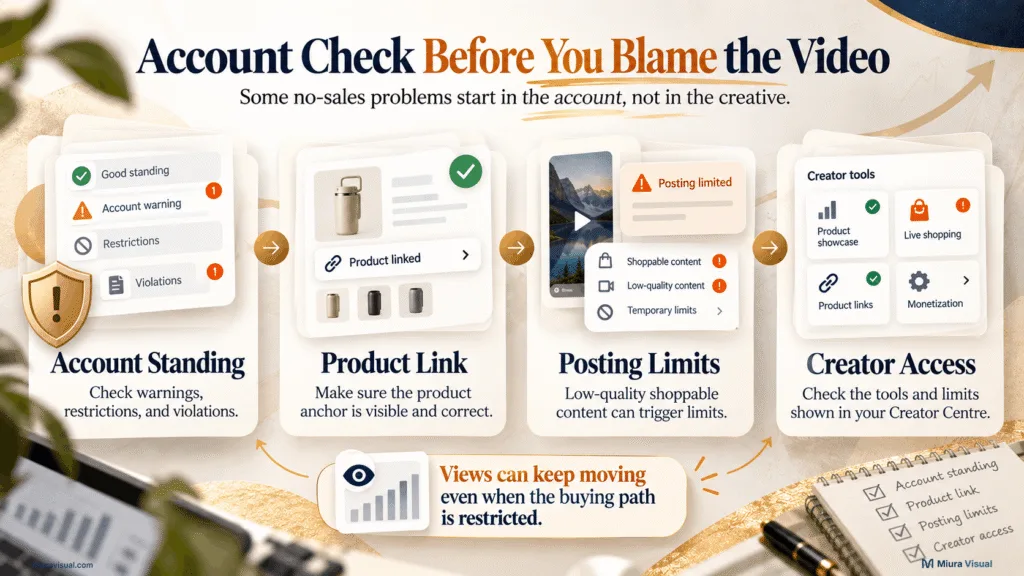
Check Account Standing
Review your TikTok Shop account health and violation records.
Look for:
- e-commerce violations
- restricted permissions
- warnings
- appeals
- creator-quality issues
If the account has a platform restriction, fixing the hook should not be your first priority.
Check whether the product anchor is being limited
TikTok can apply a Content Posting Limit to low-quality or non-compliant shoppable content.
One important detail is that the video may still publish.
The product link can be hidden or restricted. The content may keep getting views without a normal purchase path.
That creates a confusing symptom:
Views are still moving, but sales stay at zero.
Action: If views stay steady but product interactions drop, check your account notices. Also, look at the product anchor. Do this before changing your content strategy.
Check repetitive or low-interaction content
Account quality can also become a concern when shoppable content repeatedly uses:
- static visuals
- reused clips
- minimal interaction
- nearly identical scenes
- low-value product presentation
A real demonstration gives viewers better information.
Simply moving a product around the frame lacks context and is less helpful.
Check TikTok Shop Creator Limits
TikTok does not always give every creator the same level of access at the same time.
In September 2026, we looked at a Malaysian account.
It had staged Creator Pilot Program access.
This was before it hit 5,000 followers.
The screen also showed specific weekly limits for shoppable videos and LIVE sessions.
That is first-party evidence from one account, not a universal Malaysia rule.
The practical lesson is simple:
Check the limits shown inside your own Creator Centre.
Do not rely on an older tutorial or another creator’s account status.
Orders Exist but Commission Is Zero? You May Be Fixing the Wrong Problem
If the Creator Centre already shows Items Sold above zero, you may not have a no-sales problem anymore.
The problem may be why the order did not earn commission.
Possible reasons include:
- the order was cancelled
- the buyer returned the product
- the commission is still estimated
- the transaction has not settled
- the order did not qualify for affiliate attribution
Do not rebuild your videos before checking the order and commission status.
👉 Our guide to TikTok Affiliate commission in Malaysia explains commissions. It shows how much you can earn. It also covers seller rates and qualifying orders.
Keep the two problems separate:
Zero orders → troubleshoot sales.
Orders but no commission → troubleshoot commission.
Could TikTok Shop Analytics Be Wrong or Delayed?
Temporary reporting problems can happen on digital platforms.
Creators sometimes notice clicks, orders, or earnings showing up late or changing unexpectedly.
Treat that as a last check, not your first explanation.
Before assuming the dashboard is wrong:
- Check Items Sold.
- Check GMV.
- Check estimated or settled earnings.
- Review cancellations or returns.
- Check account notifications.
- Confirm the same issue appears across more than one metric.
A sudden drop across several unrelated metrics deserves investigation.
One weak video does not.
If the data looks off, don’t change your content strategy. First, find out if the problem is real.
The Miura Visual TikTok Affiliate No-Sales Troubleshooting Workflow
Instead of asking, “Why am I not getting sales?” in general, find the first stage that stops working.
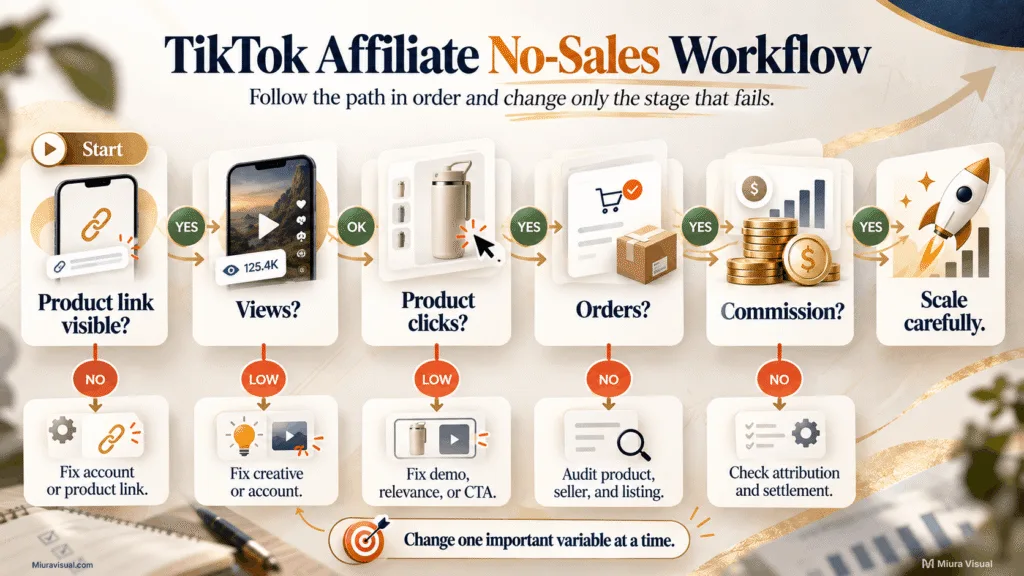
Step 1: Confirm the account and product link
Before analysing creative performance, check:
- account standing
- product anchor
- product availability
- correct listing
- any creator restrictions
If the purchase path is broken, fix that first.
Step 2: Check views and video performance
If the video barely gets distributed, start with creative quality.
Review:
- opening
- content clarity
- demonstration
- finished rate or available retention signals
Do not judge product demand from a video that received almost no useful exposure.
Step 3: Check product impressions and clicks
If people are watching but not engaging with the product, then focus on interest in the product.
Review:
- relevance
- demonstration
- buying reason
- CTA
- audience fit.
This is usually more useful than simply making another hook.
Step 4: Check Items Sold and GMV
If clicks exist but Items Sold remains zero, move further down the funnel.
Audit:
- price
- product page
- seller
- shipping
- stock
- reviews
- listing quality.
Creators can waste time here by editing the video again instead of checking the product.
Step 5: Separate sales from commission
If Items Sold is above zero, stop diagnosing “no sales.”
Move to the commission side.
👉 To estimate how an order volume impacts income, look at our guide on TikTok Affiliate earnings in Malaysia. Views don’t always equal a set monthly amount.
Step 6: Change one important variable
Use the diagnosis to decide what to change.
| Pattern | Prioritise | Do not prioritise first |
|---|---|---|
| Low views | Creative or account | Commission |
| Views, few product clicks | Demo, relevance, CTA | Seller payout |
| Product clicks, zero orders | Product, offer, seller, listing | More hooks |
| Orders, zero commission | Commission and order status | Refilming |
| Sudden multi-metric drop | Account or reporting | Random content changes |
The table is not a prediction model.
It is a priority system.
Your goal is to stop solving the wrong problem.
What we could verify from a Malaysian Creator Centre account
In September 2026, we accessed a Malaysian TikTok Shop Creator Centre.
The dashboard showed several items:
- Attributed GMV
- Attributed Items Sold
- Estimated Commission
- Product Marketplace
- Earnings
- Sample tools
At that point, the account showed RM0 in GMV. No items were sold, and the estimated commission was also RM0.
That account does not prove what a successful TikTok Affiliate campaign looks like.
It does show why the dashboard should be read as separate stages, rather than as one “earnings” number.
That difference matters when troubleshooting.
What Should You Change First, and When Should You Wait?
The best next action depends on where the failure happens.
Change the video first when:
- views are consistently weak
- product clicks are very low
- the product is hard to understand
- the demonstration is unclear
- the CTA does not match the content
Do not change three products at the same time.
Improve the creative around one product first.
Change the product or seller first when:
- product clicks already exist
- different creative angles still produce no orders
- the price has become less competitive
- the seller rating or reviews are weak
- stock or variants are limited
- the product page creates friction
At that point, another hook may not be the highest-value task.
Fix the account first when:
- the product anchor disappears
- account warnings appear
- shoppable posting is restricted
- product access changes
- multiple videos suddenly behave abnormally
Do not keep publishing into a broken purchase path.
Wait for more data when:
- you have only one or two videos
- each test uses a completely different product
- the performance pattern is inconsistent
- there are not enough clicks to judge the product
Waiting does not mean doing nothing.
Keep the product stable, test another clear content angle, and collect comparable data.
Stop producing more of the same when:
- the same format repeatedly gets weak reach
- viewers repeatedly ignore the product
- clicks repeatedly fail to become orders
- you are changing nothing except posting frequency
More content is not automatically more testing.
If every new video changes the product, hook, audience, and format, you make more content.
But, you won’t learn what went wrong.
Conclusion
TikTok Affiliate no sales are a troubleshooting issue.
They aren’t a reason to just post more videos.
If reach is weak, work on the content.
If people watch but do not click, improve the product presentation and buying reason.
If clicks already exist, audit the product, seller and listing.
If orders already exist, stop treating the issue as no sales and check the commission instead.
Your next step is easy: open Creator Analytics.
Look for the first metric that stops moving.
Fix that stage before making any other changes.
Frequently Asked Questions
Is it normal to get TikTok Affiliate views but no sales?
Yes, it can happen. Views only show that people watched the content. Sales depend on product interest. They also rely on clicks, the product page, seller quality, and the purchase decision.
Do not use a fixed “views should equal sales” benchmark unless you have reliable data for your own account.
Should I keep posting TikTok Affiliate videos if I have no sales?
Only if the next video is testing something useful.
If views are weak, test a stronger creative angle. If clicks already exist, look into the product. Don’t create more versions of the same video.
Why did I make a TikTok Affiliate sale but get no commission?
A sale may not produce final commission if the order is cancelled, returned, still unsettled or does not meet the qualifying conditions.
Check the order status first, then review how the TikTok Affiliate commission works.
How long should I test a TikTok Affiliate product before changing it?
There is no reliable universal number of videos or days.
You need enough similar data to tell a creative problem apart from a product problem. Testing different angles on the same product is better. Don’t change products after each failed video.

Miura Visual
Transforming visuals into content, stories, and scalable value across platforms and audiences.