Shopee Affiliate Sub ID: How to Track Links and Sales Properly
Sharing your Shopee affiliate links on TikTok, Instagram, Facebook, blogs, or WhatsApp? Use Sub ID to track your clicks and sales. This guide explains what Shopee Affiliate Sub ID is, when to use it, how to name it, and how to interpret the data clearly.
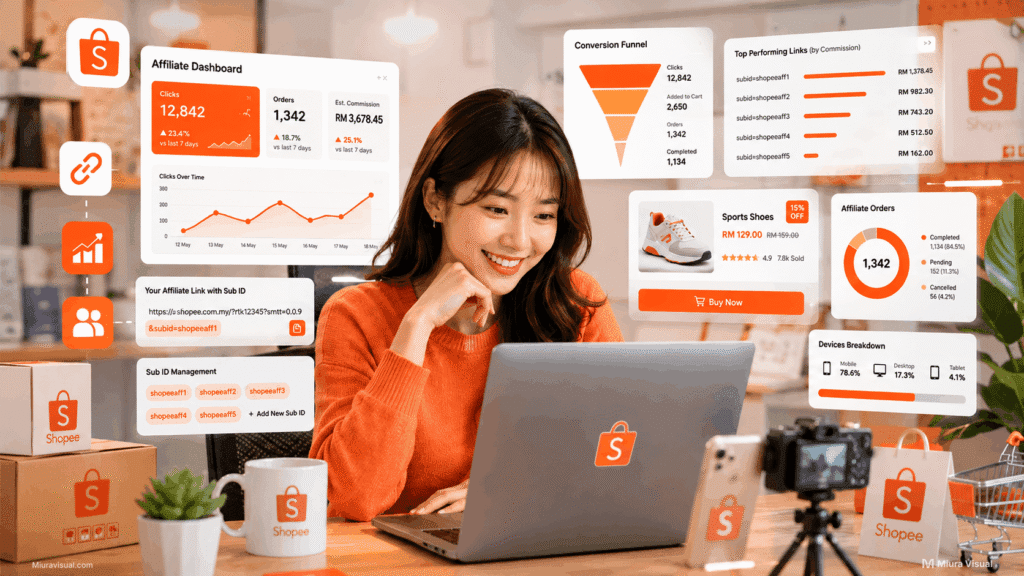
Quick Answer: What Is Shopee Affiliate Sub ID?
Shopee Affiliate Sub ID is a tracking label you add to your affiliate link.
It helps you see where your clicks, orders, or sales came from.
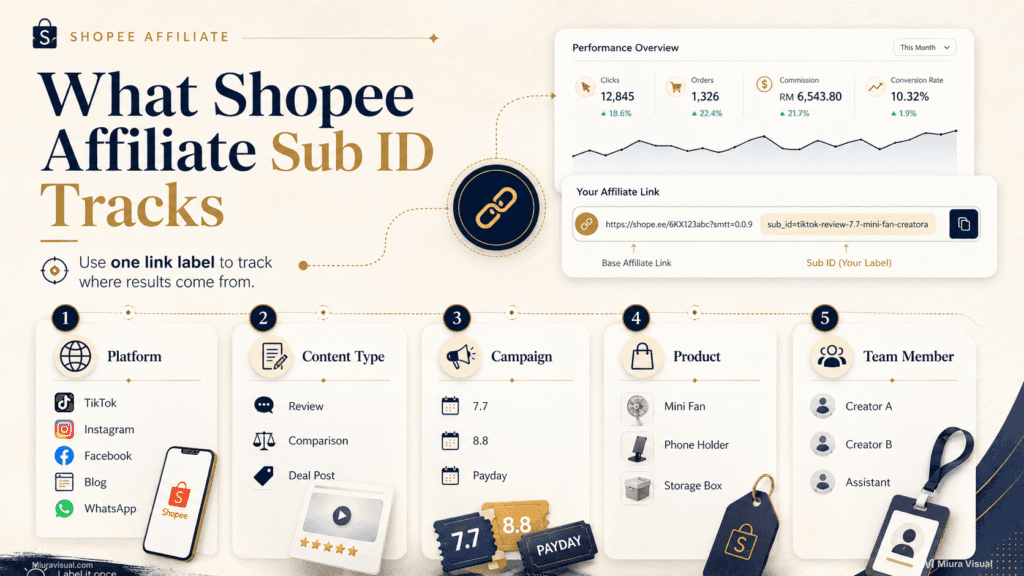
You can use Shopee Affiliate Sub ID to track:
- Platform: TikTok, Instagram, Facebook, blog, WhatsApp, Telegram.
- Post type: review, comparison, campaign post, product test.
- Campaign: 7.7, 8.8, 9.9, payday sale, 11.11.
- Product: mini fan, phone stand, storage box, skincare product.
- Team member: creator A, creator B, assistant, page admin.
Sub ID does not increase your commission by itself.
It helps you find what works.
That is the real value.
What Is Sub ID in Shopee Affiliate?
Sub ID is not a new account, product code, or special commission setting.
It is a custom tracking label you create to see where a link’s clicks, orders, or sales came from.
| Item | Meaning | Main Use |
|---|---|---|
| Affiliate ID | Your affiliate account identifier | Identify your account |
| Affiliate Link | The tracked Shopee link you share | Earn commission |
| Short Link | A cleaner version of your link | Easier sharing |
| Sub ID | Your custom tracking label | Track source or content |
| Order ID | Order reference after purchase | Check order record |
Think of Sub ID like a name tag.
If you use the same link everywhere, your report may only show clicks and orders.
If you use Sub ID, you can see which link, platform, or content angle created the result.
Why Shopee Affiliates Use Sub ID
When you only share one Shopee affiliate link, tracking is simple.
Sharing links on TikTok, Instagram, Facebook, WhatsApp, Telegram, blog posts, or Shopee campaigns can make the data messy.
Your report may show clicks or even orders.
But without clear labels, the source is still unclear.
You know something worked.
You just do not know which platform, post, or campaign created the result.
Did they come from TikTok?
Instagram Story? A Facebook post?
A blog article? A WhatsApp group?
Or an old link you shared last month?
That is where Sub ID becomes useful.
It turns messy link data into clearer source tracking.
Shopee Affiliate Sub ID helps solve this by adding a label to each link.
Label each link by its platform, content type, campaign, or product.
Don’t use the same link for everything.
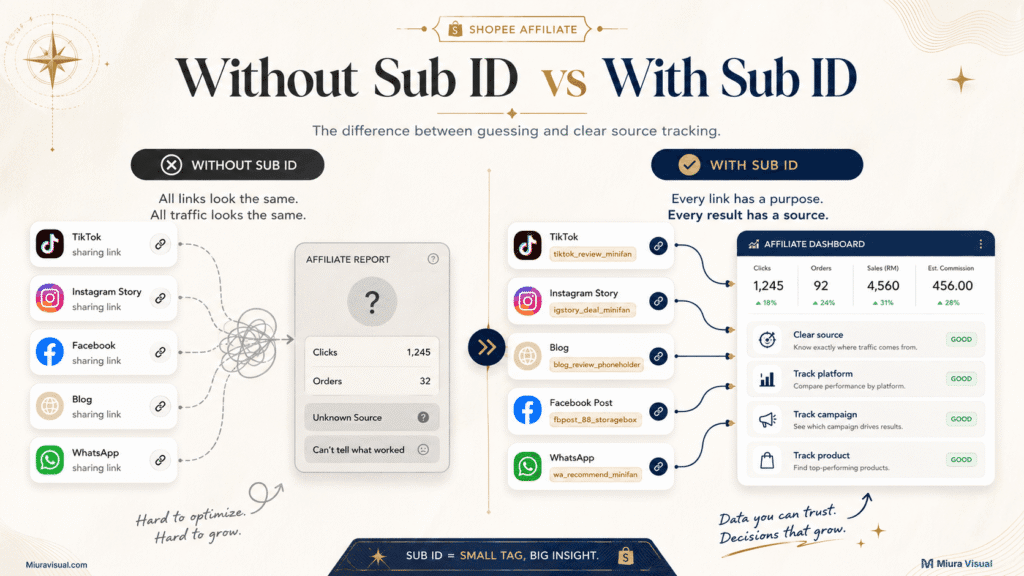
Without Sub ID, these problems happen:
- You use the same link everywhere and cannot tell which platform worked.
- You promote the same product in many posts and cannot tell which post brought clicks.
- You mix campaign links with normal links and cannot separate campaign performance.
- You see clicks in your report, but you do not know where they came from.
- You work with more than one account or person, but cannot tell who generated results.
- You end up guessing instead of making decisions from data.
With Sub ID, you move from guessing to tracking, you can:
- Label each platform separately.
- Track each post more clearly.
- Compare campaign performance.
- Separate product tests.
- See which content angle brings better clicks or orders.
- Decide where to spend more effort.
That is why serious affiliates use it.
When Should You Use Sub ID in the Shopee Affiliate Program?
You do not need Sub ID on day one.
If you only share one or two links, it is optional.
Once you test platforms, campaigns, or product angles, Sub ID becomes helpful.
Use this stage guide.
| Affiliate Stage | Should You Use Sub ID? | Why |
|---|---|---|
| Casual beginner | Optional | You may only share a few links |
| Beginner testing products | Useful | You can compare product tests |
| Intermediate affiliate | Recommended | You may use TikTok, IG, Facebook, blog, or WhatsApp |
| Campaign-focused affiliate | Strongly recommended | Campaign posts need cleaner tracking |
| Serious affiliate or small team | Must use | You need data to decide effort and manpower |
A simple rule:
Use Sub ID when you want to know which source performs.
If you are still sharing links casually, keep it simple.
If you are posting often, start using Sub ID before your data becomes messy.
Sub ID vs Affiliate Link vs Short Link
Many beginners mix these up.
They are connected, but they are not the same thing.
| Item | What It Does | Example Use |
|---|---|---|
| Affiliate Link | Tracks sales under your account | Product promotion |
| Short Link | Makes the link cleaner | Social media sharing |
| Sub ID | Labels the link source | Platform or campaign tracking |
The affiliate link helps Shopee know the sale belongs to you.
The short link makes your link easier to share.
The Sub ID helps you know where the result came from.
They work together, but they solve different problems.
👉 If you still need to generate your affiliate link first, read our Shopee affiliate link guide.
How to Add Sub ID to a Shopee Affiliate Link
This section is only a quick overview.
The full link-generation process belongs in your affiliate link guide.
Here is the simple flow:
- Open Custom Links in your Shopee Affiliate account.
- Choose or paste the Shopee product link.
- Find the Sub ID or Add Sub_id field.
- Enter your tracking label.
- Copy the link after adding your Sub ID.
- Share that link on the matching platform or post.
Example:
- TikTok product review: tiktok_review_minifan
- Instagram Story deal: igstory_deal_minifan
- Blog product review: blog_review_minifan
- Facebook campaign post: fbpost_campaign_storagebox
- WhatsApp group sharing: whatsapp_group_kitchenrack
Do not use random names.
Use a fixed format from the beginning.
That saves you trouble later.
Best Shopee Affiliate Sub ID Naming System
Your Sub ID should be easy to read later.
Do not make it too clever.
Do not make it too long.
Use a format you can repeat.
A good Sub ID should be:
- Easy to understand later.
- Short enough to read quickly.
- Consistent across different links.
- Clear about platform, content type, campaign, or product.
- Simple enough that your team can follow it.
| Situation | Good Example | Bad Example |
|---|---|---|
| Tracking a TikTok product review | tiktok_review_minifan | link1 |
| Tracking an Instagram Story deal | igstory_deal_minifan | iglink |
| Tracking a blog product review | blog_review_phoneholder | bloglink |
| Tracking a Facebook campaign post | fbpost_88_storagebox | campaign123 |
| Tracking a WhatsApp group share | whatsapp_group_kitchenrack | whatsappnew |
| Tracking a Telegram deal post | telegram_deal_skincare | tgproduct |
| Tracking a YouTube Shorts demo | ytshorts_demo_phoneholder | youtube1 |
| Tracking the same product across platforms | tiktok_review_minifan / igstory_deal_minifan / blog_review_minifan | minifan1 / minifan2 / minifan3 |
| Tracking a big sale campaign | tiktok_88_minifan | sale |
| Tracking team members | alex_tiktok_minifan | alexlink |
| Tracking content type | blog_compare_phoneholder | phoneholder |
| Tracking product test content | tiktok_test_minifan | test123 |
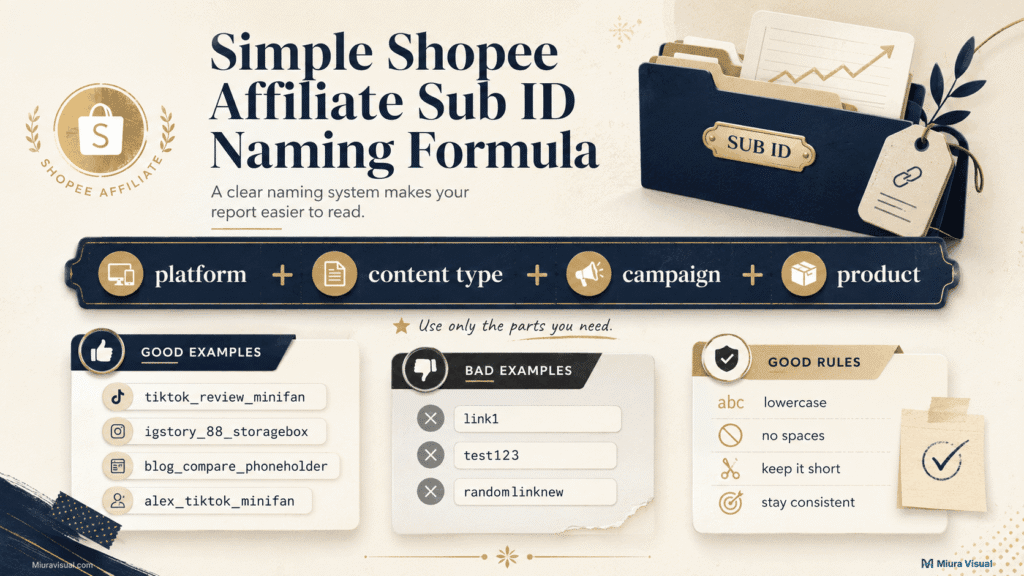
Good Sub ID rules:
- Use lowercase.
- Avoid spaces.
- Keep names short.
- Use the same format.
- Put platform first.
- Add campaign only when needed.
- Do not change naming style every week.
❌ Bad example: mybestlink123
✅ Better example: tiktok_review_minifan
The second one tells you what the link was used for.
That is the point.
Shopee Affiliate Sub ID Examples by Platform
Platform tracking is the easiest way to start.
It helps you compare where your audience is more likely to click or buy.
| Platform | Sub ID Example | Best For |
|---|---|---|
| TikTok | tiktok_review_minifan | Short product reviews |
| Instagram Story | igstory_deal_minifan | Time-limited promos |
| Facebook Post | fbpost_campaign_storagebox | Public campaign sharing |
| Blog | blog_review_phoneholder | SEO product reviews |
| whatsapp_group_kitchenrack | Private sharing | |
| Telegram | telegram_deal_skincare | Channel promotion |
This is useful when you promote the same product in many places.
For example, you may share one mini fan on TikTok, Instagram Story, and your blog.
Without Sub ID, you only know the product got clicks.
With Sub ID, you know which platform won.
That helps you decide where to focus next.
Shopee Affiliate Sub ID Examples by Content Type
Platform is only one layer.
You can also track content style.
This is useful when you test different angles for the same product.
Example:
- Product review: tiktok_review_minifan
- Product comparison: blog_compare_phoneholder
- Campaign deal: igstory_88deal_storagebox
- Problem-solution content: reels_problem_cableorganizer
- Best product list: blog_bestlist_deskgadgets
- Product test: tiktok_test_minifan
- Warning angle: tiktok_warning_skincare
- Budget list: fbpost_budget_homeitems
This helps you compare content angles.
Maybe your review gets many clicks.
Maybe your comparison gets fewer clicks but more orders.
Maybe campaign content only works during big sales.
Sub ID helps you see those patterns faster.
How to Use Sub ID Data in Your Shopee Affiliate Report
Sub ID becomes useful when you check your Shopee Affiliate report.
Do not look at clicks alone.
Clicks show interest.
Orders show buying action.
Commission shows whether the result turned into earnings.
The important part is not only how many clicks you get.
You need to know which Sub ID brought those clicks, orders, or commission.
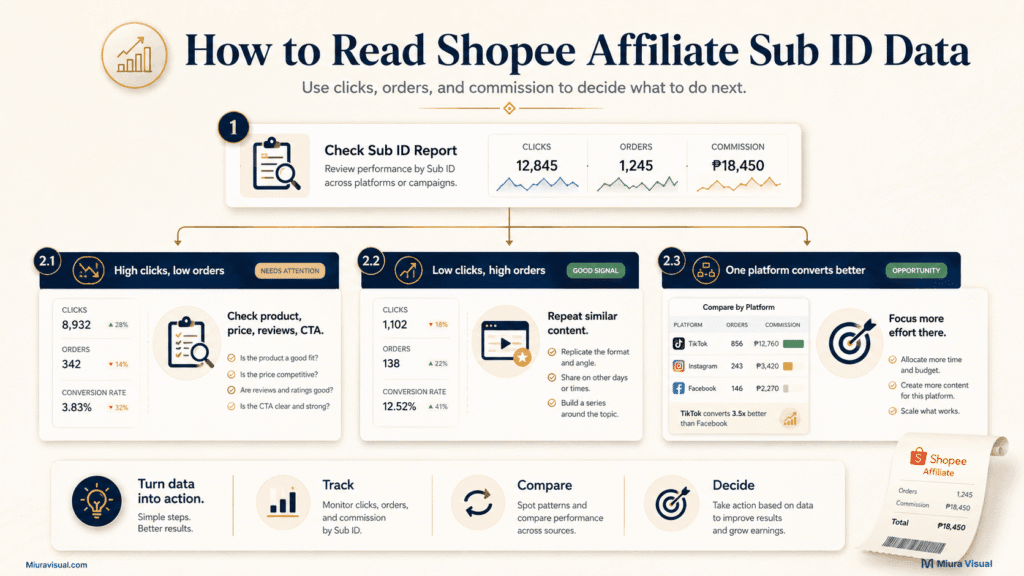
Use this simple reading guide:
| What You See | What It May Mean | What To Check |
|---|---|---|
| High clicks, low orders | The content gets attention, but the product may not convert well | Product price, reviews, voucher, product page, shipping, CTA |
| Low clicks, high orders | The traffic is smaller, but buyer intent is stronger | Repeat similar content or product angle |
| TikTok Sub ID gets many clicks but few orders | The hook may be strong, but the offer may be weak | Product choice, video promise, CTA, price match |
| Blog Sub ID gets fewer clicks but better orders | Search traffic may be more qualified | Create more review, comparison, or best-list content |
| Instagram Story Sub ID works only during campaigns | Urgency may be driving action | Post more during big sales or limited-time promos |
| Same product performs better on one platform | That platform may have a better audience match | Focus more effort on that platform |
| Many clicks, no commission | The order may not be valid, tracked, completed, or commissionable | Order status, commission rules, tracking window, report details |
The report tells you what happened.
Sub ID helps you understand where it happened.
That is the difference.
For example, your report may show 500 clicks.
Without Sub ID, that number is too general.
With Sub ID, you may see that 350 clicks came from TikTok, 100 from Instagram Story, and 50 from your blog post.
That gives you a clearer next step.
Do not use Sub ID only to count traffic.
Use it to compare source quality.
A source with fewer clicks can still be more valuable if it brings more orders or commission.
How to Decide What to Focus On Using Sub ID
Sub ID data should lead to action.
The goal is not to create perfect labels.
The goal is to know where to spend more time, content effort, or manpower.
Once you have enough data, look for patterns.
| Sub ID Pattern | What It Tells You | What To Do Next |
|---|---|---|
| One platform keeps bringing orders | The audience match is strong | Create more content for that platform |
| One product works across many platforms | The product has strong demand | Build more content around that product |
| One content angle gets more conversions | The angle is convincing buyers | Repeat the angle with similar products |
| Campaign Sub IDs perform better than normal posts | Your audience responds to urgency or discounts | Post more during big sale periods |
| A platform gets clicks but no orders | The traffic may be curious, but not ready to buy | Test better products, pricing, or CTA |
| A product gets clicks on every platform but no orders | The product may not be attractive enough | Stop pushing it or replace it |
| A blog Sub ID converts better than social posts | Search intent may be stronger | Write more review or comparison articles |
| A team member’s Sub ID performs better | Their content style or audience may be stronger | Study and repeat their approach |
A good Sub ID system helps you decide what to double down on.
It also helps you know what to stop doing.
For example:
- If TikTok gets many clicks but few orders, improve the product choice or CTA.
- If blog posts get fewer clicks but more orders, write more SEO product reviews.
- If campaign posts perform better, prepare more content before big sale dates.
- If one product keeps working, create more angles for the same product.
- If one platform never converts, reduce effort or test a different content style.
Do not treat all clicks the same.
Some clicks are only curiosity.
Some clicks come from people who are ready to buy.
Sub ID helps you separate both.
That is how you use tracking data to make better affiliate decisions.
Common Sub ID Mistakes to Avoid
Sub ID only works if you use it clearly.
Messy labels create messy reports.
Avoid these mistakes:
| Mistake | Why It Hurts |
|---|---|
| Using the same Sub ID for every link | You cannot separate results |
| Using random names | You will forget what they mean |
| Changing format every week | Your data becomes hard to compare |
| Not separating platforms | You cannot compare TikTok, IG, blog, or Facebook |
| Not labeling campaigns | Big sale performance becomes unclear |
| Making Sub ID too long | Hard to read and manage |
| Thinking Sub ID increases commission | It only tracks performance |
| Checking clicks only | Clicks do not always mean orders |
The worst mistake is using Sub ID without a system.
A simple system beats a complicated one.
Simple Sub ID System You Can Start With
If you want the simplest system, start with platform + content type + product.
Examples:
- tiktok_review_minifan
- igstory_deal_minifan
- blog_review_phoneholder
Add campaign labels only when you join big sales.
Examples:
- tiktok_88_minifan
- igstory_99_storagebox
Add team names only when more than one person or account shares links.
Examples:
- alex_tiktok_minifan
- team1_fbpost_phoneholder
Start simple.
Only add more details when your tracking actually needs them.
Final Answer: How Should You Use Shopee Affiliate Sub ID?
Use Shopee Affiliate Sub ID as a simple tracking system.
Start with platform, content type, and product.
Add campaign labels when you join big sales.
Use different Sub IDs for different platforms or posts.
Then check your report to see which source brings clicks, orders, and commission.
The goal is not to make your links look complicated.
The goal is to know what deserves more effort.
If you’re serious about Shopee Affiliate, use Sub ID.
It helps you track effectively instead of guessing.
Frequently Asked Questions
What is Shopee Affiliate Sub ID?
Shopee Affiliate Sub ID is a custom tracking label added to your affiliate link. It shows you which platform, post, campaign, or product source led to clicks or sales.
Is Sub ID required for Shopee Affiliate?
No. Sub ID is usually optional. It becomes helpful when you share many links across different platforms, posts, products, or campaigns.
Is Sub ID the same as Affiliate ID?
No. Affiliate ID identifies your affiliate account. Sub ID is a custom label you create to track where a specific link’s traffic came from.
Does Sub ID increase Shopee affiliate commission?
No. Sub ID does not increase commission. It only helps you track performance more clearly.
How do I add Sub ID to a Shopee affiliate link?
You can add Sub ID when generating or converting your Shopee affiliate link. Enter your tracking label in the Sub ID field before copying the final link.
Can I use different Sub IDs for TikTok, Instagram, Facebook, and blog posts?
Yes. That is one of the best ways to use Sub ID. You can make labels for each platform. This way, you’ll see which source does better.
Can Sub ID show which link generated sales?
Sub ID helps you see which labeled link drove clicks or conversions based on your Shopee Affiliate report. This makes it easier to compare platforms and campaigns.
Should beginners use Sub ID?
Beginners can skip it if they only share one or two links. Sub ID becomes helpful when testing different platforms, products, or campaigns.

Miura Visual
Transforming visuals into content, stories, and scalable value across platforms and audiences.