How to Check Your Shopee Affiliate Report: Clicks, Orders and Conversion
If you share Shopee Affiliate links, your report gives useful insight into what works and what doesn’t. This guide explains how to check your clicks, orders, and conversion data. So you can decide what to improve next.

Quick Answer: How Do You Check Your Shopee Affiliate Report in the Dashboard?
To check your Shopee Affiliate report, go to your dashboard or Affiliate Platform.
Then, open the Report section.
From there, check:
| What you want to know | Where to check | What it tells you |
|---|---|---|
| Source performance | Report + Sub ID | Which platform, post or link performed better |
| Link clicks | Click Report | Whether people clicked your affiliate link |
| Orders | Conversion Report | Whether clicks turned into orders |
| Order details | Conversion Report | Which products or orders were recorded |
| Commission status | Commission / payout area | Whether your commission is pending, approved or cancelled |
The key is simple.
Do not only check whether you got sales.
Check clicks, orders, conversion, and what to fix next.
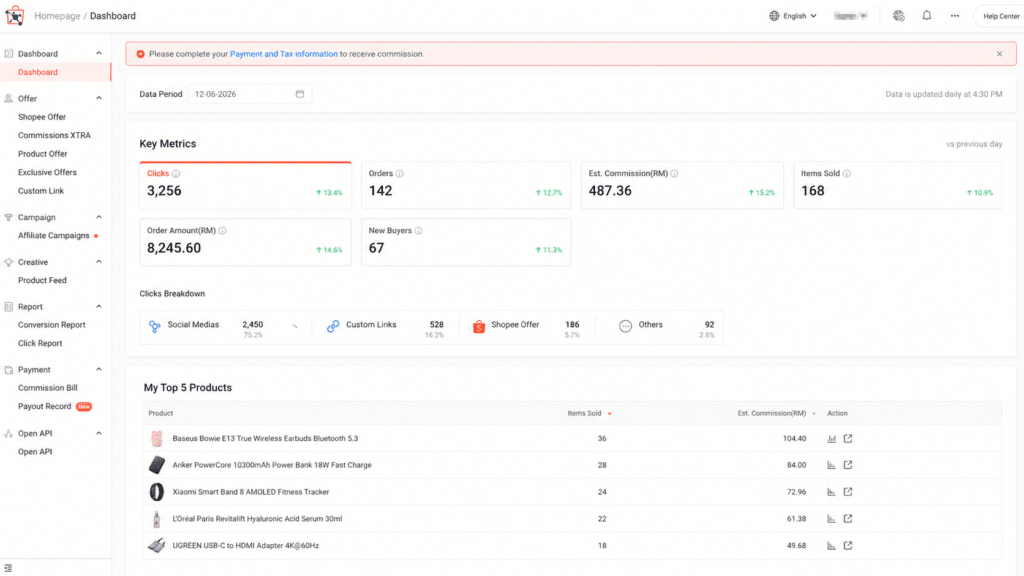
What the Shopee Affiliate Report Shows
The Shopee Affiliate report shows your affiliate performance.
It helps you understand whether your links, products and content are doing their job.
Most affiliates check the report for:
- Clicks
- Orders
- Conversion
- Product performance
- Link performance
- Sub ID tracking
- Possible commission-related data
The report tells you what happened.
It does not always tell you why it happened.
That is why you need to read the numbers together.
For example, high clicks do not always mean your content is converting well. It may only mean people were curious enough to click.
Clicks vs Orders vs Conversion: What Is the Difference?
This is where many Shopee affiliates get confused.
A click is not a sale.
An order is not always approved by the commission.
A conversion is the bridge between interest and action.
| Metric | What it means | What it tells you |
|---|---|---|
| Clicks | Someone clicked your affiliate link | Your content, CTA or product caught attention |
| Orders | Someone placed an order after clicking | The product had buying intent |
| Conversion | Clicks turned into orders | Your traffic quality and product match |
| Commission | Possible earning from valid orders | Still depends on order status and validation |
Here is the simple version:
- Clicks show interest.
- Orders show buying action.
- Conversion shows quality.
- Commission shows possible income.
If you only look at clicks, you may overrate your content.
If you only look at commission, you may miss useful early signals.
The best decision comes from comparing all three.
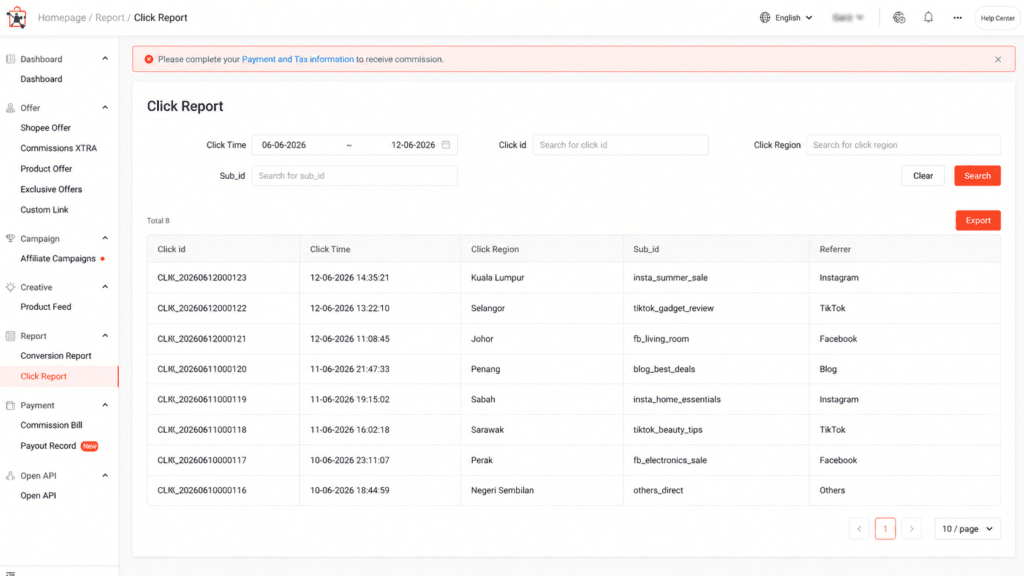
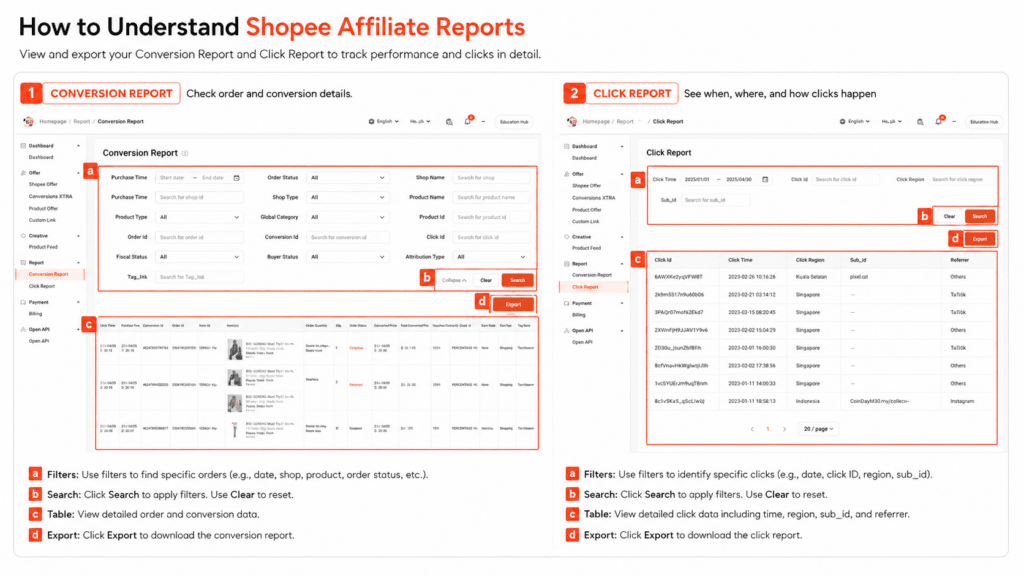
How to Check Shopee Affiliate Clicks in the Click Report
Start with your click data.
Clicks indicate if people are interested in visiting Shopee via your affiliate link.
To check your clicks:
- Open your Shopee Affiliate dashboard.
- Go to the Report section.
- Check the Click Report.
- Set the correct date range.
- Compare clicks by link, product or Sub ID.
Do not judge too fast.
A post with low clicks may have a weak hook.
A post with many clicks may still fail if the product does not convert.
Watch out for this mistake:
High clicks do not mean high income.
Clicks are only the first signal.
They show that people entered the buying path.
They do not prove that the product, price or offer is strong.
 If your clicks are not showing, read guide on why your Shopee Affiliate link is not tracking.
How to Check Shopee Affiliate Orders and Conversion Report
After checking clicks, check orders.
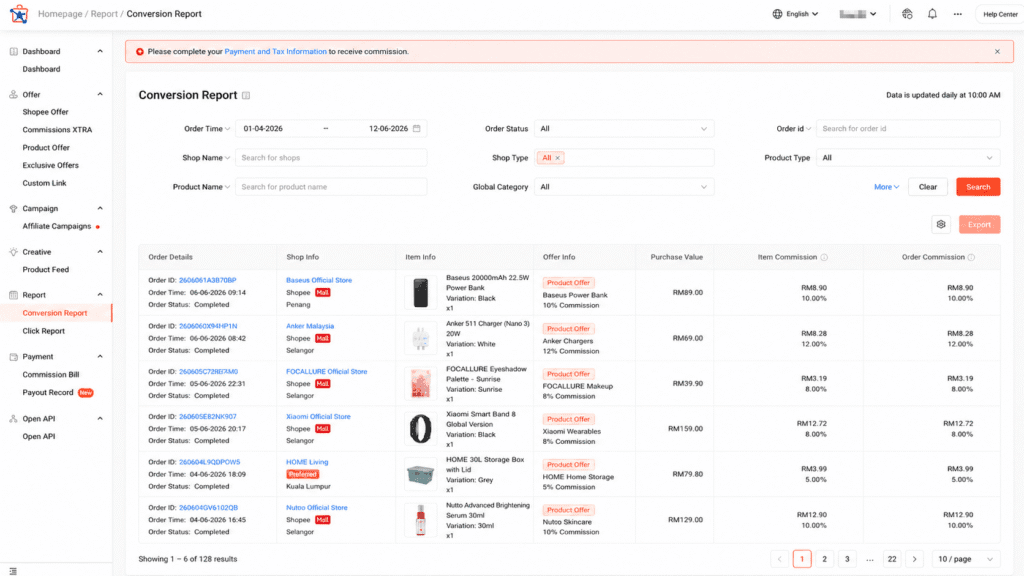
This is where the Conversion Report becomes important.
The Conversion Report shows if your clicks resulted in actual Shopee orders.
To check your orders and conversion:
- Open the Conversion Report.
- Set the same date range as your Click Report.
- Check whether any orders were recorded.
- Look at the product or order details.
- Compare orders against clicks.
The main question is not only “Did I get orders?”
The better question is “Which clicks became orders, and why?”
If you have clicks but no orders, your link may still be working.
The issue may be conversion, not tracking.
That means people clicked, but they did not buy.
How to Read Your Shopee Affiliate Report and Decide What to Do Next
This is the most important part.
Your report is not just for checking income.
It is a decision tool.
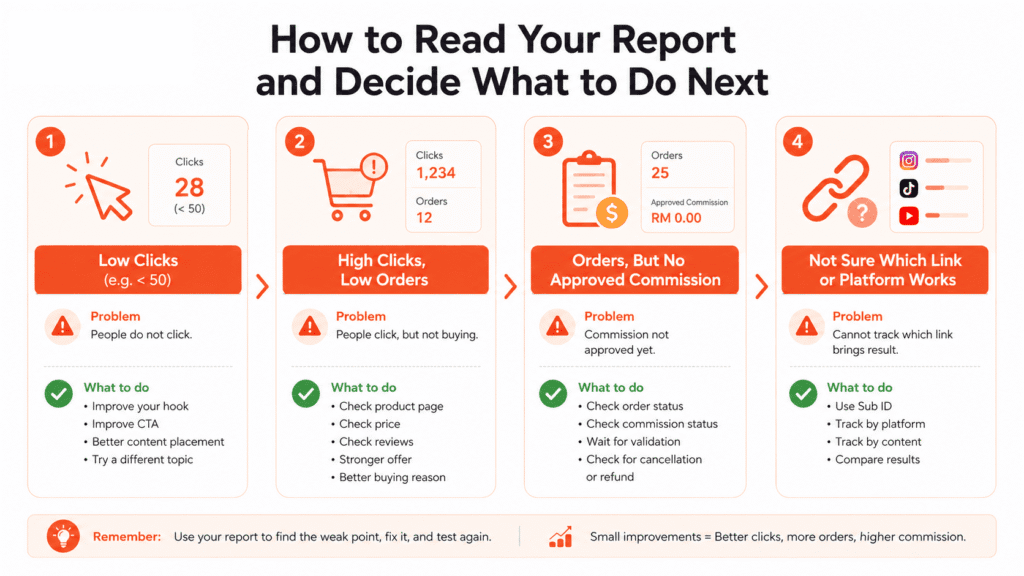
Use this table to read your data properly:
| What you see | What it usually means | What to do next |
|---|---|---|
| Low clicks + low orders | Content is not attracting enough interest | Improve hook, product placement and CTA |
| High clicks + low orders | People are curious but not buying | Check product price, reviews and audience fit |
| Low clicks + high conversion | Small traffic but strong buyer intent | Make more content around this product type |
| High clicks + high orders | Strong product-content fit | Scale the same angle and test similar products |
| Orders but no approved commission | Order may still be under validation | Check commission status instead of the report only |
| One platform gets clicks but no orders | Traffic may be low intent | Change the offer or platform angle |
| One Sub ID performs better | One source or post works better | Repeat that format |
Here is the rule:
Do not treat all clicks equally.
Some clicks are weak curiosity clicks.
Some clicks are strong buyer-intent clicks.
Your job is to find which content brings buyers, not just visitors.
Example: How to Diagnose Your Shopee Affiliate Report
Examples make the report easier to understand.
Use these as quick patterns when reading your own data.
Example 1: High Clicks, No Orders
Scenario:
Clicks: 120
Orders: 0
Conversion: 0%
This usually means people were interested enough to click, but they were not ready to buy.
The link may be working.
The problem is probably the product, offer, or buying reason.
✅ What it usually means:
- Your affiliate link is probably working.
- Your content created interest.
- The product did not convince people to buy.
- The traffic may be curious, but not ready to purchase.
⚠️ Common causes:
- The product price is too high.
- The product reviews look weak.
- The product page does not build enough trust.
- The content creates curiosity, not buying intent.
- The audience does not match the product.
- The offer is not strong enough.
🔧 What to do next:
- Check the product page first.
- Compare the price with similar products.
- Read the reviews and buyer photos.
- Test a stronger product.
- Change the content angle.
- Add a clearer reason to buy.
Do not immediately assume your link is broken.
If clicks are recorded, the issue is likely conversion, not tracking.
Example 2: Low Clicks, Some Orders
Scenario:
Clicks: 15
Orders: 2
Conversion: 13.3%
This is usually a good sign.
The traffic is small, but the people who click are serious.
This means your product or content angle may have strong buyer intent.
✅ What it usually means:
- Your audience is small but relevant.
- The product matches the viewer’s need.
- The content attracts people who are ready to buy.
- The product may be easier to convert than expected.
- The angle may be worth repeating.
⚠️ Common causes:
- The hook may not be strong enough.
- The CTA may be too soft.
- The product is good, but not enough people see it.
- The content may be hidden too deep in the post or video.
- The platform reach may still be too low.
🔧 What to do next:
- Make more content for the same product.
- Test similar products in the same category.
- Improve your hook to get more clicks.
- Add a clearer CTA.
- Promote it again during campaign periods.
- Repeat the content angle with small changes.
Do not ignore this pattern.
Low clicks can be improved.
Strong conversion is harder to find.
If a product converts with small traffic, it may be worth scaling.
Example 3: High Clicks, Some Orders, No Approved Commission Yet
Scenario:
Clicks: 300
Orders: 5
Approved commission: 0
This may not be a report problem.
It may be a commission status issue.
Your content might be attracting interest and orders.
However, the commission hasn’t been approved yet.
✅ What it usually means:
- Your content is getting attention.
- Your link is bringing people to Shopee.
- Some people are placing orders.
- The commission may still be under review.
- The final earning is not confirmed yet.
⚠️ Common causes:
- The orders may still be pending.
- The orders may still need validation.
- Some orders may be cancelled.
- Some orders may be refunded.
- The commission may not qualify yet.
- The payout cycle may not have reached that stage.
🔧 What to do next:
- Check the order status.
- Check the commission status.
- Wait for validation if needed.
- Compare the data with your payout page.
- Check whether the orders were cancelled or refunded.
- Read the commission status guide if the status is unclear.
Do not mix up report data with payout data.
Clicks and orders show activity.
Approved commission shows confirmed earning.
They are connected, but they are not the same thing.
👉 If you see pending, approved or cancelled status, check the guide on Shopee Affiliate commission status.
Why Do I Have Shopee Affiliate Clicks But No Orders?
Clicks without orders are common.
It does not always mean your Shopee Affiliate link is not tracking.
Usually, it means the buyer did not complete the purchase.
Common reasons include:
| Reason | What it means |
|---|---|
| Weak product | People clicked, but the product did not convince them |
| Price too high | Buyer hesitated after seeing the price |
| Poor reviews | The product page reduced trust |
| Wrong audience | The content attracted the wrong people |
| Weak offer | There was no clear reason to buy now |
| Curiosity click | People clicked only to look, not buy |
Your next action depends on the pattern.
If many people click but nobody buys, stop pushing the same product blindly.
Check the product page first.
Then test a better offer, clearer hook or more relevant product.
👉 If clicks or orders are not showing at all, read Shopee Affiliate link tracking guide.
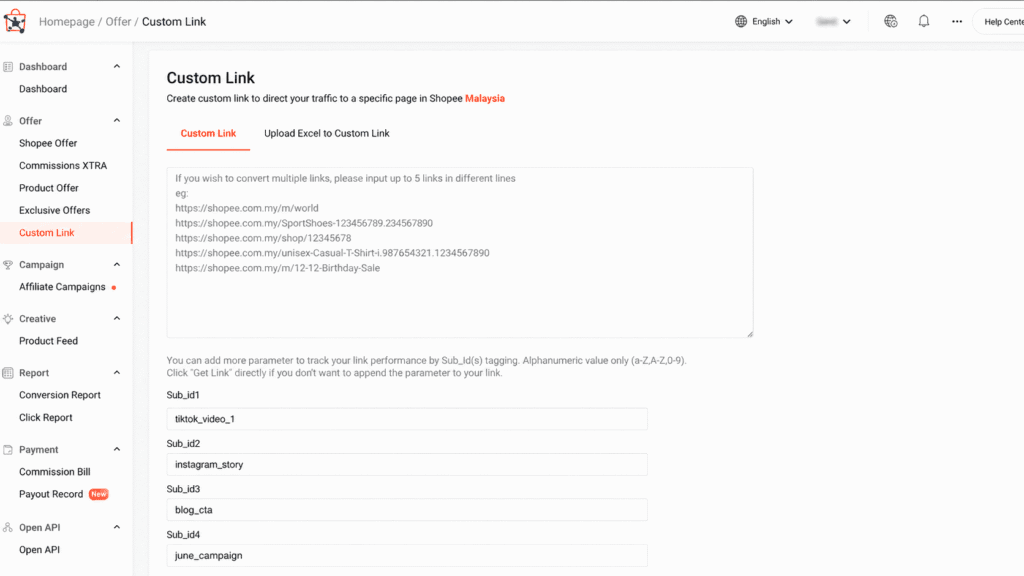
How to Use Sub ID to Track Different Links, Platforms or Social Media
Sub ID helps you identify where your affiliate performance comes from.
Without Sub ID, you may know that a link got clicks.
But you may not know which post, channel or content angle caused them.
Use Sub ID when you promote the same product in different places.
| Sub ID example | Use case |
|---|---|
| ig_story | Instagram Story |
| tiktok_video_1 | First TikTok video |
| fb_post | Facebook post |
| blog_cta | Blog call-to-action |
| whatsapp_group | WhatsApp sharing |
Example : You promote the same Shopee product on TikTok and Instagram.
Both use the same product link.
But you add different Sub IDs.
Now you can compare which platform brings better clicks, orders and conversion.
That makes your report more useful.
Do not use random Sub ID names.
Use names you can understand later.
❌ Bad example:
- abc123
- testlink1
- random01
✅ Good example:
- tiktok_video_storagebox
- ig_story_storagebox
- blog_cta_storagebox
Clear tracking helps you make clearer decisions.
Shopee Affiliate Report vs Payout Report vs Commission Status
Many beginners confuse report data with payment data.
They are not the same thing.
| Area | Main purpose |
|---|---|
| Click Report | Shows whether people clicked your affiliate links |
| Conversion Report | Shows whether clicks turned into orders |
| Commission status | Shows whether commission is pending, approved or cancelled |
| Payout page | Shows payment-related progress |
This matters because the solution is different.
If clicks are low, fix content.
If orders are low, fix product or offer.
If commission is missing, check status.
If payout is delayed, check payment rules or payout records.
Do not use the wrong page to solve the wrong problem.
That wastes time.
Common Mistakes When Reading Shopee Affiliate Reports
Most report mistakes come from reading one number alone.
Avoid these common errors:
| Mistake | Why it is a problem |
|---|---|
| Looking at the wrong date range | You may think data is missing |
| Confusing views with clicks | Views do not mean link clicks |
| Thinking clicks guarantee orders | Clicks only show interest |
| Thinking orders guarantee commission | Orders still need validation |
| Ignoring Sub ID | You cannot tell which source worked |
| Judging too early | Some content needs more time and data |
| Chasing only high clicks | High clicks can still bring weak buyers |
The biggest mistake is simple: Reading the report like a scorecard.
It is better to read it like a diagnosis.
The goal is not only to see whether you earned.
The goal is to get insight into what to fix next.
What to Do After Checking Your Shopee Affiliate Report
Your next move should match your data.
Use this quick action table:
| If your report shows | Do this next |
|---|---|
| High clicks, low orders | Test a better product or stronger offer |
| Low clicks | Improve hook, title, CTA or product placement |
| Low clicks, high conversion | Create more content for the same product type |
| High clicks, high orders | Scale the same format |
| Orders but no approved commission | Check commission status |
| Unclear source | Use Sub ID next time |
| One product keeps working | Find similar products to test |
Do not change everything at once.
Change one thing at a time.
For example:
- Change the hook
- Keep the product
- Test again
Or:
- Keep the hook
- Change the product
- Test again
This helps you know what actually made the difference.
Good affiliate strategy comes from testing, not guessing.
Conclusion: How Should You Use the Shopee Affiliate Report?
Use your Shopee Affiliate report as a decision tool, not just an income checker.
The report helps you answer three important questions:
- Are people clicking your affiliate links?
- Are those clicks turning into orders?
- What should you improve next?
Clicks show whether your content can attract attention.
Orders show whether your product and offer can convert.
Use the report to decide your next move:
- Low clicks: Improve your hook, CTA, or product placement.
- High clicks, low orders: Check the product page, price, reviews, and buying reason.
- Orders recorded, no approved commission: Check the commission status first. Don’t assume the report is wrong.
- Unclear traffic source: Use Sub ID next time to track the platform, post, or link.
The best Shopee Affiliate creators don’t just look at reports to check their earnings.
They use the report to decide what to test, what to stop, and what to repeat.
That is how your Shopee Affiliate report becomes useful.
It shows you where the problem is.
It also shows you where the next opportunity is.
Frequently Asked Questions
How do I check my Shopee Affiliate report?
Visit your Shopee Affiliate dashboard or Affiliate Platform. Then, open the Report section. Check your Click Report and Conversion Report. They show clicks, orders, and performance.
What is Shopee Affiliate Conversion Report?
Shopee Affiliate Conversion Report shows whether your affiliate clicks turned into orders. It helps you review order data. You can see which products, links or recommendations are converting.
What is the difference between clicks and orders?
Clicks mean someone clicked your affiliate link. Orders mean someone placed an order after clicking. Clicks show interest, while orders show buying action.
Why do I have Shopee Affiliate clicks but no orders?
You may have clicks but no orders because the product, price, reviews, offer or audience match is weak. It does not always mean your affiliate link is broken.
Does every Shopee Affiliate order become commission?
No. An order does not always become approved commission. The order may still need validation, or it may be cancelled, refunded or rejected based on Shopee’s rules.
How can I track different Shopee Affiliate links separately?
Use Sub ID when creating or sharing affiliate links. This helps you track different platforms, posts or content angles inside your report.
Can I use Shopee Affiliate report to choose better products?
Yes. Your report can show which products get clicks, orders and better conversion. Use that data to test similar products and stop wasting time on weak offers.

Miura Visual
Transforming visuals into content, stories, and scalable value across platforms and audiences.