Why Is My Shopee Affiliate Link Not Tracking? A Step-by-Step Guide
Your Shopee Affiliate link is shared, but clicks, orders, or commissions aren’t showing. This guide shows why your link might not track. We also explains how to check your Click Report and Conversion Report.

Quick Answer: Why Your Shopee Affiliate Link May Not Be Tracking
Your Shopee Affiliate link might not show clicks, orders, or commissions for a few reasons.
| Problem | What it usually means |
|---|---|
| No clicks showing | The Click Report may be delayed, or no real click happened |
| Clicks but no orders | People clicked, but did not complete a valid purchase |
| Orders not showing | The Conversion Report may need time to update |
| Commission missing | The order may be cancelled, invalid, excluded, or attributed to another affiliate |
| Link not working | You may have shared a normal Shopee link instead of an affiliate link |
| Hard to track source | You did not use Sub ID to separate each link or platform |
The first thing to understand is this:
A click is not the same as a commission.
A tracked click only shows that someone clicked your link.
You earn affiliate commission only if the order is valid, eligible, and tied to your affiliate account.
How Shopee Affiliate Program Tracking Works
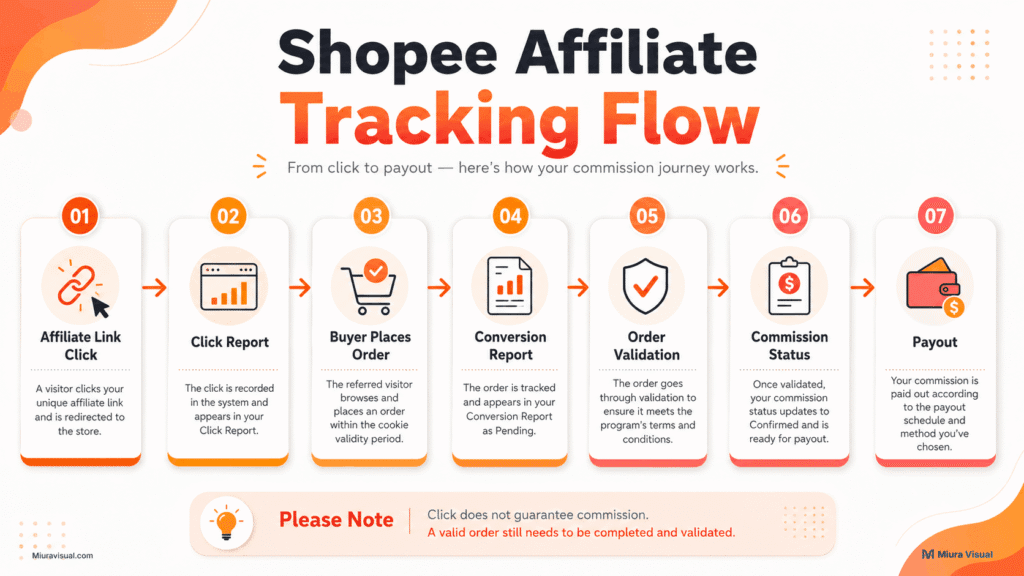
Shopee Affiliate tracking starts when someone clicks your affiliate link.
That link connects the visitor to your affiliate account.
But tracking does not stop at the click.
For commission to appear, several things need to happen:
- The user must click your affiliate link.
- The user must place an order.
- The product or shop must be eligible.
- Shopee must validate the order.
- The commission must be attributed to your account.
- The report must update.
This is why many beginners get confused.
They expect this:
Click → Order → Commission immediately
But the real process is closer to this:
Click → Order → Validation → Report update → Commission confirmation
So if your Shopee Affiliate link looks like it is not tracking, check the report first.
Do not panic too early.
How to Check If Your Shopee Affiliate Link Is Working Correctly
Start with the link itself.
Before checking commission, make sure the link is actually an affiliate link.
Here is a simple checklist.
| Check | What to do |
|---|---|
| Link opens correctly | Click the link and see if it opens the correct Shopee page |
| Link is affiliate link | Make sure it was generated from the Shopee Affiliate platform |
| Link was not edited wrongly | Avoid manually deleting or changing parts of the link |
| Link was copied fully | Make sure the full link was shared |
| Link was not broken by platform | Test how it opens from TikTok, Instagram, blog, or WhatsApp |
If the link opens the wrong page, fix the link first.
If the link opens correctly, the issue may be with reporting, order status, or attribution.
If you are not sure how to create the correct link, read the guide on how to generate a Shopee Affiliate link.
Why Your Shopee Affiliate Clicks Are Not Showing in the Report
If your Shopee Affiliate clicks are not showing, it usually comes down to a few common reasons.
1. The Click Report Has Not Updated Yet
Clicks may not appear immediately.
Shopee Help Center FAQ says clicks may take 1–2 days to show in the Click Report.
So if you just clicked your own link today, wait first.
Do not assume the link is broken within the first few hours.
2. No One Actually Clicked the Link
Views are not clicks.
A person could watch your TikTok video, read your blog, or view your Instagram Story without clicking the link.
This is common.
If your post has views but no clicks, the problem may be your call-to-action.
Your link may be working, but people are not clicking.
3. You Shared a Normal Shopee Link
This is a common beginner mistake.
A normal Shopee product link is not the same as a Shopee Affiliate link.
If you copy the product URL from Shopee without using the affiliate platform, it might not link to your affiliate account.
Always generate or convert the link from your Shopee Affiliate account.
4. The Link Was Shortened or Edited Wrongly
Some affiliates copy, shorten, edit, or paste links across multiple platforms.
That can create problems.
If the link loses its tracking information, Shopee may not know the traffic came from you.
To avoid this, do not manually edit the affiliate link.
Copy the full link and test it after pasting.
5. You Are Checking the Wrong Date Range
This one sounds simple, but it happens a lot.
If your Click Report is filtered to the wrong date, you may think there are no clicks.
Check the correct date range.
Also check the time zone and report filter.
Sometimes the data is there, but you are looking at the wrong period.
How to Check Your Shopee Affiliate Click Report
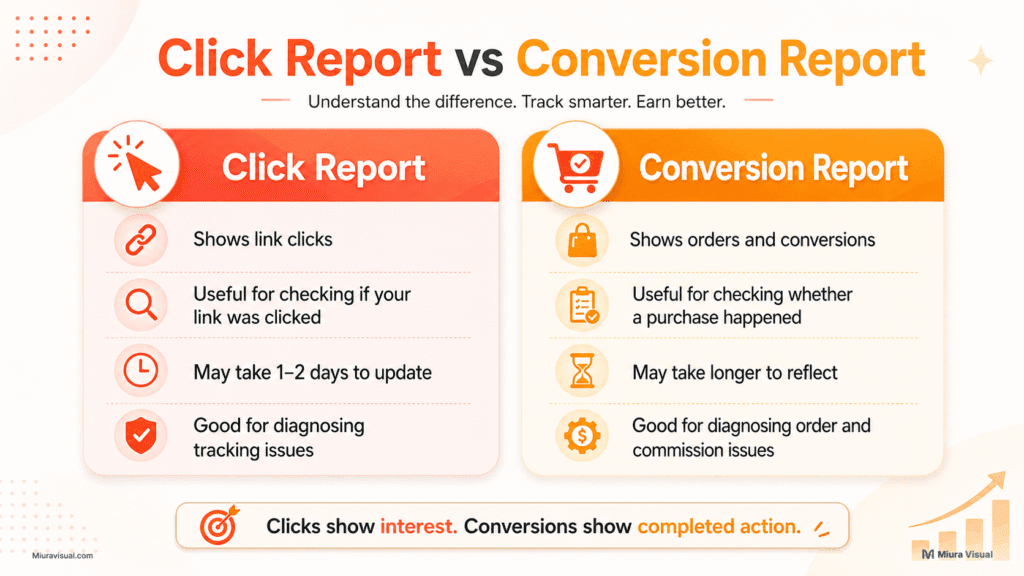
Your Click Report helps you see whether people are clicking your affiliate links.
It is the first place to check when you think your Shopee Affiliate link is not tracking.
In the Shopee Affiliate app or web portal, go to your affiliate dashboard report section and check the Click Report.
The Click Report can help you see details such as:
- click time
- click source
- region
- social platform
- link performance
If your Click Report shows clicks, your link is probably tracking.
If the Click Report shows zero clicks, check the following:
- Link format
- Date filter
- Where the link was shared
Do not jump straight to commission problems.
First, confirm whether the click was tracked.
Why Shopee Affiliate Orders Are Not Showing in Conversion Report
Sometimes clicks show, but orders do not.
This does not always mean tracking failed.
It may mean the user clicked but did not buy.
It may also mean the order has not appeared in the Conversion Report yet.
Here are the common reasons.
| Reason | What it means |
|---|---|
| Buyer did not complete checkout | They clicked but did not place an order |
| Report is delayed | The order may need time to appear |
| Product, shop, or seller is excluded | Some products or shops may not qualify |
| Another affiliate got attribution | The buyer may have clicked another affiliate link later |
| Order was cancelled or refunded | The order may not become a valid commission |
| Order is under validation | Shopee may still be checking the order |
The important point is simple.
Clicks prove interest.
Orders prove conversion.
Commission only comes after a valid order.
So if you have clicks but no orders, your link may still be working.
The issue may be conversion, product choice, or order eligibility.
How to Check Your Shopee Affiliate Conversion Report
Your Conversion Report shows order-related details.
Use it when you want to check whether a click became an order.
Check these things:
- Correct date range
- Order status
- Product or shop details
- Commission status
- Sub ID, if used
- Exported report, if you need deeper checking
If you see orders there, your link is tracking.
If you do not see orders, compare it with the Click Report.
If the Click Report shows clicks but the Conversion Report has no orders, the issue is probably not with link tracking.
It is usually one of these:
- no purchase happened
- order has not updated yet
- product exclusion or ineligibility
- buyer clicked another link later
- order did not pass validation
This is where many beginners misunderstand the system.
They think “no order” means “link not tracking.”
Not always.
Sometimes it simply means the traffic did not convert.
How to Use Sub ID for Shopee Affiliate Tracking
Sub ID is useful if you share many Shopee Affiliate links.
It helps you know which link, platform, or content brought the click or order.
For example, you can use Sub IDs like:
| Sub ID Example | Meaning |
|---|---|
| tiktok_video_01 | Link from one TikTok video |
| ig_story_june | Link from Instagram Story |
| blog_button_top | Button near the top of a blog post |
| fb_group_post | Link shared in a Facebook group |
| whatsapp_broadcast | Link shared through messaging apps like WhatsApp |
This is useful because not all traffic sources behave the same.
TikTok may bring many clicks but fewer orders.
A blog post may bring fewer clicks but better conversion.
Instagram Story may work during campaign periods.
Without Sub ID, everything looks mixed together.
With Sub ID, you can see which link actually works.
That is how you stop guessing.
Clicks but No Sales or Earnings: Is the Affiliate Link Broken?
Not always.
If your Click Report shows clicks, your link is probably tracking.
The problem is usually conversion.
Here is how to read the situation.
| Situation | Likely Meaning |
|---|---|
| Clicks shown, no orders | People clicked but did not buy |
| Many clicks, no sales | Product, price, content, or CTA may be weak |
| Orders claimed by buyer, not shown | Wait for report update and check eligibility |
| Commission missing | Order may be invalid, cancelled, excluded, or attributed elsewhere |
This is an important difference.
Tracking problem means Shopee did not record the click.
A conversion problem means Shopee tracked the click, but the user didn’t finish a valid order.
If you have clicks but no sales, do not only blame the link.
Check your content too.
Maybe your hook is good enough to get clicks, but your product is not strong enough to convert.
Maybe your audience is curious, but not ready to buy.
Maybe your CTA is too soft.
Affiliate income is not only about links.
It is about matching the right product with the right buyer at the right moment.
Common Shopee Affiliate Marketing Mistakes That Make Tracking Look Broken
Many Shopee Affiliate tracking problems are actually user mistakes.
Here are the most common ones.
| Mistake | Why it causes confusion |
|---|---|
| Sharing a normal Shopee link | It may not track to your affiliate account |
| Checking report too early | Clicks and orders may not appear immediately |
| Looking at the wrong date range | You may miss the correct data |
| Not using Sub ID | You cannot tell which link performed |
| Expecting every click to become commission | Clicks do not guarantee sales |
| Asking friends or family to test buy | These orders may not be valid |
| Promoting excluded products | Some products may not earn commission |
| Mixing payout issue with tracking issue | Payout delay is not the same as link tracking |
The biggest mistake is assuming every missing commission is a link problem.
Sometimes it is.
But many times, the link works fine.
The problem is the order, product, buyer behavior, or report delay.
When Should You Wait and When Should You Fix Your Affiliate Link?
Use this simple table.
| Situation | What to do |
|---|---|
| Someone just ordered today | Wait a few days for the Conversion Report |
| Click Report is still empty after waiting | Check link format and date filter |
| Clicks appear but no orders | Improve product, content, and CTA |
| Buyer says they ordered but you see nothing | Check delay, product eligibility, and attribution |
| Commission is pending | Check order validation and payout status |
| Commission is cancelled | Check refund, fraud validation, or invalid order issues |
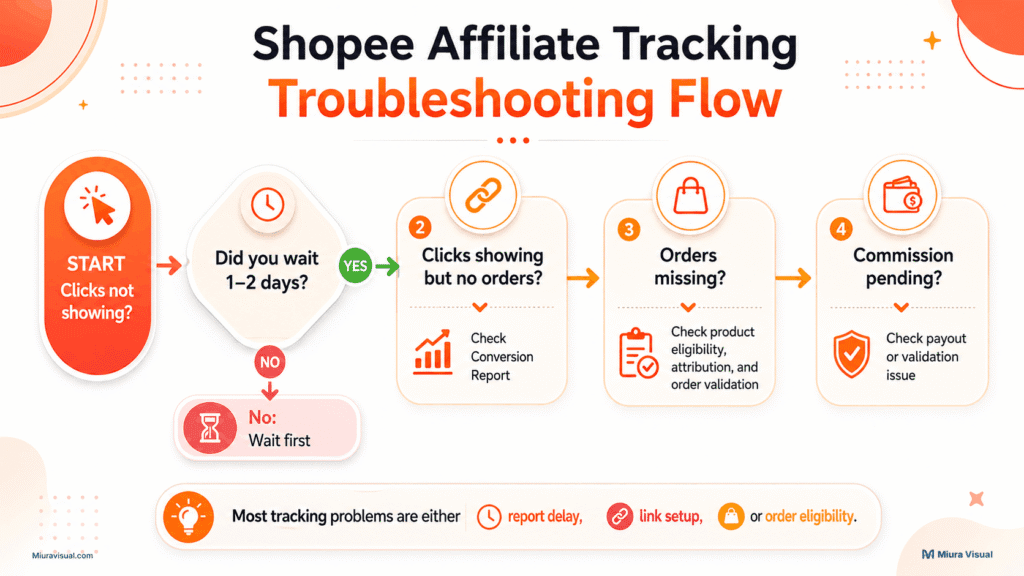
If you are still within the reporting window, wait.
If the report is still empty after waiting, check the link.
If clicks appear but sales do not, work on your conversion rate.
This is the cleanest way to diagnose the issue.
Beginner Checklist Before You Assume Your Shopee Affiliate Link Is Not Tracking
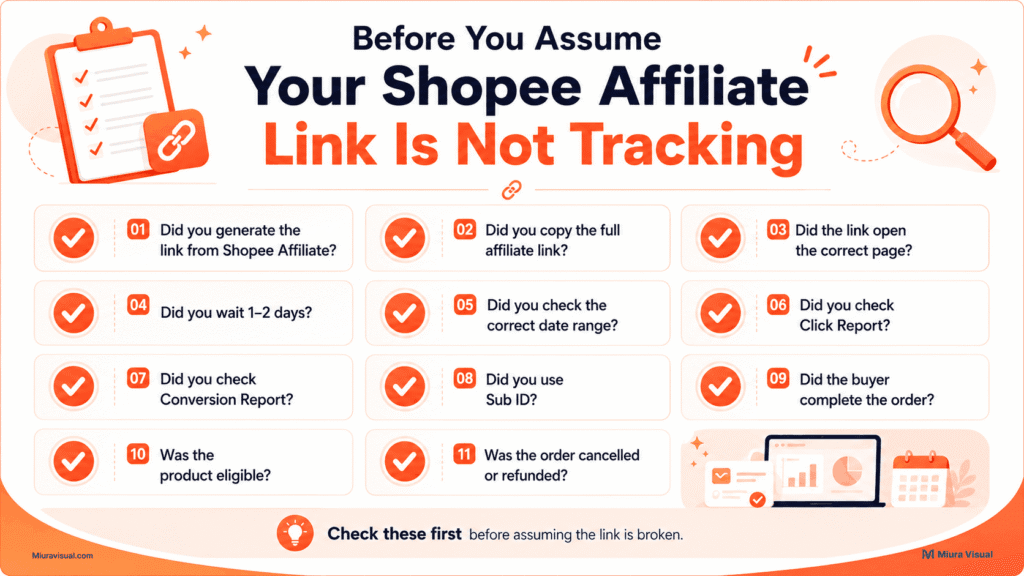
Before you say your Shopee Affiliate link is broken, check these:
- Did you generate the link from your Shopee Affiliate account?
- Did you copy the full affiliate link?
- Did the link open the correct product or shop page?
- Did you wait 1–2 days for clicks to appear?
- Did you check the correct date range?
- Did you check the Click Report?
- Did you check the Conversion Report?
- Did you use Sub ID for that specific link?
- Did the buyer actually complete the order?
- Was the product or shop eligible for commission?
- Did the buyer click another affiliate link later?
- Was the order cancelled, refunded, or flagged?
Are you confusing tracking problems with payout delay?
Conclusion: Is Your Shopee Affiliate Link Really Not Tracking?
If your Shopee Affiliate link is not showing clicks, start with the Click Report.
If clicks are showing but orders are not, check the Conversion Report.
If you have orders but no commission, the problem might be with:
- Order validation
- Eligibility
- Attribution
- Timing of payouts
Do not treat every missing commission as a broken link.
A broken link is only one possible reason.
Most of the time, the real issue is one of these:
- report delay
- wrong link
- weak conversion
- excluded product
- order validation
- attribution loss
- cancelled or invalid order
So check the reports first.
Then fix the right problem.
This is how to stop guessing and start boosting your Shopee Affiliate results.
Frequently Asked Questions
Why is my Shopee Affiliate link not tracking?
Your Shopee Affiliate link may not be tracking because the report is delayed, the wrong link was shared, the date filter is incorrect, or the order has not become valid yet. Start by checking the Click Report first.
How do I check if my Shopee Affiliate link is working?
Click your affiliate link and see if it opens the correct Shopee page. Then check your Click Report after waiting for the report to update. If clicks appear, the link is likely tracking.
Why are my Shopee Affiliate clicks not showing?
Clicks may not show immediately. Shopee’s FAQ says clicks may take 1–2 days to appear in the Click Report. Also check whether you are using the right date range.
Why are my Shopee Affiliate orders not showing?
Orders may take time to appear in the Conversion Report. They might also be missing if the buyer didn’t finish checkout, the product is excluded, or the order isn’t eligible for commission.
How do I check Shopee Affiliate conversions?
Check the Conversion Report in the Shopee Affiliate portal. Look at the order details, order status, product information, date range, and Sub ID if you used one.
What is Sub ID in Shopee Affiliate?
Sub ID is a tracking code or label you can add to your affiliate links. It helps you know which platform, post, or link generated clicks and conversions.
Why do I get clicks but no Shopee Affiliate sales?
Clicks without sales usually means people are clicking but not buying. Your link may be tracking correctly, but your product, content, price, or CTA may not be converting.
Does every Shopee Affiliate click earn commission?
No. A click does not guarantee commission. The buyer must place a valid eligible order, and the order must pass Shopee’s validation process.
Is commission pending the same as a tracking problem?
No. Pending commission means the order is still being checked. It hasn’t reached the payout stage yet. That is different from a link tracking problem.
Should I create a new link if my clicks are not showing?
Not immediately. First, wait for the report to update. Then check your link format, date range, and Click Report. If the link is wrong or not generated from your affiliate account, create a new affiliate link.

Miura Visual
Transforming visuals into content, stories, and scalable value across platforms and audiences.