Why Miura Visual Organized Its Website Services Into 3 Core Pillars
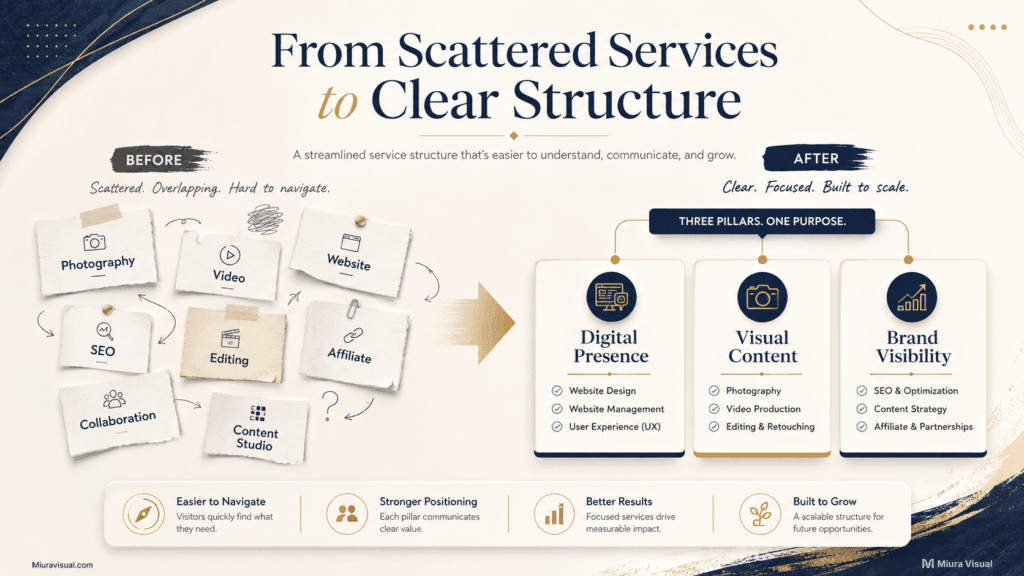
As Miura Visual expanded beyond photography and video, our service list became harder to explain clearly. We needed a better way to organize website services without turning every capability into another top-level category.

Quick Answer
Miura Visual has three main pillars for its services: Digital Presence, Visual Content, and Brand Visibility.
The goal was not to make the business look smaller.
It was to make the offer easier to understand and more realistic for our current scale.
The three pillars give visitors a clear starting point.
More specific services sit underneath them.
At Miura Visual, we were comfortable managing only three main business directions.
Our team was small, so we kept it simple.
It is not a universal rule that every business should have three categories.
The right number depends on how many broad customer needs you can explain.
It also depends on how well you can support them.
When Our Growing Service List Stopped Explaining Miura Visual Clearly
Miura Visual started from photography, video, and creative visual work.
The business then grew.
We added websites, SEO-ready design, editing, affiliate content, referral work, and more digital services.
That wider direction is now reflected across the current Miura Visual website.
The problem was not that the newer services were unrelated.
The issue was that a long list of features didn’t clearly explain what Miura Visual did.
A visitor can see terms like photography and video.
They might also find website design, SEO, editing, affiliate content, or Content Studio.
They would still need to figure out how those pieces connected.
That creates unnecessary confusion.
A service list should help someone answer:
- What kind of problem can this business help me solve?
- Which area should I explore first?
- Where does a specific service belong?
If website visitors must decode the business structure first, the hierarchy isn’t effective.
That became the main issue we wanted to fix.
We were no longer trying to show everything Miura Visual could technically do.
We needed to present the business in a way that was easier to understand.
The current website now presents three broad directions first.
Potential clients can then move into more specific services.
Why We Chose Three Core Pillars — Not Five, Eight or Ten
The number three was not chosen because three-column layouts look nice.
It was a business decision.
1. Three broad needs were easier to explain
We wanted each pillar to answer a different customer need.
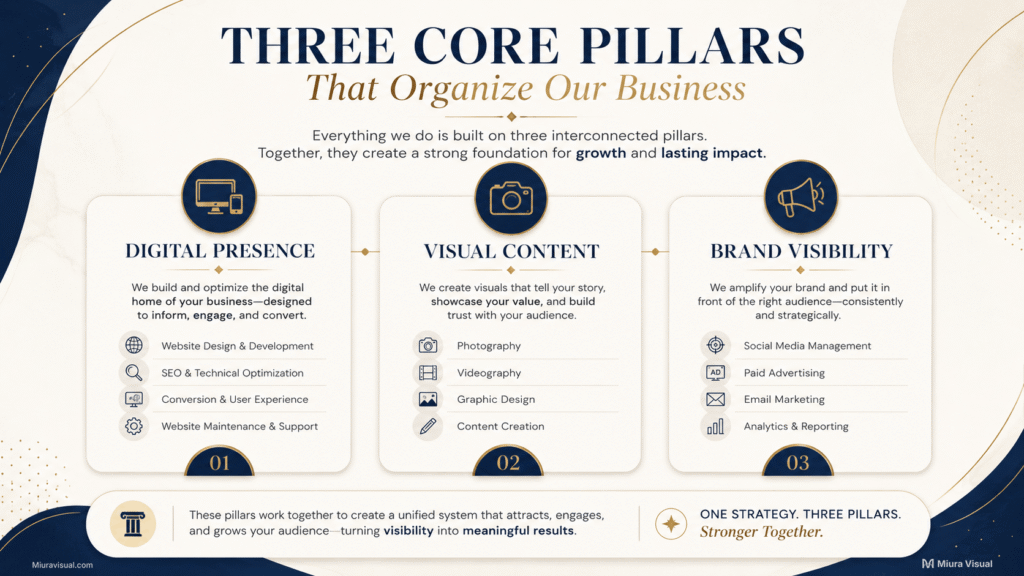
Digital Presence covers the online foundation behind the business.
This includes websites, landing pages, SEO setup, content structure, and website support.
Visual Content covers the material a brand needs to show and communicate.
This includes photography, videography, retouching, design, and post-production.
Brand Visibility shows how a brand can reach more people. This includes affiliate content, referrals, promotions, and collaborations.
Each pillar is broad enough to contain several services.
It is also specific enough to mean something.
That balance matters.
A category such as “Creative Services” could hold almost everything we do.
It would also tell visitors very little.
2. The pillars needed room for more specific services
We did not want every new service to become another top-level item on the website.
For example, Website Design is important, but it is still one part of Digital Presence.
Photography is a major service, but it still fits naturally inside Visual Content.
Affiliate and referral work can stand on their own commercially.
They still belong to the wider Brand Visibility direction.
This lets the website grow without constantly rebuilding the top-level structure.
Miura Visual can adjust or enhance specific services.
They will keep the same overall navigation logic.
3. The website had to match what we could realistically manage
This was just as important as the customer-facing logic.
A small team can list ten things it knows how to do.
That does not mean all ten should become major business directions.
Every top-level service area creates more work.
It needs clear scope, supporting pages, portfolio evidence, enquiries, pricing decisions, content, maintenance, and real delivery capacity.
For Miura Visual’s current size, we felt three core pillars were the best limit to commit to.
A website should show what the business can actually deliver, not just what the team can do.
Adding a fourth or fifth pillar just to make Miura Visual look broader would work against that goal.
More categories could make the website look bigger.
They would not automatically make the business clearer.
How We Decided What Became a Pillar and What Stayed a Service
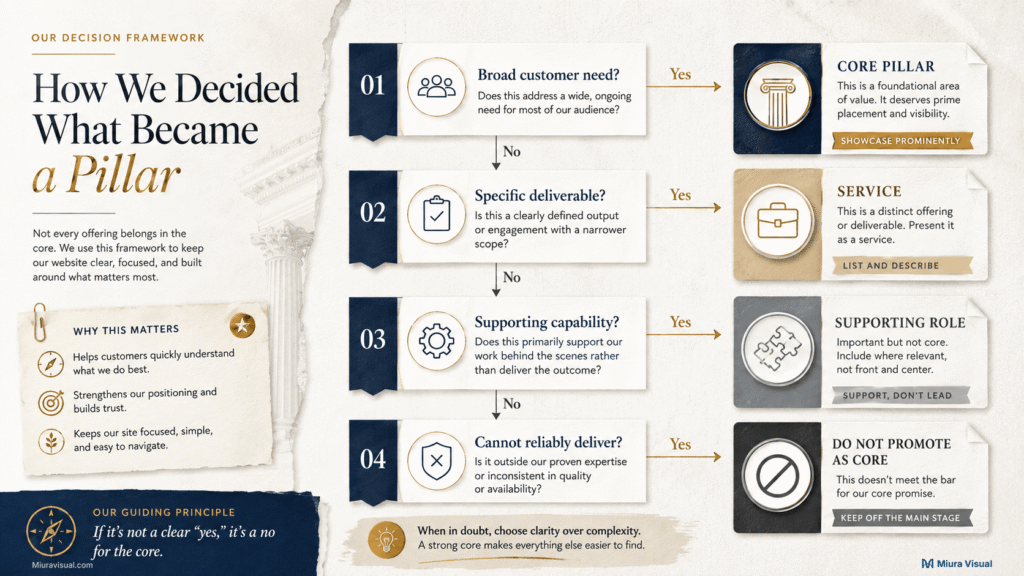
The key decision was to stop treating every capability as equal.
We started separating broad customer needs from specific deliverables.
A simple version of the logic looks like this:
| What we were looking at | Where it belongs |
|---|---|
| A broad customer need containing several related services | Core pillar |
| A specific service or deliverable people can enquire about | Individual service |
| A capability mainly used to support another service | Supporting capability |
| A new direction we cannot consistently maintain or deliver | Not a core pillar |
This helped answer questions that were easy to overcomplicate.
Website Design doesn’t need to be a top business category. It’s already part of Digital Presence.
Photography doesn’t need a separate top-level pillar. It fits well within Visual Content.
Affiliate content and partnerships can fit under Brand Visibility. They don’t need to be separate divisions.
The current Digital Presence structure shows how this works in practice.
Website Design, SEO Setup, content structure, and website support remain distinct services.
They are still presented as connected parts of one broader need.
The customer problem came before the internal skill
This became an important filter.
We stopped organizing the website around everything Miura Visual could do.
Instead, we grouped services around the broader problems customers were trying to solve.
That changed the structure.
A person looking for a website needs SEO setup or maintenance.
They are working on their online foundation.
Someone looking for photography, video, retouching, or graphics needs visual material.
Someone exploring affiliate promotion or collaboration wants more ways for the brand to be discovered.
It’s simpler to start with those than to show each internal capability as its own business unit.
For a detailed website project, think the same way.
Focus on website planning and content hierarchy.
That page covers sitemap, navigation, service presentation, and customer pathways in more depth.
How the Three-Pillar Structure Changed Our Website Navigation
Changing the labels in the Services menu would not have been enough.
The three-pillar structure needed to work across the site.
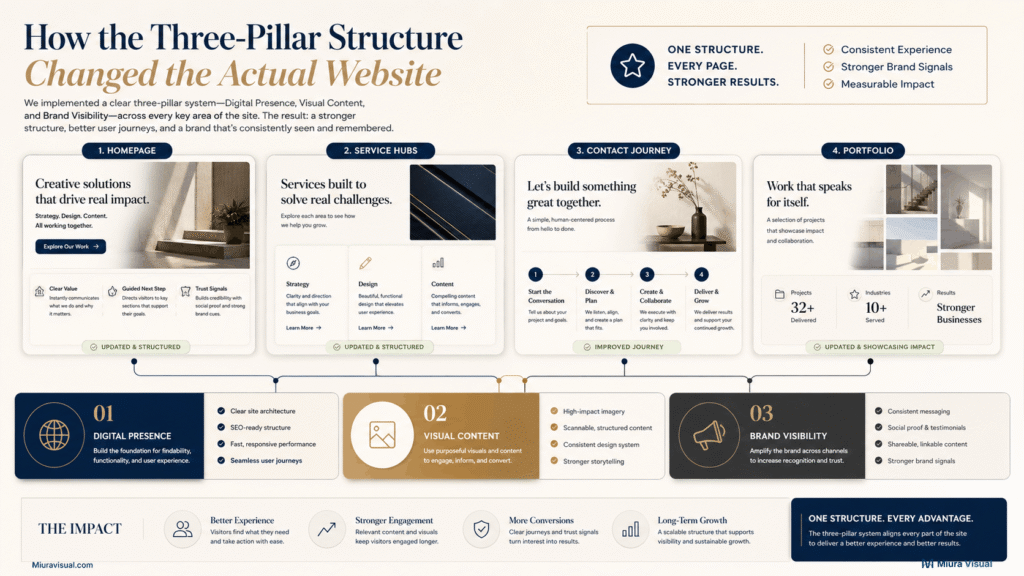
Homepage
The homepage now highlights three key areas: Digital Presence, Visual Content, and Brand Visibility.
These are the main focuses of Miura Visual.
A visitor can start with the broad need before exploring specific services.
Service Hubs and Website Navigation
Each pillar has space to explain the services underneath it.
That keeps the hierarchy clear:
Core pillar → specific service → detailed service page
The structure gives us room to add depth without adding more top-level noise.
Contact Page Journey
The same logic also appears when someone is ready to contact us.
We do not expect every visitor to know the exact service name.
The website can guide visitors in three ways.
They can explore Digital Presence, Visual Content, or Brand Visibility.
The current contact flow presents those three connected areas as starting directions.
That is the kind of clarity we wanted from the restructure.
It does not prove that conversions increased.
We do not currently have enough before-and-after performance data to make that claim.
What we can say is that the current website now uses one consistent service hierarchy.
Visitors no longer need to interpret a long list of unrelated-looking offers.
Portfolio
The same structure also carries into the Miura Visual portfolio.
Digital work can support Digital Presence.
Photography, video, and post-production can support Visual Content.
Affiliate, referral, and partnership work can support Brand Visibility.
The portfolio can still show projects that combine several capabilities.
It does not need another category every time one project crosses service boundaries.
That consistency matters more than forcing every piece of work into an isolated box.
What We Deliberately Did Not Turn Into Another Core Pillar
A common mistake in organizing services is creating a new category for each new skill.
This can lead to confusion.
We deliberately avoided that.
Website Design did not become a fourth pillar.
Photography did not become a fourth pillar.
Editing did not become another pillar.
Affiliate content did not become another pillar.
Partnerships did not become another pillar.
These services still matter.
Some may even be commercially important.
But capability does not automatically equal business pillar.
A new pillar should represent a broad direction that customers can understand.
The business should also be able to support it over time.
That creates a useful trade-off.
More top-level categories can make a company appear broader.
Fewer, stronger categories can make the offer easier to understand.
For Miura Visual, clarity was more valuable than showing maximum breadth.
There is also an operational reason to stay disciplined.
Before adding a new pillar, we first check if the capability meets a different customer need or just boosts an existing service.
If it strengthens an existing pillar, it usually belongs underneath that pillar.
If it creates a completely new business direction, it deserves a more serious review.
A Simple Check Before You Add Another Service Category
If the services on your website are starting to feel crowded, do not begin by redesigning the menu.
Start with the business structure.
Take your current services and ask these five questions.
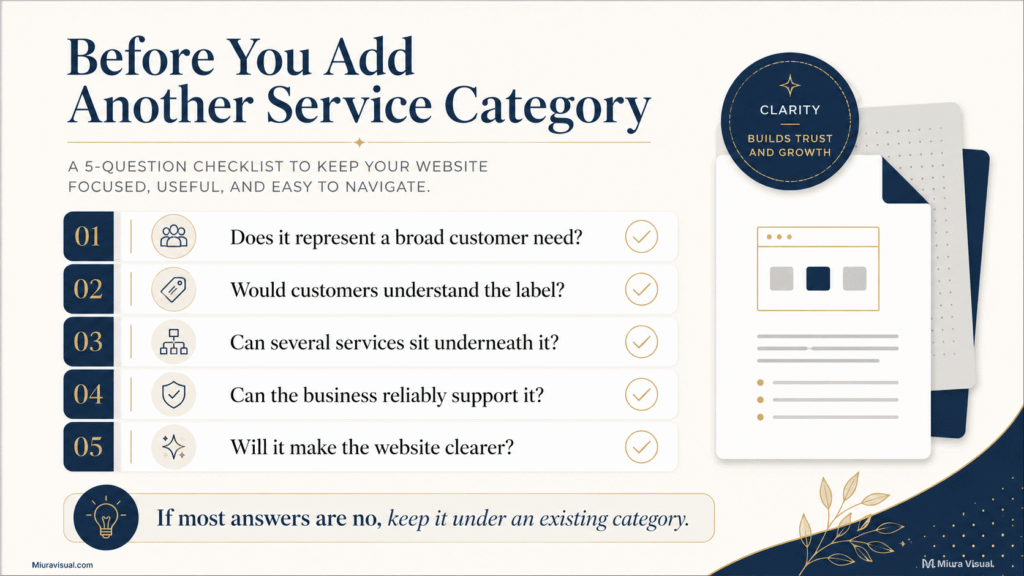
1. Does this category represent a broad customer need?
A pillar should describe more than one narrow deliverable.
If the category contains only one small service, it may not need to sit at the highest level.
2. Would a customer understand the label without explanation?
Internal terminology is often clear to the team but confusing to everyone else.
Rethink the label if it needs a paragraph for visitors to understand it.
3. Can several meaningful services sit underneath it?
A useful service category gives the website room to grow.
If items seem unrelated within the category, the grouping is likely too broad.
4. Can the business reliably support this direction?
This question is often skipped.
Do you have the time, skills, workflow, proof, and delivery capacity to treat it as a major business area?
If not, making it prominent on the website may create a promise the business is not ready to maintain.
5. Will the new category make the website clearer?
This should be the final test.
Don’t add another top-level category.
Six categories make the business look better than just three.
Add it only if the category helps visitors make a faster and more accurate decision.
If most answers are no, the service likely fits an existing category.
Conclusion
If your services are easy to understand, don’t change them to add more hierarchy.
Restructuring is helpful when your service list grows.
It’s also useful if navigation feels crowded.
Plus, if visitors need extra context before starting, consider restructuring.
Miura Visual picked three core pillars.
These directions clearly explain our business and fit our current scale.
If you face the same problem, start by listing every service you offer.
Then organize your services by the broad customer need they solve.
Do that before changing your menu.
Frequently Asked Questions
How many service categories should a small business website have?
There is no fixed number. Use enough categories to show different customer needs. Don’t use too many, or it might get confusing.
Miura Visual chose three because that matched both our service range and our current ability to manage those areas properly.
Should Every Service Have a Separate Page?
Not always. A service usually deserves a separate page when it has a distinct customer need, enough unique information, and its own buying decision. Smaller supporting capabilities may fit better inside a broader service page.
Can You Put Multiple Services on One Page?
It can be enough when the services are few and closely related.
If the services cover several different needs, a clearer structure usually helps. That may mean one overview page, several service categories, and separate service pages for the most important services.

Miura Visual
Transforming visuals into content, stories, and scalable value across platforms and audiences.