Video Production Workflow: How to Plan, Shoot, Edit and Deliver Videos Smoothly
A good video production workflow takes your project from idea to final delivery. It helps you avoid missing shots, messy footage, slow edits, and unclear revisions. This guide outlines a practical video production process. You can use it to plan, shoot, edit, and deliver videos more easily.

What Is a Video Production Workflow?
A video production workflow is how a video project goes from an idea to its final delivery.
It usually covers planning, scripting or outlining, shot listing, filming, footage organization, editing, exporting and final delivery.
A video production workflow is different from a video editing workflow.
Editing is only one part of the larger production process.
The production process starts much earlier.
It begins when you decide what the video is for.
That early planning is what prevents many editing problems later.
A smoother edit usually starts before the shoot, not inside the editing software.
 If you’re building a system beyond video projects, read this guide on content creation workflow. You’ll see how planning, production, editing, publishing, and review link in various formats.
Simple Video Production Workflow Example for a Video Project
Here is a simple production process you can use as a starting point.
| Stage | What Happens |
|---|---|
| Idea | Define the purpose and message of the video |
| Brief | Confirm audience, platform, style, deadline and deliverables |
| Script / Outline | Plan what needs to be said or shown |
| Shot List | List the shots needed before filming |
| Filming | Capture main footage, B-roll, audio and backup shots |
| Footage Organization | Backup, sort and name your files before editing |
| Rough Cut | Build the basic structure of the video |
| Polish | Add music, subtitles, sound, color and pacing adjustments |
| Export | Prepare the right version for each platform or client |
| Delivery / Publish | Send, publish, archive and review the project |
This does not need to be complicated.
The goal is to make every stage clear enough so you do not need to rely on memory every time.
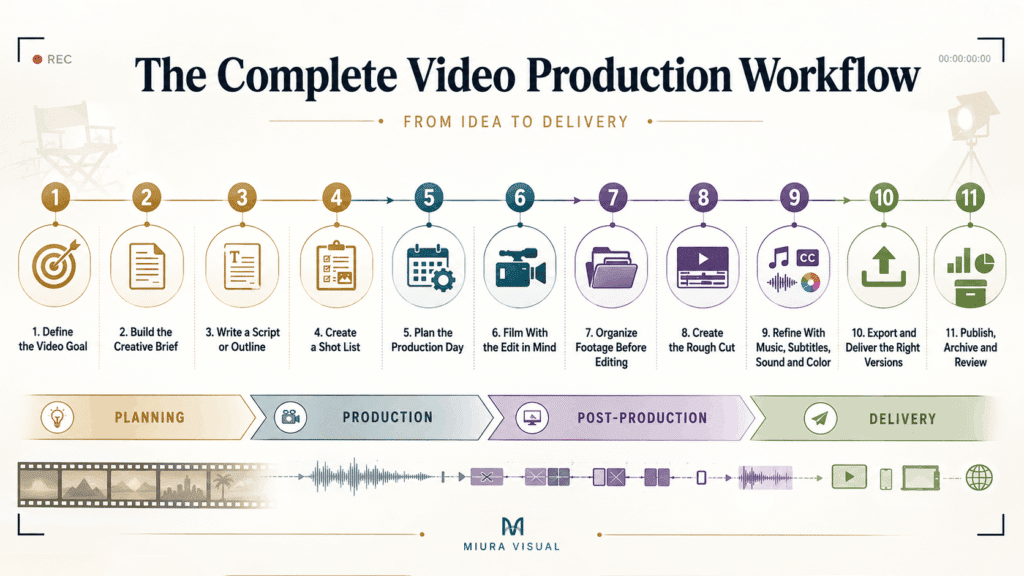
The Complete Video Production Workflow: A Step-by-Step Breakdown
A complete video production workflow should help you answer one question:
What needs to happen before this video is ready to deliver?
Here is the full process.
Step 1 — Define the Video Goal in Pre-Production
Before writing, shooting or editing, define the goal of the video.
Ask:
- What is this video supposed to do?
- Who is it for?
- Where will it be published?
- What should the viewer understand or feel after watching it?
- What does success look like?
A brand video, event recap, product video, TikTok ad and YouTube tutorial should not follow the same creative direction.
They may all use a camera.
But they do not serve the same purpose.
This is why the video goal must come first.
If the goal is unclear, the script becomes unclear.
If the script is unclear, the shoot becomes unclear.
If the shoot is unclear, the edit becomes painful.
Step 2 — Build the Creative Brief
A creative brief keeps the project aligned before production starts.
It does not need to be long.
It just needs to be clear.
A useful video brief should include:
| Brief Item | Why It Matters |
|---|---|
| Project goal | Keeps the video focused |
| Target audience | Helps decide tone, pacing and message |
| Platform | Affects format, length and framing |
| Key message | Prevents the video from becoming too broad |
| Style reference | Reduces misunderstanding |
| Deadline | Keeps production realistic |
| Deliverables | Clarifies what needs to be exported |
| Approval person | Avoids feedback from too many directions |
This is especially important for client work.
Many video problems are not caused by poor shooting.
They are caused by unclear expectations.
A brief protects both the creator and the client.
Step 3 — Write a Script or Outline
Not every video needs a full script.
But every video needs some kind of structure.
For talking head videos, ads, tutorials, product videos and corporate videos, a script is useful.
For events, lifestyle shoots, or behind-the-scenes videos, a basic outline may be enough. It can also work for social media content.
The point is not to make the video stiff.
The point is to avoid shooting blindly.
A script or outline helps you decide:
- what must be said
- what must be shown
- what shots are needed
- what B-roll will support the story
- what the ending should be
For many small productions, this step is often skipped.
Everyone is eager to start filming quickly.
That usually creates more work later.
The edit will reveal every missing idea.
Step 4 — Create a Shot List
A shot list is your filming checklist.
It tells you what shots you need before the shoot is over.
Example of a simple video shot list can include:
- opening shot
- main action shot
- close-up shot
- product detail shot
- reaction shot
- B-roll shot
- transition shot
- environment shot
- ending shot
Shot planning does not kill creativity, it protects the project.
You can still capture spontaneous moments on set.
But the planned shots must be covered first.
A clear shot plan helps you avoid one of the worst editing problems:
- The footage looks nice, but the video cannot be built properly.
- Pretty shots are not always useful shots.
Shoot what the edit needs.
Step 5 — Plan the Production Phase
Once the brief, script and shot list are ready, plan the shoot day.
This is where the process becomes practical.
A production day is not only about bringing the camera and pressing record.
It’s about ensuring the right people, location, and equipment are ready.
Backup plans must also be in place before filming starts.
A simple production-day checklist can follow this order.
Use the free video production day checklist below.
It helps you confirm key details before filming.
Checking the location, schedule, talent, gear, and backup plans.
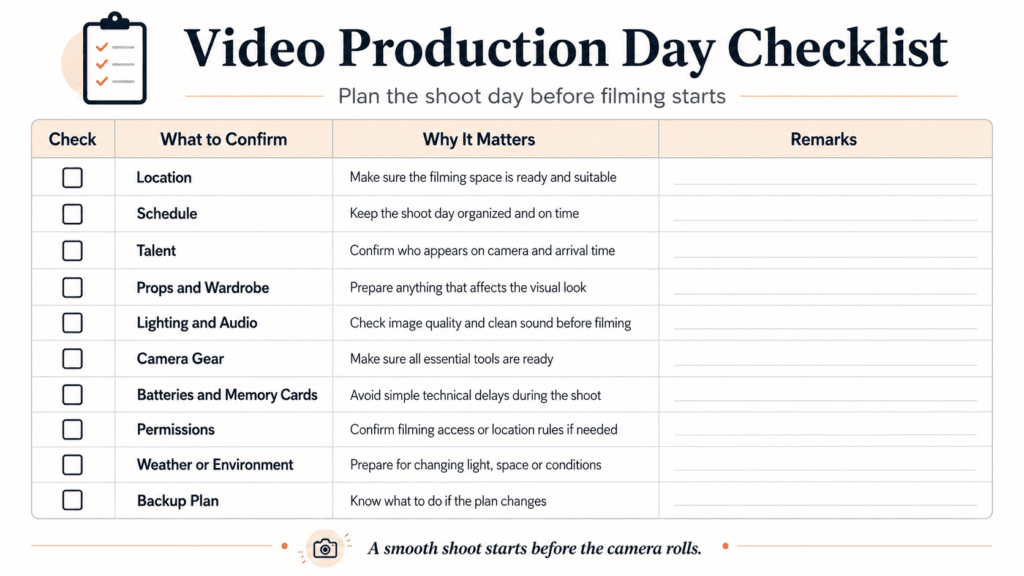
The visual checklist gives you a quick overview. The table below explains what each item means and why it matters.
| Order | What to Confirm | Why It Matters |
|---|---|---|
| 1 | Location | Make sure the place is available, suitable and ready for filming |
| 2 | Schedule | Decide what time each scene, setup or segment will be filmed |
| 3 | Talent | Confirm who needs to appear on camera and when they should arrive |
| 4 | Props and wardrobe | Prepare anything that affects the look of the video |
| 5 | Lighting and audio | Check how the scene will be lit and how clean the sound will be |
| 6 | Camera gear | Prepare cameras, lenses, tripod, gimbal or other support tools |
| 7 | Batteries and memory cards | Avoid stopping the shoot because of simple technical issues |
| 8 | Permissions | Confirm access, filming approval or location rules if needed |
| 9 | Weather or environment | Prepare alternatives if the location or light changes |
| 10 | Backup plan | Decide what to do if something does not go as planned |
For small teams, this step is often informal.
But even a simple checklist can save a production.
The more moving parts you have, the more important this stage becomes.
A smooth production day does not happen because everyone is talented.
It happens because the important details were prepared before filming.
Step 6 — Film With the Edit in Mind
Filming is not just about capturing beautiful footage.
It is about capturing footage that can be edited into a clear video.
This is where many videographers improve over time.
At first, most people shoot what looks good.
Later, they learn to shoot what cuts well.
During filming, make sure you capture:
- main action
- wide shots
- medium shots
- close-ups
- B-roll
- cutaway shots
- natural sound
- room tone
- transition shots
- backup angles
If the video is for social media, decide the format before filming.
Vertical, horizontal and square videos need different framing.
Do not decide this only during export.
Also, pay attention to audio.
A video with average visuals can still work if the audio is clear.
A video with beautiful visuals but bad audio often feels unprofessional.
Step 7 — Organize Raw Footage Before Editing
Footage organization is not exciting.
But it can save hours.
Before editing, organize your files properly.
A simple folder structure can look like this:
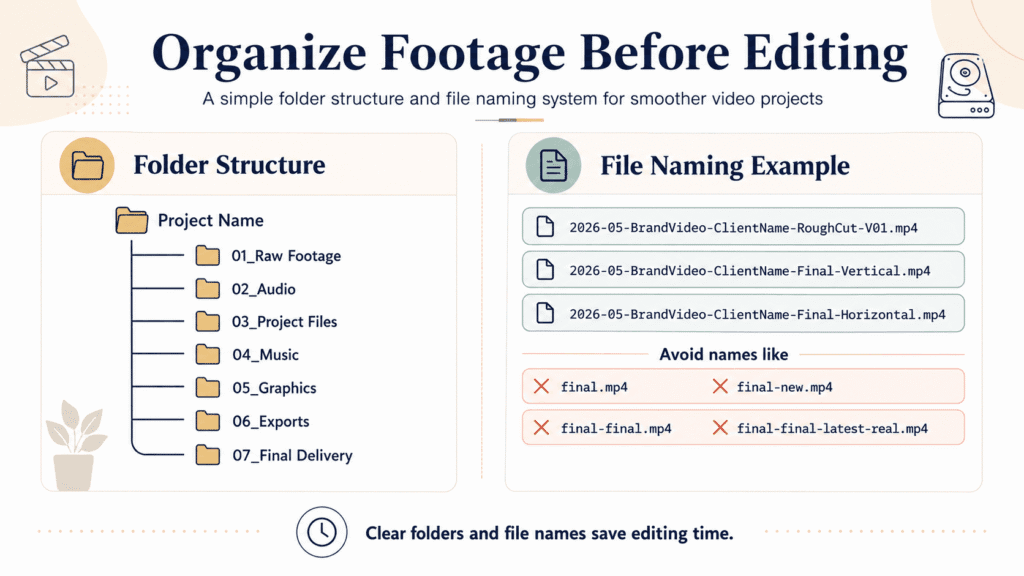
That is how chaos begins.
Good footage organization makes editing faster.
It also helps when clients ask for revisions later.
Step 8 — Start the Post-Production Phase With a Rough Cut
The rough cut is where you build the structure of the video.
Do not polish too early.
Do not start with color grading, sound effects or fancy transitions.
First, make sure the video works.
Focus on:
- story flow
- message clarity
- scene order
- pacing
- missing shots
- weak sections
The rough cut answers one question: “Does this video make sense?”
If the answer is no, no amount of color grading will save it.
Structure comes before style.
This is true for client videos, social media videos and creative projects.
Step 9 — Refine the Post-Production Edit With Music, Subtitles, Sound and Color
After the rough cut works, start refining.
This is where the video becomes more polished.
You can work on:
- music
- sound effects
- subtitles
- pacing
- color correction
- color grading
- transitions
- Motion graphics
- lower thirds
- logo animation
- final audio level
For social media, subtitles are often important.
Many people watch videos without sound.
If the message depends on spoken words, subtitles help the video perform better.
Music also matters.
It controls the mood and rhythm.
But music should support the video, not cover weak editing.
Step 10 — Export and Deliver the Right Versions
Export is not just clicking one button.
Different platforms and clients may need different versions.
You may need:
- master export
- client review version
- vertical version
- horizontal version
- square version
- compressed social media version
- high-quality archive version
Before exporting, confirm:
- aspect ratio
- resolution
- file format
- subtitle option
- file size
- naming format
- delivery method
This is very important when one project needs to be used across Instagram, TikTok, YouTube, Facebook, website and ads.
One video project can easily become multiple deliverables.
Plan for that before export.
Step 11 — Publish, Archive and Review
The process does not end after export.
You still need to deliver, publish, archive and review the project.
After delivery, save:
- final exports
- project files
- raw footage
- music licenses
- graphics
- client notes
- approved versions
After publishing, review the video performance instead of moving on immediately.
Look at the metrics that show whether the video worked:
| Metric | What It Tells You |
|---|---|
| Views | Whether the video reached enough people |
| Watch time | Whether people stayed long enough to watch |
| Retention | Where viewers started dropping off |
| Saves | Whether the content was useful enough to keep |
| Shares | Whether people found it worth sending to others |
| Clicks | Whether the video encouraged action |
| Comments | What viewers reacted to or asked about |
| Client feedback | Whether the video met the project goal |
You do not need to track every metric deeply for every project.
The point is to learn what worked, what slowed people down, and what should be improved in the next video.
Who Needs a Video Production Workflow?
A video production workflow is helpful when your projects include planning, filming, editing, revising, and delivering. It’s more than just recording and posting.
| Who It Helps | Why They Need It |
|---|---|
| Freelance videographers | They usually handle the client work, shoot, edit, and deliver on their own. A good workflow helps them avoid missing details. |
| Small video production teams | A shared process lets the team see who is in charge of planning, filming, editing, and client feedback. |
| Growing creative agencies | A repeatable workflow helps streamline video projects. It helps with deadlines, revisions, and approvals. |
| Content and marketing teams | A simple workflow helps them create video content for Reels, TikTok, YouTube, ads, and campaigns. So they don’t have to start from scratch each time. |
The more people, platforms and deliverables involved, the more important a clear process becomes.
Common Video Production Workflow Mistakes
Most production problems are easy to understand after they happen.
The problem is noticing them early enough.
| Mistake | Why It Causes Problems |
|---|---|
| Starting without a clear goal | The video becomes unfocused |
| Skipping the creative brief | Client and creator expectations become different |
| No script or outline | Important points may be missed |
| No shot list | Key shots may be forgotten |
| Not filming enough B-roll | The edit feels limited |
| Poor audio planning | The video feels unprofessional |
| Organizing footage too late | Editing becomes slow and stressful |
| Polishing before rough cut approval | Time is wasted on scenes that may be removed |
| Exporting without version control | Files become confusing |
| Not reviewing the final product | The same mistakes repeat next time |
The biggest mistake is treating workflow as admin work.
It is not.
Your production process directly affects creative quality.
A messy process usually creates a messy final video.
Video Production Workflow Checklist for a Smooth Video Project
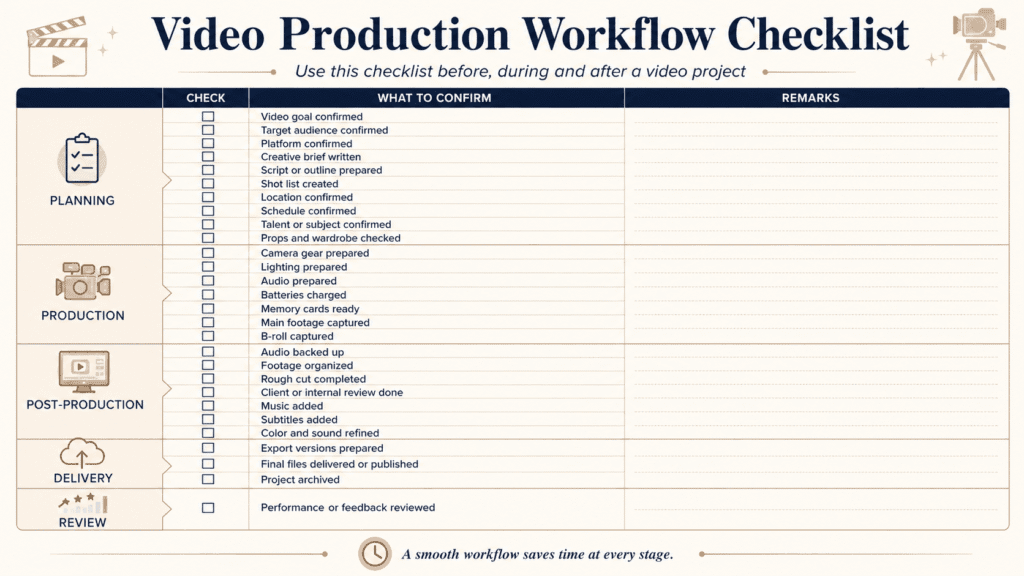
Use this video production workflow checklist to review the key stages of a project: planning, production, post-production, delivery and review.
Before the shoot, confirm the goal, audience, platform, brief, script, shot list, location, schedule, talent, props and wardrobe.
During production, check camera gear, lighting, audio, batteries, memory cards, main footage and B-roll.
After filming, organize the footage, complete the rough cut, review the edit, add music, subtitles, color and sound, then export the right versions, deliver the final files, archive the project and review performance or feedback.
You do not need to use every item for every project.
But the checklist gives you a base system.
Remove what does not apply.
Add what your projects need.
Video Production Workflow vs Video Editing Workflow
Video production workflow and video editing workflow are related. However, they are not the same.
Editing is only one part of the larger video production workflow.
If your video footage is poorly planned, filmed, or organized, the editing process gets tougher.
A good editor can improve weak footage.
But a good workflow prevents many problems before editing starts.
That is why the production process matters.
How This Fits Into a Larger Content Creation Workflow
Video production workflow is one part of a larger content creation workflow.
If you are creating visual content regularly, you may also need workflows for:
- photography workflow
- photo editing
- video editing
- file organization
- social media publishing
- content repurposing
- performance review
For example, one video shoot can become:
- a full video
- short clips
- vertical reels
- behind-the-scenes content
- thumbnail images
- blog visuals
- social media posts
- portfolio material
This is why your video process should not exist alone.
It should connect with your wider content system.
A better system helps you turn one production into many useful content pieces. It gets easier and faster.
👉 Once your workflow is clear, the next step is making the video itself more engaging. Check out this guide on making engaging videos. It helps with structure, pacing, and keeping viewers’ attention.
Conclusion
A good video production workflow keeps the whole project clear from start to finish.
The basic flow is:
Planning → Production Day Preparation → Filming → Footage Organization → Editing → Export → Delivery → Review
Each stage helps prevent a different problem.
Planning prevents unclear direction.
A filming checklist prevents missing footage.
Footage organization prevents slow editing.
Proper export and review prevent messy delivery and repeated mistakes.
The point is not to build a complicated system.
The point is to make every video project easier to manage, easier to edit and easier to deliver.
Start with a simple workflow.
Use it on your next shoot.
Then improve the process after every project.
Frequently Asked Questions
What is a video production workflow?
A video production workflow is the full process of moving a video project from idea to final delivery. It usually includes planning, scripting, shot listing, filming, footage organization, editing, exporting and publishing. The goal is to clarify each stage. This way, the project won’t rely on memory, guesswork, or last-minute choices.
What are the main stages of video production?
The main stages of video production are planning, production, post-production, delivery and review. Planning covers the goal, brief, script and shot list. Production covers filming and audio capture. Post-production covers editing, music, subtitles, sound and color. Delivery covers export and publishing. Review helps improve the next project.
Why is a video production workflow important?
A video production workflow is the key to reduce confusion, missed shots, messy files and slow revisions. Without a workflow, problems often appear during editing. A well-defined workflow helps videographers, agencies and content teams plan better, shoot with purpose and deliver videos more smoothly.
What is the difference between video production workflow and video editing workflow?
A video production workflow includes everything in a video project. It starts with planning and filming, then moves to editing, export, and delivery. A video editing workflow focuses on the post-production stage. This happens after filming is done. Editing is part of production, but a good workflow simplifies editing.
How can I improve my video production workflow?
You can improve your video production workflow by creating a clear brief, using a script or outline, preparing a shot list, organizing footage before editing and reviewing each project after delivery. Start with a simple checklist first. After each shoot, write down what caused delays, confusion, or changes. Then, make the workflow better for the next project.

Miura Visual
Transforming visuals into content, stories, and scalable value across platforms and audiences.
Related Article