How to Build a Photography Workflow From Shoot to Delivery
A clear photography workflow helps you plan the shoot and deliver final images. It helps you avoid missing key shots, losing files, or doing extra editing. This guide shows you how to structure each stage so you know what to prepare, what to check, and when to move on.

Quick Answer
A practical photography workflow can follow this order:
Purpose → Planning → Shot List → Preparation → Shooting → Backup → Culling → Editing → Export → Delivery and Archive
The key rule is clear: every stage must create something valuable for the next stage.
Do not start shooting before the purpose and must-have images are clear.
Do not start editing before your files are backed up and selected.
Do not deliver files until the final versions match how they will be used.
If you only shoot occasionally for yourself, you can keep the process simple.
If you manage client work, create regular content, sell products, or do many shoots, a repeatable workflow helps a lot.
Digital Photography Workflow at a Glance
A photography workflow should do more than list ten steps.
It should show what each stage needs to produce before you move on.

| Step | Stage | Main Action | Ready to Move On When |
|---|---|---|---|
| 1 | Purpose | Confirm what the photos are for | Final use and required outputs are clear |
| 2 | Planning | Set direction, timing, location, and references | The shoot can move ahead without major unanswered questions |
| 3 | Shot List | Protect the must-have images | Essential shots, angles, and formats are identified |
| 4 | Preparation | Check gear, location, and backup options | Equipment and shoot conditions are ready |
| 5 | Shooting | Capture required images and useful variations | Must-have shots have been checked |
| 6 | Backup | Copy and verify files | Original files exist in more than one safe location |
| 7 | Culling | Remove weak or unnecessary images | A clear final selection is ready |
| 8 | Editing | Correct and refine selected images | The set looks consistent and usable |
| 9 | Export | Prepare the right file versions | Each output matches its intended platform or use |
| 10 | Delivery | Send, record, and archive the project | Final files are delivered and easy to retrieve later |
The exact tools may change. The order matters more.
Lightroom users, Capture One users, and photographers with folders can follow this workflow.
Start With the Final Use Before You Plan the Shoot
The first question should not be, “Which lens should I bring?”
Ask yourself: Where will these photos actually be used?
That choice affects how you plan, frame, shoot, select, and export the images.

| Final Use | What Should Change During the Shoot |
|---|---|
| Website | Capture horizontal options and leave space for text where needed |
| Social media | Include vertical crops and stronger visual hooks |
| Product listing | Keep angles, lighting, and framing consistent |
| Portfolio | Prioritise the strongest hero images and useful variety |
| Advertising | Leave room for copy, logos, or campaign layouts |
A website banner may need negative space on one side.
A product listing may need several consistent angles.
A social post may need vertical framing that is less useful on a website.
Decide the final use first. Then build the rest of the shoot around it.
This also makes culling easier.
Choose the image that best meets your purpose, not just the most attractive one.
Plan the Shoot and Protect the Must-Have Images
Planning does not need to become a large production document.
For a simple shoot, you may only need:
- the purpose
- visual direction
- location
- schedule
- subject, product, or outfit
- lighting direction
- required image formats
- must-have shots
- basic backup plan
For more complex projects, you can include:
- References
- Talent details
- Props
- Styling
- Permits
- Production notes
The goal is to remove avoidable decisions from shoot day.
Build the must-have list first
A shot list is useful because it separates required images from creative experiments.
Your essential list might include:
- hero shot
- front angle
- detail shot
- horizontal version
- vertical version
- website banner option
- social media version
Once those images are covered, you can experiment more freely.
👉 If you need a more detailed method, use a proper photography shot list rather than turning the workflow itself into a second shot-list guide.
Planning is ready when
You should be able to answer:
- What are these photos for?
- Which images cannot be missed?
- Where and when will you shoot?
- What equipment is actually needed?
- Are there location or lighting limits?
- What is the backup plan if something changes?
If several answers are still unclear, the shoot is probably not ready yet.
For lighting prep, a content creator lighting setup can assist you.
It helps plan lighting without making your workflow feel like a tutorial.

Shoot With Selection and Delivery in Mind
A smoother editing process starts before you import anything.
Do not shoot randomly and expect post-production to solve every problem later.
During the shoot, capture useful variation:
- wide shots
- medium shots
- close-ups
- detail shots
- horizontal images
- vertical images
- safe shots
- creative variations
The right mix depends on the project.
A product shoot may need consistent angles across the set.
A brand shoot may need more layout flexibility.
A portrait session may allow more variation once the required images are covered.
You should also watch for consistency across the full set:
- exposure
- white balance
- lighting direction
- background
- framing
- subject distance
This does not mean every image must look identical.
It means the images should still feel like they belong to the same project.
Before you wrap the shoot
Check the must-have images again.
Do not assume you captured everything because the session felt productive.
A simple final review can prevent a missing image from becoming an editing problem later.
Shoot day is finished when the required images are covered, not when the memory card is full.
Backup and Select Before You Start Editing
Post-production should not begin with heavy editing.
It should begin with file safety and selection.
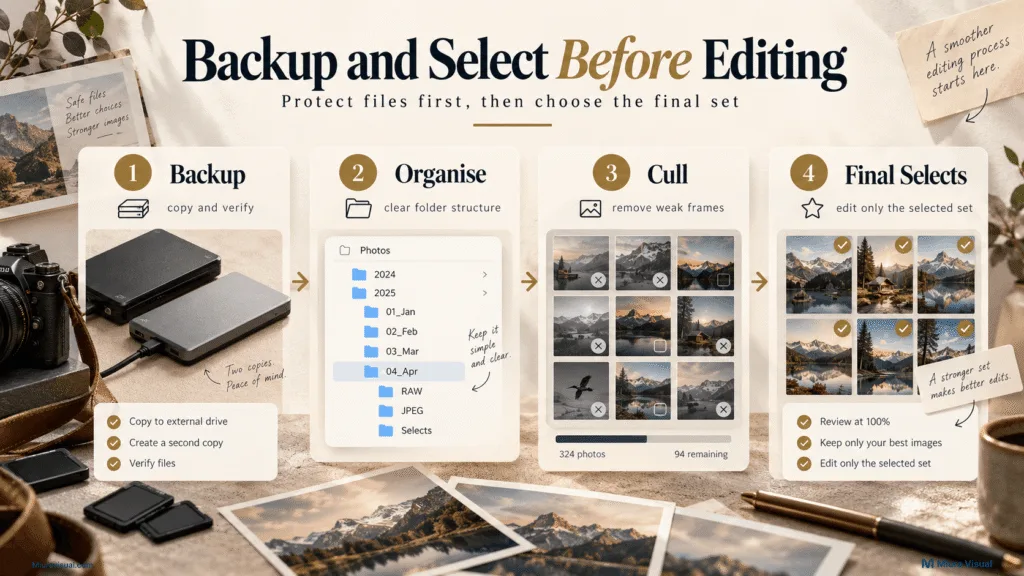
Back up before editing
Copy the files and confirm that the backup works.
For important work, avoid keeping the only copy on one memory card, laptop, or external hard drive.
You do not need an overcomplicated storage system.
You do need a system that helps you find the project again.
👉 If your folders get messy often, try a consistent photo file organisation system. This way, you won’t need to create a new folder structure for each shoot.
Cull before you edit
Do not edit everything.
A practical culling process is:
- Remove technically unusable images.
- Shortlist the stronger frames.
- Compare similar shots.
- Check the images against the final use.
- Mark the final selects.
- Edit only the selected set.
One common mistake is choosing only the most dramatic image.
The most dramatic frame may not be the most useful one.
A simpler portrait may work better for a professional profile.
A clean product angle may be more useful than a creative shot that hides important details.
Cull for usefulness, not only visual impact.
Post-Processing: Edit, Review and Export the Final Set
The photography workflow only needs to define where editing fits.
It does not need to become a full editing software tutorial.
A simple sequence is enough:
- Correct the image.
- Build a consistent look.
- Retouch only where needed.
- Review the full set.
- Export the required versions.
Basic correction may include exposure, white balance, crop, contrast, and lens correction.
More detailed retouching should only be added when the image needs it.
👉 For the full post-production steps, check out a dedicated photo editing workflow. Don’t expand this stage too much.
👉 Advanced cleanup and compositing may need a separate photo retouching process. Background work and detailed portraits may also require it.
Review the set, not only individual photos
An image can look good by itself but still feel inconsistent beside the rest of the project.
Before export, review:
- colour consistency
- exposure consistency
- crop
- image order
- required versions
- missing deliverables
Then export according to use.
One export setting should not be used for everything.
A website image may need smaller dimensions and compression.
A client archive may need a high-resolution version.
A social post may need a different crop.
Deliver, Archive and Close the Project
Exporting a photo is not the same as finishing the project.
A clean delivery should make it obvious which files the recipient should use.
For example:
- High Resolution
- Web Size
- Social Media
- Final Selection
Only create multiple versions when they are needed.
Also make the delivery terms clear:
- how many images are included
- which folder contains the final files
- whether revisions are still available
- where the files or cloud storage are kept
- whether the download link expires
After delivery, keep your own project record.
Depending on the project, that may include:
- RAW files
- final selects
- edited masters
- delivered files
- brief or reference notes
- invoice
- usage terms
- delivery record
This makes future requests easier to handle.
A client may return months later asking for another crop or higher-resolution version.
A clear archive saves you from rebuilding the project from scratch.
How Miura Visual Applies This Workflow to a Real Shoot
Miura Visual’s current photography process follows the same overall logic.
A project begins with these key steps:
- Confirm what needs to be photographed.
- Decide where the shoot will take place.
- Identify who or what will be involved.
- Determine how the images will be used.
The project scope is then confirmed before preparation begins.
For D.Creator cosplay shoot, for example, the process can include:
- receiving the shoot details
- confirming the date, location, character, and shoot type
- discussing visual references and direction
- completing the photography session
- selecting and editing the agreed images
- delivering the edited files
The exact preparation changes with the project.
A cosplay portrait needs character references, location planning, posing ideas, and costume details.
A product shoot may need consistent angles, clean backgrounds, and clear image requirements.
The useful part is not forcing every shoot into the same checklist.
Keep the same decision structure but change the project details.
If you are building a workflow for paid photography, this is a more practical way to standardise it.
Standardise the stages. Adapt the details.
👉 Photographers who need help can check Miura Visual’s photography services. Miura Visual supports the whole process.
Where Photography Workflows Break and How to Fix Them
A workflow problem often appears later than the stage that caused it.
If editing feels slow, the real problem may have started during shooting or culling.
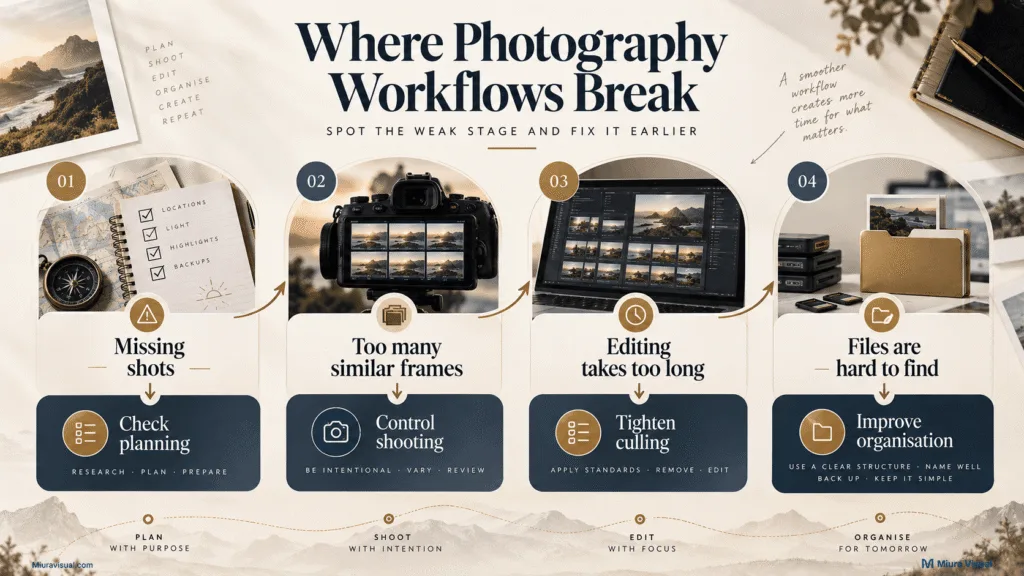
| Problem You Notice | Likely Broken Stage | Practical Fix |
|---|---|---|
| You keep missing important images | Planning | Confirm must-have shots before shooting |
| You shoot hundreds of similar frames | Shooting | Capture required variations, then stop repeating the same shot |
| Editing takes too long | Culling | Make the final selection before detailed editing |
| Files become difficult to find | Backup and organisation | Use the same folder logic for every project |
| Colours vary across the set | Shooting or editing | Check exposure and white balance before building the final style |
| The image does not fit the final platform | Planning | Confirm orientation and final use before shooting |
| You cannot find an old client file | Archive | Keep final files and project notes after delivery |
The key is to fix the earliest broken stage.
If you keep fixing the symptom later, the same problem will return on the next shoot.
For example, repeatedly cropping images to fix a missing website layout isn’t really an editing issue.
The workflow should have included a website-friendly composition during planning and shooting.
Photography Workflow Checklist
Use this checklist as a starting point.
Remove anything that does not match your type of work.
Before the Shoot
- Confirm the final use
- Confirm the required images
- Prepare the shoot direction
- Create the must-have shot list
- Check the location
- Prepare gear
- Charge batteries
- Prepare memory cards
- Check lighting requirements
- Prepare a backup plan
Ready to shoot when: the purpose is clear. Must-have images are listed. The location is chosen. Timing is confirmed. Required equipment is ready.
During the Shoot
- Capture must-have shots first
- Capture useful variations
- Check horizontal and vertical needs
- Keep the set visually consistent
- Review key images before wrapping
Ready to leave when: the required images are covered and you have checked the important files.
After the Shoot
- Back up the original files
- Verify the backup
- Organise the project
- Cull before editing
- Edit only the final selection
- Review the full set
- Export the required versions
- Deliver clearly
- Archive the project
Project complete when: the right files are delivered, and you can find the project later.
Conclusion: Build the Workflow Around the Problems You Actually Have
If you only shoot occasionally, keep your photography workflow simple.
You do not need a complex studio system.
If you do regular shoots, client work, or have many files, start by standardizing.
Focus on planning, backup, culling, and delivery.
Those stages often create the biggest problems when they are unclear.
Take one recent project and map what happened from planning to delivery.
Find the stage that caused the most confusion or wasted time, then improve that stage first.
Frequently Asked Questions
What are the main stages of a photography workflow?
A practical workflow usually includes planning, preparation, shooting, backup, culling, editing, export, delivery, and archiving. The exact number of stages matters less than having a clear order.
Do I need a photography workflow template?
A template is useful when you repeat similar work. It provides a starting point for each project. You should adjust the details based on the subject, use, location, and deliverables.
Should I cull photos before editing?
Yes. Select the strongest and most useful images first. Editing every usable frame adds extra work and makes it tough to keep the final set focused.
What is the difference between a photography workflow and a photo editing workflow?
A photography workflow covers the full process from planning to final delivery. A photo editing workflow includes post-production tasks. These tasks are culling, correction, styling, retouching, review, and export.

Miura Visual
Transforming visuals into content, stories, and scalable value across platforms and audiences.
Related Article